SideQuest, the LARGEST unofficial app store for Meta Quest, has REMOVED the setup step that kept MOST Quest owners away from it. As of its October 6 announcement, new users NO LONGER need DEVELOPER MODE, a Meta developer ORGANIZATION, or a USB cable to get SideQuest onto a headset. Road to VR walked through the NEW flow on October 13, a WEEK after the company’s own post.
The PITCH from CEO and co-founder Shane Harris is BLUNT: “No more developer mode, no more USB cable required. Hell you don’t even need sideloading anymore, who would have thought!”
Welcome to the future of SideQuest – No more developer mode, no more USB cable required. Hell you don’t even need sideloading anymore, who would have thought!
— SideQuest (@SideQuestVR) October 6, 2026
What Changed
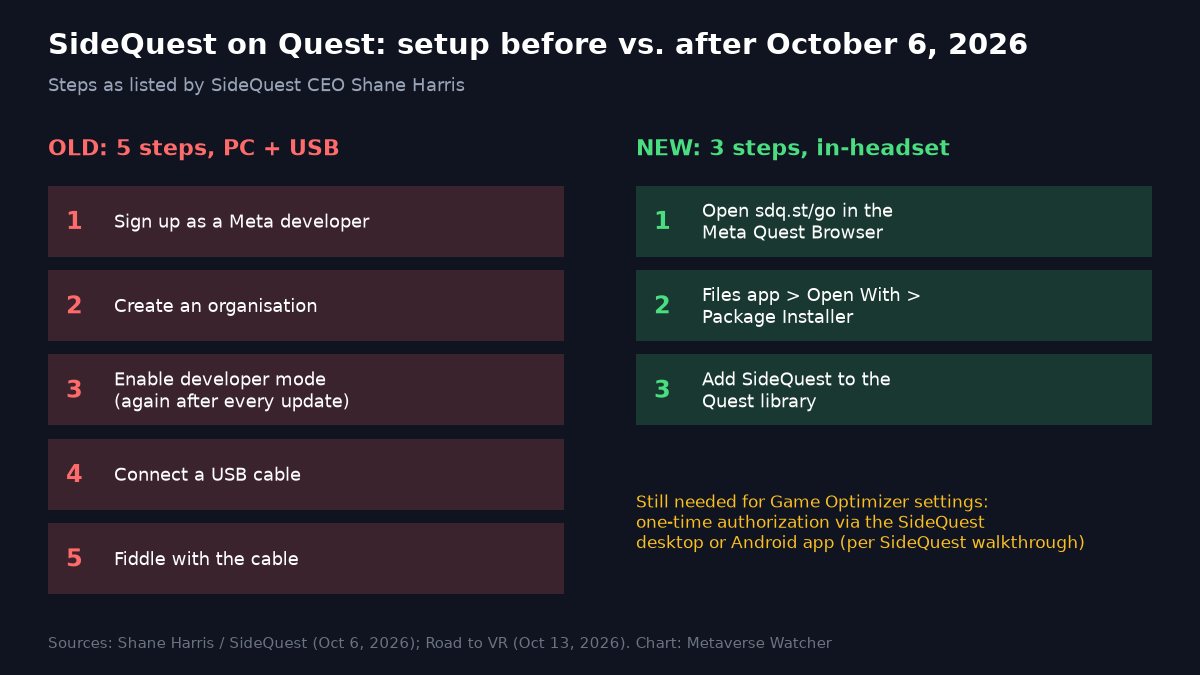
The OLD path, as Harris listed it, took FIVE chores: sign up as a developer, create an organisation, enable developer mode in the Meta phone app (and AGAIN after every update), connect a USB cable, and “probably fiddle with the cable a bunch.” That FRICTION has DEFINED Quest sideloading since SideQuest launched in 2019.
The NEW path comes in TWO forms:
- From a PC or phone. Users SIGN INTO their Meta account, and SideQuest connects over BLUETOOTH and turns on WIRELESS ADB, the Android DEBUGGING channel it uses to INSTALL apps. Harris says it then “installs SideQuest into your headset and that’s it.” The desktop route lives at sdq.st/get and the phone route at sdq.st/go, with a Google Play listing he describes as “rolling out now.”
- Entirely in the headset. Open the Meta Quest Browser, download the SideQuest APK from sdq.st/go, then use the Files app’s Open With > Package Installer option. SideQuest then offers to add itself to the Quest LIBRARY. NO PC and NO phone are involved.
TWO follow-on changes MATTER as much as the install. SideQuest now places apps it installs DIRECTLY in the main Quest library, so users NO LONGER dig through the Unknown Sources list. And users can sign into STEAM inside the headset and have SideQuest download supported game ports automatically, INSTEAD of dragging files across from a PC. Road to VR stresses that this covers EXISTING ports only, NOT the Steam catalog at large.
The Steam Ports Angle
The Steam piece is the MOST COMMERCIALLY interesting part. A Kintezia summary of SideQuest’s own walkthrough says Steam sign-in WORKS through a QR code from the mobile app, that the catalog includes VR ports of PC classics such as Doom 3, Half-Life, Quake, and Tomb Raider, and that SideQuest offers to SELL the matching Steam title in-headset if the user does not already own it. Ports STILL REQUIRE OWNERSHIP of the original game; SideQuest is AUTOMATING the file transfer, NOT supplying the game DATA.
What Still Needs A PC
The “no PC” PROMISE has LIMITS. Road to VR notes the in-headset route STILL cannot tweak headset SETTINGS the way the PC method can. Per the Kintezia summary, SideQuest’s free Game Optimizer, which adjusts texture RESOLUTION, FOVEATED rendering, and CPU and GPU levels PER TITLE, needs a ONE-TIME authorization through the SideQuest desktop or Android app, though NOT permanent developer mode.
There are also open QUESTIONS. Neither Harris’s post nor Road to VR’s write-up explains in TECHNICAL detail how SideQuest enables wireless ADB over Bluetooth WITHOUT developer mode, and we have found NO public comment from Meta on the new flow. A path that runs through Meta account sign-in and a debugging channel DEPENDS on Meta continuing to ALLOW it, so the DURABILITY of this setup is worth WATCHING across future Horizon OS updates.
Why It Matters
SideQuest has been building toward this for MONTHS. In a September 8 Reddit post, Harris described an OVERHAULED wireless connection system that can enable wireless ADB on older devices without a built-in Wireless Debugging option, an in-VR app that MIRRORS most desktop features, EXPERIMENTAL 207 Hz refresh on Quest 3, and 4.5 MILLION registered SideQuest accounts. One commenter on that thread asked for installs WITHOUT USB because their Quest 3 port had FAILED. A MONTH later, that is the DEFAULT.
The timing is NOTABLE. Valve’s Steam Frame is shipping into a market that VALUES open-ended use, and Meta’s VR Glasses arrive in spring 2027. Lowering the barrier to an ALTERNATIVE store on the Quest headsets ALREADY in homes gives SideQuest a STRONGER position in that contest, whatever Meta decides to do next. For now, the PRACTICAL takeaway is SIMPLE: getting SideQuest onto a Quest is a THREE-step job done INSIDE the headset.
Sources: SideQuest on X, October 6, 2026; Road to VR, October 13, 2026; Kintezia; Shane Harris on r/OculusQuest, September 8, 2026.