THIRD-PARTY apps that stream video from Meta’s smart glasses have a HARD, DOCUMENTED ceiling, and Meta has now put it IN WRITING: 720 × 1280 pixels at 30 frames per second. More SURPRISING, Meta’s OWN documentation tells developers that the TOP setting is NOT the one that looks BEST.
The detail sits in the camera-streaming guide inside Meta’s official Wearables Device Access Toolkit (DAT) repository for iOS, and it was first highlighted by MIXED on October 13. An INDEPENDENT open-source streaming app, MetaStream, CONFIRMS the SAME limit from the RECEIVING end.
Three Resolutions, Five Frame Rates
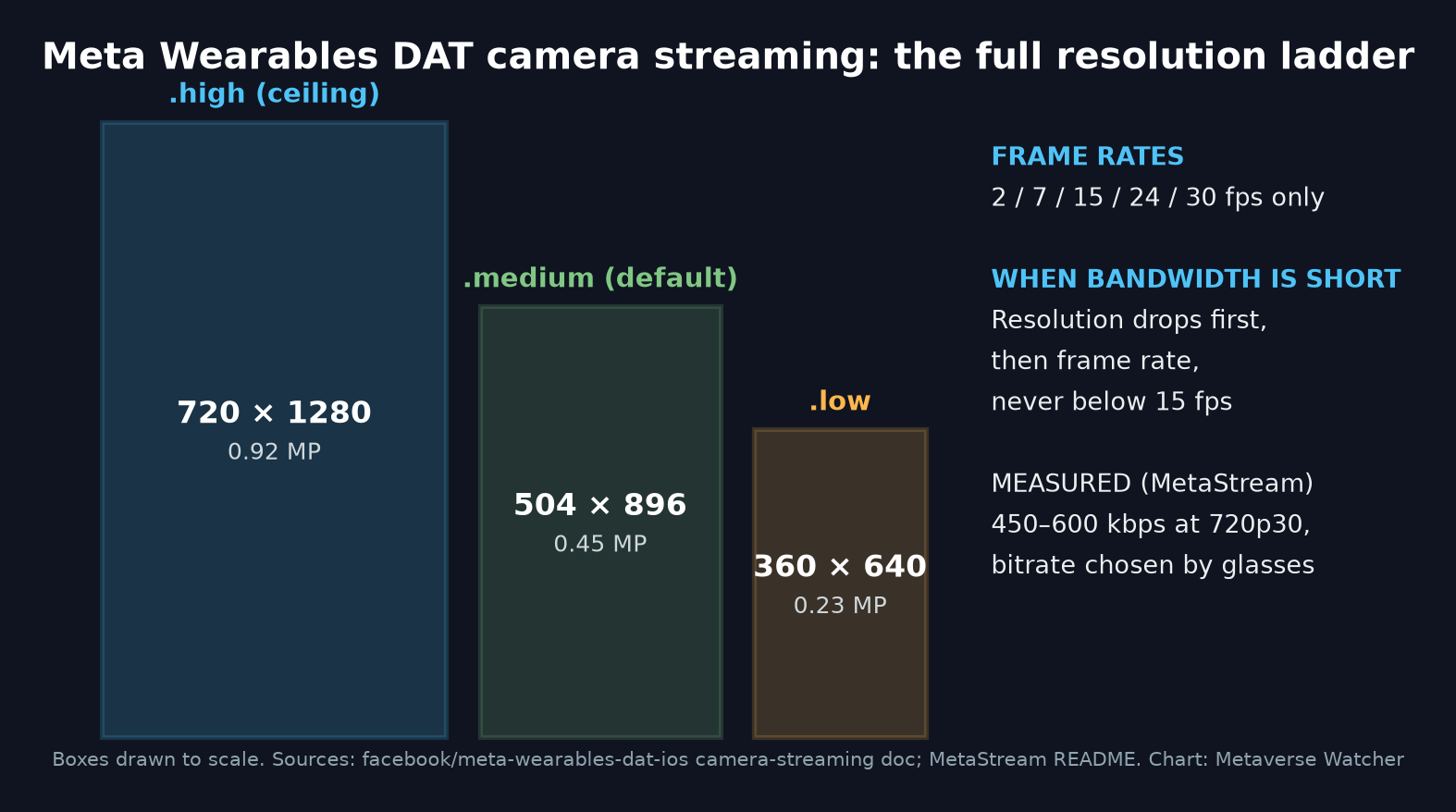
According to Meta’s camera-streaming document, a StreamConfiguration can request EXACTLY THREE resolutions:
.high: 720 × 1280.medium: 504 × 896.low: 360 × 640
Frame rate is EQUALLY constrained. Meta’s text reads: “Valid values: 2, 7, 15, 24, 30 FPS.” Nothing in between, and NOTHING above 30.
The DEFAULT is not the ceiling EITHER. Meta states that StreamConfiguration() with no arguments uses .raw frames, .medium resolution and 30 fps, so an app that asks for nothing gets ONLY 504 × 896. Developers can CHOOSE decoded frames (.raw) or compressed HEVC (.hvc1), the latter INTENDED for writing frames to a file in passthrough mode.
Meta: Lower Settings Look Better
The most USEFUL line for BUILDERS is a COUNTERINTUITIVE one. “Lower resolution and frame rate yield higher visual quality due to less Bluetooth compression,” Meta writes. Its bandwidth section adds that resolution and frame rate “are constrained by Bluetooth Classic bandwidth,” and that the SDK degrades AUTOMATICALLY when the link tightens: it FIRST lowers resolution (for example, High to Medium), THEN reduces frame rate, “never below 15 FPS.” Meta’s CLOSING advice: “Request lower settings for higher visual quality per frame.”
In PRACTICE, that means asking for .high does not GUARANTEE 720p output. It is a REQUEST the SDK can QUIETLY downgrade.
MetaStream Measures the Other End
MetaStream, an iPhone app that pushes the glasses feed to Kick, Twitch, YouTube, Restream or any RTMP server, states the limit BLUNTLY in its README: “720×1280 portrait at 30 fps is the ceiling for the glasses. The SDK offers nothing higher to any third-party app.” It adds that the glasses “choose their own bitrate, which measured 450 to 600 kbps at 720p30,” and that the app’s bitrate slider ONLY affects video the PHONE encodes.
The project ALSO publishes a codec table it says was “tested against each ingest, not taken from marketing pages.” YouTube (over enhanced RTMP) and any SRT ingest take the glasses’ HEVC stream UNTOUCHED. Kick, Instagram and TikTok do NOT, so the phone TRANSCODES to H.264. Restream accepts HEVC ONLY over SRT, and Twitch is listed as HEVC for Affiliates and Partners only.
One DISCREPANCY is WORTH flagging. Meta’s document ATTRIBUTES the quality trade-off to Bluetooth Classic, while MetaStream’s README says that “since DAT SDK 0.8 the glasses send video over a direct Wi-Fi link,” and that a build signed with a free Apple ID “registers and connects over Bluetooth but never receives a frame.” NEITHER document reconciles the two descriptions, and Meta has not PUBLICLY addressed it.
What It Takes to Run
MetaStream is NOT on the App Store; it ships as SOURCE. Its REQUIREMENTS: Ray-Ban Meta (Gen 1/2), Meta Ray-Ban Display or Oakley Meta glasses, an iPhone on iOS 26.0 or later, the Meta AI app, and access to a PAID Apple Developer team, which it says is NEEDED for the Wi-Fi entitlements. The README ALSO lists glasses firmware v126 or later and Meta AI app V282 or later for Developer Mode, and notes the glasses keep only ONE third-party app registered at a time.
Version context MATTERS. MetaStream’s badge names DAT 0.9.0, and its claim that glasses battery is unreadable is EXPLICITLY tied to 0.9’s DeviceState. Meta’s changelog shows DAT 1.0 (September 24) ADDED a batteryLevel accessor on Device and in DeviceState. The 1.0.1 release on October 9 reads SIMPLY “No developer-facing changes,” and the streaming resolution ladder is UNCHANGED.
DAT 1.0 also introduced an EXPERIMENTAL Camera.photo path for “standalone high-quality photos,” SEPARATE from streaming. The same changelog carries a STANDING caveat: experimental features “can be built and tested against, though apps using them cannot be published yet.”
Why It Matters
For anyone building livestreaming, remote-assist or computer-vision apps on Meta’s glasses, the PRACTICAL budget is now CLEAR: UNDER one megapixel, 30 fps at MOST, ROUGHLY half a megabit per second, and a VENDOR recommendation to aim LOWER for cleaner frames. That is a MODEST pipe for a CAMERA-FIRST product category, and developers should DESIGN around it rather than EXPECT the SDK to unlock more on its own.
Sources: Meta DAT camera-streaming documentation; Meta DAT iOS changelog; MetaStream on GitHub; MIXED.