By Metaverse Watcher Staff · Published November 13, 2026 · Sources: Meta AI Glasses Help Center, Meta Store listings, Frames & Features
Ray-Ban Meta battery life is the first thing most owners start to watch after the novelty wears off. Meta’s rated figure has more than doubled since the first pair, from 4 hours on Gen 1 to 9 hours on the current Gen 3, but a day of video, music and “Hey Meta” questions can still drain the frames before dinner. This guide collects Meta’s official numbers for every Ray-Ban Meta model, explains what the charging case LED is telling you, and lists the settings that actually move the needle, including the battery saver mode Meta says can add up to 7.9 hours.
Everything below comes from Meta’s own Battery life on AI glasses, battery saver and charging help articles, checked on November 13, 2026, unless another source is named.
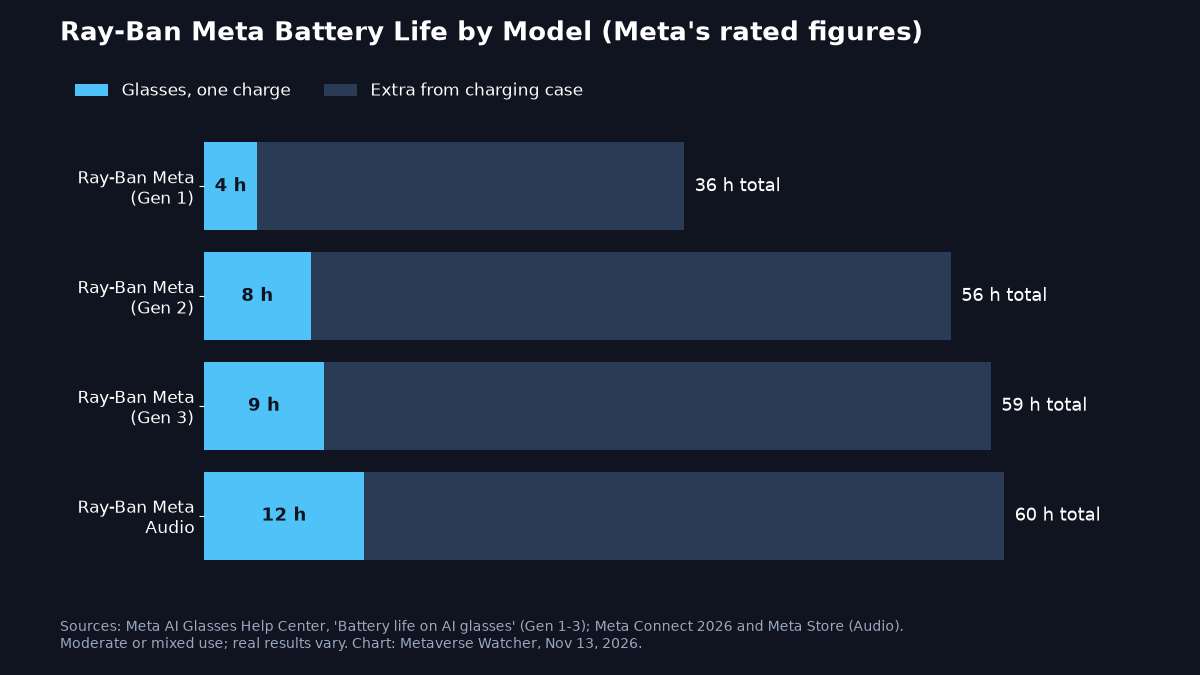
How Long Does Ray-Ban Meta Battery Last? Every Model
Meta rates the glasses for “moderate usage,” a mix of standby, audio, a few photos and some Meta AI requests. The case is a separate battery that recharges the glasses when you dock them.
| Model | Glasses, one charge | Extra from case | Total rated | Camera |
|---|---|---|---|---|
| Ray-Ban Meta (Gen 1) | Up to 4 hours | Up to 32 hours | 36 hours | Yes |
| Ray-Ban Meta (Gen 2) | Up to 8 hours | Up to 48 hours | 56 hours | Yes |
| Ray-Ban Meta (Gen 3) | Up to 9 hours | Up to 50 hours | 59 hours | Yes, 12 MP / 3K |
| Ray-Ban Meta Audio | Up to 12 hours (6 hours continuous playback) | Up to 48 hours | 60 hours | No |
Two caveats matter. First, these are ceilings, not promises; Meta itself says times “may vary with use and other factors.” Second, the camera is the biggest single drain. Video recording, live streaming and Live AI (which keeps the camera and assistant active) burn through the battery far faster than music or calls. That is why the camera-free Ray-Ban Meta Audio earns three more rated hours than Gen 3, and why its continuous-playback rating of 6 hours is the number to plan around for a long flight.
If you are deciding between models, our Best Smart Glasses of 2026 list and the Ray-Ban Meta vs Oakley Meta vs Meta Glasses comparison put battery life next to price, weight and camera quality.
How to Check Your Battery Level
There are three ways to see how much charge is left:
- Ask the glasses. Say “Hey Meta, what is my battery level?” This is the fastest check and works without taking out your phone.
- Meta AI app. The charge status of your glasses appears in the Glasses tab whenever they are connected. If the glasses are docked, the app also shows the case level.
- Case LED. Press the button on the back of the case. With the glasses docked, the LED shows the glasses’ level; with the case empty, it shows the case’s own level.
What the Charging Case LED Colors Mean
| LED | Glasses docked | Case empty |
|---|---|---|
| Solid green | Glasses fully charged | Case fully charged |
| Solid orange | Glasses charging | Case not fully charged |
| Blinking orange | n/a | Case battery low |
| Blinking red | Charging error | Charging error |
The same chart is built into the Meta AI app: tap Glasses, swipe down to Learn and explore, tap See all, then Gestures & LEDs.

How to Charge Ray-Ban Meta Glasses Properly
The glasses have no port of their own. Meta says docking them in the case, nose bridge down on the charging contact, is “the only way to charge the glasses.” Close the lid and the LED blinks to confirm charging has started. If nothing lights up, clean the contacts on the nose bridge and inside the case, then dock again. On a brand-new pair, remember to pull the plastic tab off the case contacts first, a step covered in our Ray-Ban Meta setup guide.
The case charges over USB-C from the port on its bottom. Meta’s requirements are modest:
- A USB-C to USB-C or USB-C to USB-A cable that meets the USB-C standard, rated for at least 1.2A. Lower-rated cables work but charge more slowly.
- A USB-C or USB-A power adapter rated at 5W or more. USB Power Delivery is not required, so the brick that came with an older phone is fine.
Charging is quick. Meta said at launch that Gen 2 reaches 50% in about 20 minutes, Meta lists 50% in 22 minutes for the Audio model, and Ray-Ban puts a full charge at roughly 75 minutes, according to Frames & Features’ summary of the official guidance. Meta’s help center does not list a separate fast-charge figure for Gen 3.
One warning from Meta: do not store any other glasses in the case. A Ray-Ban Meta case is only for Ray-Ban Meta frames, and an Oakley case only for Oakley Meta frames. Other glasses can damage both.
Battery Saver Mode: The Biggest Single Fix
Battery saver is a switch in the Meta AI app that pauses the background features that drain the most power. Meta’s numbers are notable: it increases battery life by up to 47%, about 1.5 extra hours, if you turn it on at 20%, or by up to 88%, about 7.9 extra hours, if you turn it on from a full charge. It is available on all Ray-Ban Meta glasses as well as Oakley Meta HSTN and Vanguard.
What battery saver turns off or limits:
- “Hey Meta” voice activation (tap and hold the touchpad to reach Meta AI instead)
- Automatic volume adjustment
- Automatic transfer of photos and videos to your phone
- Maximum video length, cut from 3 minutes to 1 minute
- Resolution and frame rate, set to 1080p at 30 fps
What still works: photos, videos up to a minute, calls, music and podcasts, Meta AI by touch, and Live AI or Autocapture if you start them manually.
How to turn on battery saver
- Open the Meta AI app.
- Go to Device settings.
- Tap Battery.
- Turn on Battery saver, or turn on Turn on automatically so it starts whenever the glasses drop to 20% while not charging.
When the glasses fall below 20%, the app also shows a quick link to turn it on. Battery saver switches itself off once the glasses charge back to 75% or more, and the app sends a notification when that happens.
Because auto-transfer is paused, your captures stay on the glasses until you turn battery saver off or dock them. Our guide to transferring photos from Ray-Ban Meta glasses to your phone covers importing them manually.
Seven Settings and Habits That Extend Battery Life
Meta’s own battery tips, plus the practical logic behind each:
- Shoot in 1080p and keep clips short. Meta recommends Full HD video and shorter maximum lengths. 3K capture is the heaviest load the glasses carry.
- Turn off “Hey Meta” when you don’t need it. The always-listening wake word costs standby power. The touchpad and capture button still do everything.
- Turn off adaptive volume. Meta lists it alongside the wake word as a feature to disable during long activities.
- Use battery saver automatically. Setting it to start at 20% is the low-effort option, and it can buy roughly 90 minutes at the end of the day.
- Keep the case topped up. The glasses are designed to live in the case between uses. A drained case, shown by a blinking orange LED, is the usual reason glasses are found dead in the morning.
- Protect them from the cold. Below 32°F (0°C), Meta suggests insulating the glasses, for example under a beanie, helmet or balaclava. Charging also slows in the cold and pauses entirely below freezing, so warm the case up before plugging it in.
- Turn off auto-import in winter. Meta says disabling auto-import can conserve battery in cold weather. You can still import media while the glasses charge in the case.
These tips are gathered on Meta’s help pages and summarized by Frames & Features, which tracks Meta’s glasses documentation.
Is Gen 3’s Extra Hour Worth Upgrading For?
On battery alone, not really. Gen 3’s rating of 9 hours is one hour more than Gen 2, and its case adds 50 hours against 48. Reviewers have reached the same conclusion. PCMag’s review called the upgrade modest:
The Ray-Ban Meta (Gen 3) smart glasses offer the same clear audio, good-looking photos, and AI assistance as their predecessor, with few changes besides new styles, better mics, and slightly longer battery life.
— PCMag (@PCMag) November 3, 2026
The upgrade that changes daily life is from Gen 1. Owners of the original 2023 frames, rated at 4 hours, get more than double the runtime on either newer model. Buyers who never use the camera should look hardest at Ray-Ban Meta Audio, which pairs the longest rating in the family with a $349 starting price. Anyone who needs prescription lenses can compare frames in our best smart glasses for prescription wearers list.
When Battery Problems Mean Something Is Wrong
Short runtime after heavy video use is normal. These signs are not:
- A blinking red case LED. Meta treats this as a charging error. Clean the contacts, let a warm case cool down, and redock. If the error persists, follow Meta’s charging troubleshooting article linked from its charging help page.
- No LED at all when docked. Usually dirty contacts or glasses not seated fully on the nose-bridge connector.
- Glasses that drain while stored. Check the case LED. If the case itself is empty, it cannot keep the glasses charged.
If hardware is at fault, Meta’s warranty process applies. As with any lithium-ion device, capacity declines with age, so a two-year-old Gen 1 pair falling well short of 4 hours is expected wear rather than a defect.
The Bottom Line
Ray-Ban Meta battery life is now good enough for a normal day if you treat the case as part of the product. Expect up to 9 hours from Gen 3, 8 from Gen 2 and 12 from the camera-free Audio, with roughly two full days of top-ups in the case. Turn on automatic battery saver, shoot in 1080p and drop the wake word on long days, and the glasses will outlast most commutes, workdays and flights.