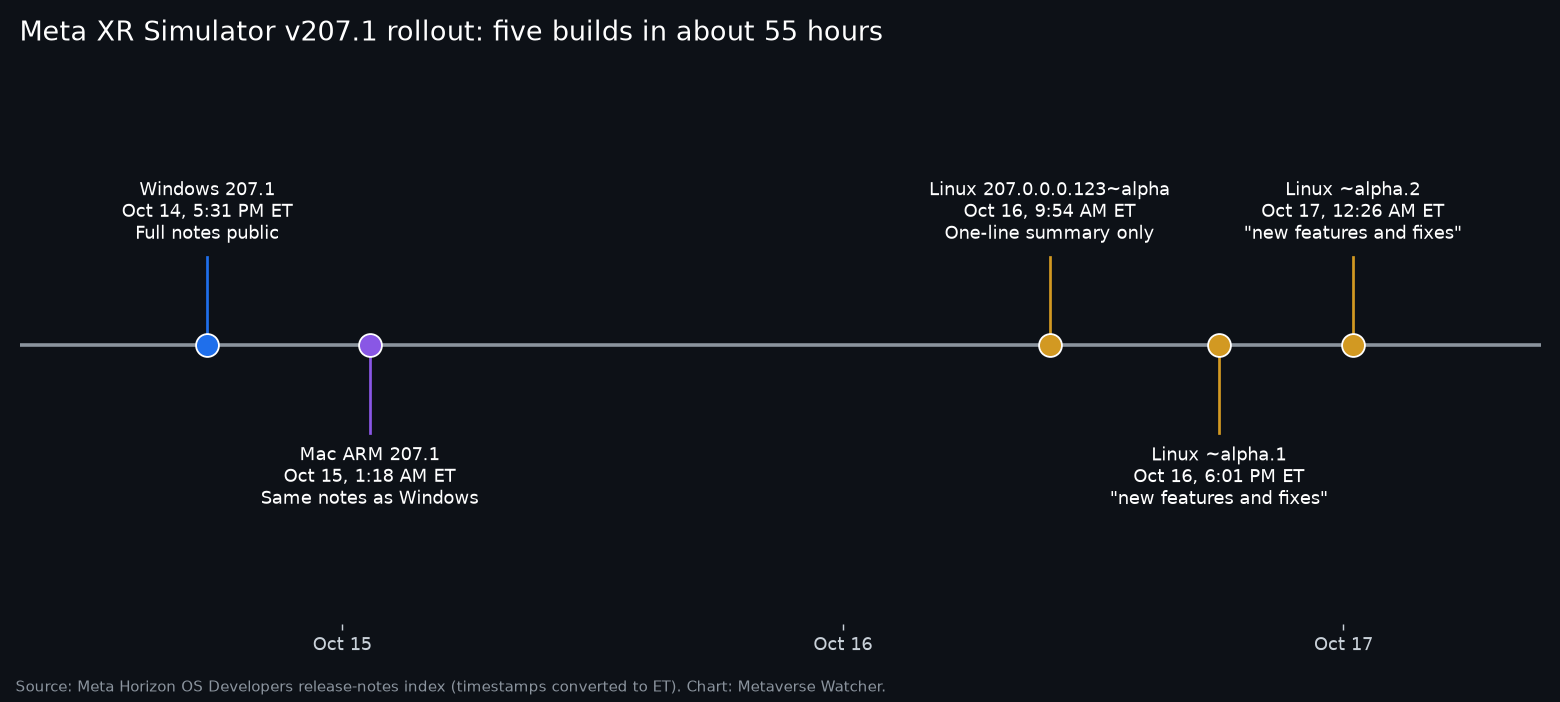
Meta has SHIPPED Meta XR Simulator 207.1, and the HEADLINE change is one that PC developers have been WAITING on: the DESKTOP OpenXR runtime now RUNS on AMD graphics cards. The Windows BUILD landed on October 14 (about 5:31 p.m. ET) and the Mac ARM build followed at about 1:18 a.m. ET on October 15. Then, WITHOUT an ANNOUNCEMENT, a Linux package started moving FAST: THREE ALPHA builds went up in roughly 14.5 hours on October 16 and 17, and NONE of them has release notes a SIGNED-OUT visitor can read.

What 207.1 Actually Changes
Meta describes XR Simulator as a “lightweight OpenXR runtime” that presents an API-level model of a Quest or other supported device to an app running on a computer. Its overview documentation is BLUNT that it ships no operating system image and does NOT emulate device HARDWARE. The 207.1 release notes list TWO new FEATURES:
- AMD GPU support. Meta says the simulator “now runs on AMD graphics cards,” and that the memory growth that “could use up all system memory during Unity Play Mode and crash the machine” is FIXED and “verified on AMD hardware.”
- Grab and pinch from camera hand tracking. Webcam-tracked HANDS now REPORT GRAB AND PINCH, “so apps can read them like any other hand input.”
The FIX list is LONGER than the feature list. Meta says 207.1 stops memory that kept growing over LONG sessions, fixes CRASHES and hangs when an app EXITS or disconnects, lets apps reach a focused state FASTER at launch, clears Vulkan validation errors, and fixes the WHITE screen in Passthrough Camera Access. Camera hand tracking is described as MORE ACCURATE and steadier, and it now SURVIVES Stop and Play in the Unity and Unreal editors. Look and Pinch hands that got STUCK or left behind are fixed, as are stuck keys, micro-gestures, and Meta VR Glasses input.
Two KNOWN issues REMAIN: VRS Recording still does not capture user interactions in the scene, and updating the Unity OpenXR package while the Editor is OPEN means the simulator will NOT connect until the Editor is RESTARTED.
Why the Webcam Line Matters
The 207.0 release on September 24 introduced camera-driven hand tracking, a FULLY SUPPORTED Look and Pinch mode, session video recording, and simulation of Meta VR Glasses, including field-of-view simulation, variable IPD, and gaze tracking. Meta’s own developer account framed those tools as a way to build for the GLASSES “before hardware ships in spring 2027.” Developer Dilmer (@Dilmerv) showed the WEBCAM feature shortly after:
📣 VR devs, this is pretty cool! You can now use your webcam to prototype hand-first experiences in Meta XR Simulator as you prepare for Meta VR Glasses. Iterate without a Quest or VR Glasses, then validate on-device! 🚀
— Dilmer (@Dilmerv) September 29, 2026
Webcam hands that could MOVE but not reliably GRAB were a LIMITED test tool. With grab and pinch now reported as standard hand input, a developer can exercise BASIC hand-first interactions at a DESK. Meta’s own guidance, echoed in that post, is still to VALIDATE on a REAL DEVICE.
The Mac Notes Are a Copy
The Mac ARM 207.1 page carries the SAME TEXT as the Windows page, including the AMD paragraph WORD for word. Apple Silicon Macs use Apple’s OWN GPUs, so that line does not describe ANYTHING a Mac ARM user can run. The MAC-SPECIFIC CHANGES are at the BOTTOM: background servers now close with the simulator, adb discovery works, and the app shows up as “Meta XR Simulator” in Finder, Dock, and Spotlight.
A Linux Build With No Public Notes
Meta’s release-notes index now lists a package called Meta XR Simulator (Linux), tagged for Unreal Engine and Unity. Version 207.0.0.0.123~alpha appeared at about 9:54 a.m. ET on October 16, ~alpha.1 at about 6:01 p.m. ET, and ~alpha.2 at about 12:26 a.m. ET on October 17. Only the FIRST entry has a SUBSTANTIVE summary, and it MIRRORS 207.1: AMD GPU support, camera hand tracking grab and pinch, and fixes for memory growth, app-exit crashes, rendering, hand tracking, and input. The other two say only “released with new features and fixes.” The index itself notes that its descriptions are “summarized by AI from Meta.”
Clicking through does NOT help a signed-out reader. Each Linux package page RETURNED “This page isn’t available. Make sure you’re signed in, then try again” when Metaverse Watcher checked it, while the Windows and Mac pages LOAD in FULL. The overview documentation, last updated September 4, still LINKS ONLY Windows and macOS downloads, and its graphics section names Vulkan on Windows and macOS, Direct3D on Windows, and Metal on macOS, with NO mention of Linux.
That leaves the BASIC questions open: which DISTRIBUTIONS are supported, whether the Linux build COVERS camera hand tracking and Meta VR Glasses simulation, and whether “alpha” means a PUBLIC PREVIEW or an INTERNAL track that surfaced early. Meta’s public pages do NOT SAY.
The Bottom Line
For Windows developers on AMD CARDS, 207.1 is the release that makes XR Simulator a REAL OPTION, with a memory fix Meta says it TESTED on AMD hardware. For everyone building toward Meta VR Glasses, webcam grab and pinch closes a PRACTICAL GAP in desk-side testing. The Linux build is the item to WATCH, but until Meta PUBLISHES notes and documentation for it, three alphas in under 15 hours is a SIGNAL, not a SUPPORTED PLATFORM.
Sources: XR Simulator 207.1 for Windows and Mac ARM release notes (October 14 and 15), the Meta Horizon OS Developers release-notes index, the 207.0 release notes (September 24), the XR Simulator overview, and @MetaVRDevs on X.