A security researcher has shown that Ray-Ban Meta smart glasses could be made to run software Meta never signed. Then, after Meta shipped a fix in firmware 127, she got around that fix by changing a SINGLE byte in a configuration file the glasses accept from the paired phone. The research is not a remote takeover of strangers’ glasses. It is the first detailed public look at how Meta’s best-selling camera glasses decide which code they trust, and where that trust broke down.
The write-up, “Hacking the meta ray-ban smartglasses”, was published on November 6 by the vulnerability researcher known as pamoutaf. Malwarebytes covered it on November 10, and Nullcon lists a talk on the same work, “Beeps and Patches: arbitrary code execution on Meta Ray-Ban”.
What the researcher did
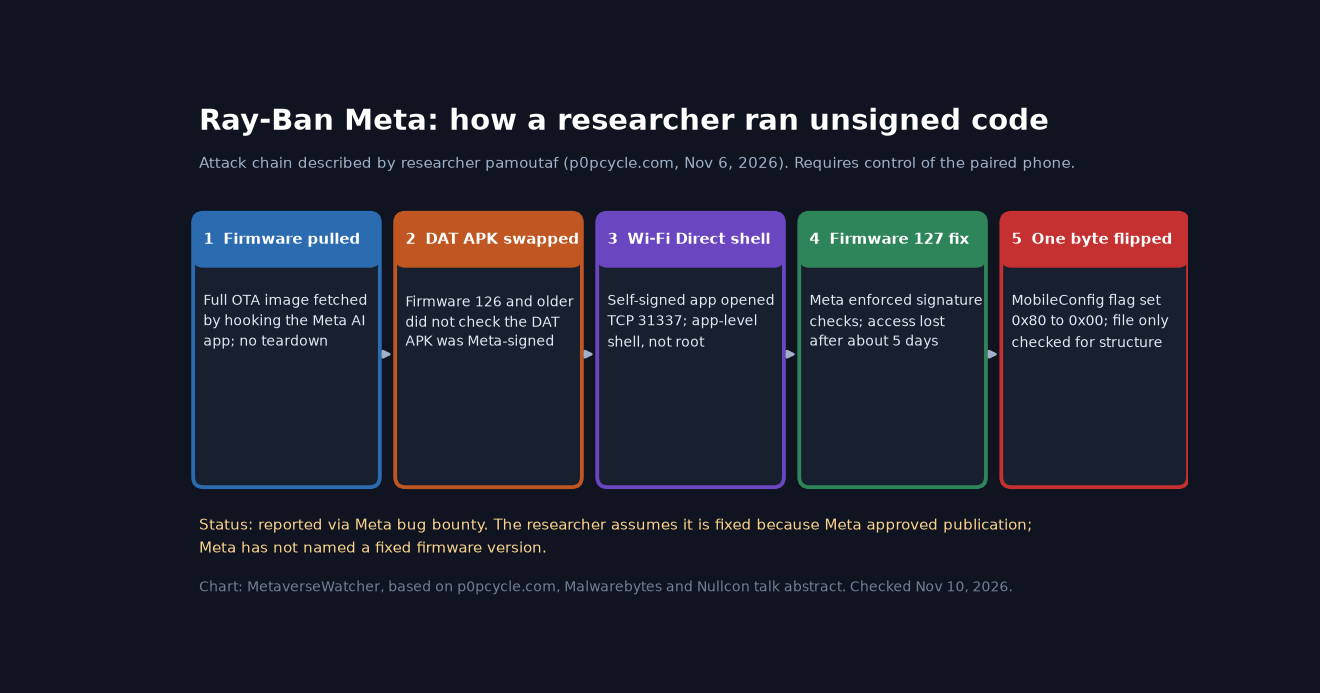
The work started in July with a borrowed pair of Ray-Ban Meta glasses. Rather than opening the hardware, the researcher reverse-engineered the Meta AI phone app, which handles pairing, media sync and firmware updates. By hooking the app with the Frida instrumentation toolkit, she captured the download URL for an over-the-air update. The first result was a roughly 156 MB incremental package. Forcing a GraphQL field named device_firmware_full_update_only to true returned the full Android-based firmware image instead, which she unpacked and mounted for analysis.
The opening was the Device Access Toolkit (DAT), Meta’s developer channel that lets phone apps use the glasses’ camera and other features. To use it, the Meta AI app downloads a DAT APK and installs it on the glasses. According to the write-up, firmware up to and including version 126 did not verify that this package was signed by Meta. With Frida, the researcher swapped Meta’s package for a self-signed app of her own, which the Meta AI app then installed for her.
Because the glasses have no screen, she debugged with sound: her app played different beep patterns through Android’s tone generator to signal which code path was running. After keeping a DAT session alive through Meta’s own Camera Access sample app, her implant opened a listener on TCP port 31337 over the Wi-Fi Direct link the glasses use to sync photos. From the phone she got an interactive shell. That shell ran with the permissions of an ordinary Android app (the id output in her post shows an app user ID), not root.
How one byte undid firmware 127
After about five days, the shell stopped working. Firmware 127 had started enforcing signature checks on the DAT package. The researcher says she could not tell whether her own activity triggered the change or whether Meta was already patching it.
The new check was controlled by a feature flag, wss_appmanager.signature_verification_enabled, stored in Meta’s MobileConfig system. MobileConfig lets Meta change device behavior without a firmware update: the glasses ask the phone for their configuration, the phone fetches it from Meta’s servers, and passes it on. The flaw, per the write-up, is that the glasses only checked the file was structurally valid, not that it was unaltered. Changing one value in the 0.mctable file from 0x80 to 0x00 switched signature verification OFF, and the self-signed app installed again.
That is the most important lesson in the research. Meta added the right control, code signing, but let the switch for that control travel through a channel the attacker already sat on. Security engineers call this a trust-boundary failure: a check is only as strong as the integrity of whatever decides whether the check runs.
Who is at risk, and who is not
| Question | What the sources say |
|---|---|
| Is this a remote attack on any pair of glasses? | No. The whole chain relies on hooking the Meta AI app on the phone paired with the glasses, as IT-Connect also stresses. |
| Which firmware was affected? | Version 126 and earlier had no DAT signature check. Version 127 added one, which the MobileConfig change bypassed. |
| Did the researcher get full control? | No root access was shown. The shell ran in the installed app’s context. She says mapping the wider attack surface is “a story for another time.” |
| Was the camera accessed or footage stolen? | Not demonstrated. Malwarebytes notes the research “doesn’t demonstrate that scenario.” |
| Is it fixed? | Reported through Meta’s bug bounty. The researcher says Meta approved her post, “which makes me assume it is now fixed.” Meta has not named a fixed firmware version, and no CVE is listed. |
For ordinary owners, the realistic threat model is narrow: someone would need control of your phone, or you would need to install a tampered Meta AI app yourself. If an attacker already controls your phone, the glasses are one of many things at risk. The more interesting concern is for later: a camera-and-microphone wearable whose trust in signed code can be switched off by configuration data is the kind of weakness that matters more as third-party glasses apps grow.
Why this matters for smart glasses
Debate about Meta’s glasses has mostly been about privacy in normal use: the capture LED, bystander consent and bans in schools, exams and workplaces. We have covered that in depth, from Meta’s own privacy defense of the LED to employer rules for smart glasses at work and the UK’s consideration of a ban. This research moves the debate to device security: who decides what code runs on a camera you wear all day.
It also lands as the developer story widens. Meta’s toolkit has been gaining features, with documented limits such as the 720×1280, 30 fps camera streaming cap, and Samsung’s Android XR glasses open preorders on November 12 (our preorder coverage). Android XR policy, as summarized in VR.org’s spec tracker, requires a recording light and stops recording if it is covered. Every platform that opens its glasses to outside apps will face the same question the researcher posed: whether the device verifies not only the app, but also whatever tells it to verify apps.
One caveat on timing: the researcher notes that the glasses were no longer in Pwn2Own’s wearables category when she finished, and comments on her post question the payout. Those details affect the researcher, not owners. They do show how little public security research exists on a device that, as the Nullcon abstract puts it, already has “millions of pairs” in circulation.
What Ray-Ban Meta owners should do
- Keep firmware and the Meta AI app updated. Turn on automatic updates in the Meta AI app. Meta pushed a separate high-priority update this week for non-Ray-Ban Meta Glasses (update 130 and the moisture fix).
- Install the Meta AI app only from the official app store. Avoid modified APKs and unofficial glasses tools.
- Protect the phone. A locked, updated, uncompromised phone is the real defense here, since every step ran through it.
- Leave developer mode off unless you are actively building for the Device Access Toolkit.
Shopping for glasses this season? Our Ray-Ban Meta vs Oakley Meta vs Meta Glasses comparison covers current prices and specs.
Sources: pamoutaf / p0pcycle.com; Malwarebytes; Nullcon; IT-Connect. Checked November 10, 2026. Meta had not published a statement on the research at the time of writing.