Updated November 18, 2026. Every command below is taken from Meta’s AI Glasses Help Center and Meta Store guides, checked on this date. Meta changes features through app and firmware updates, so wording and availability can vary by country and model.
Ray-Ban Meta glasses have no screen, apart from the Meta Ray-Ban Display model, so your voice is the main way to control them. Every command starts the same way: say “Hey Meta”, or tap and hold the touchpad on the right arm. Then you say what you want. This guide lists the commands Meta itself documents, grouped by task, plus the settings that make them work better. It applies to Ray-Ban Meta, Oakley Meta and Meta Glasses frames unless a section says otherwise.
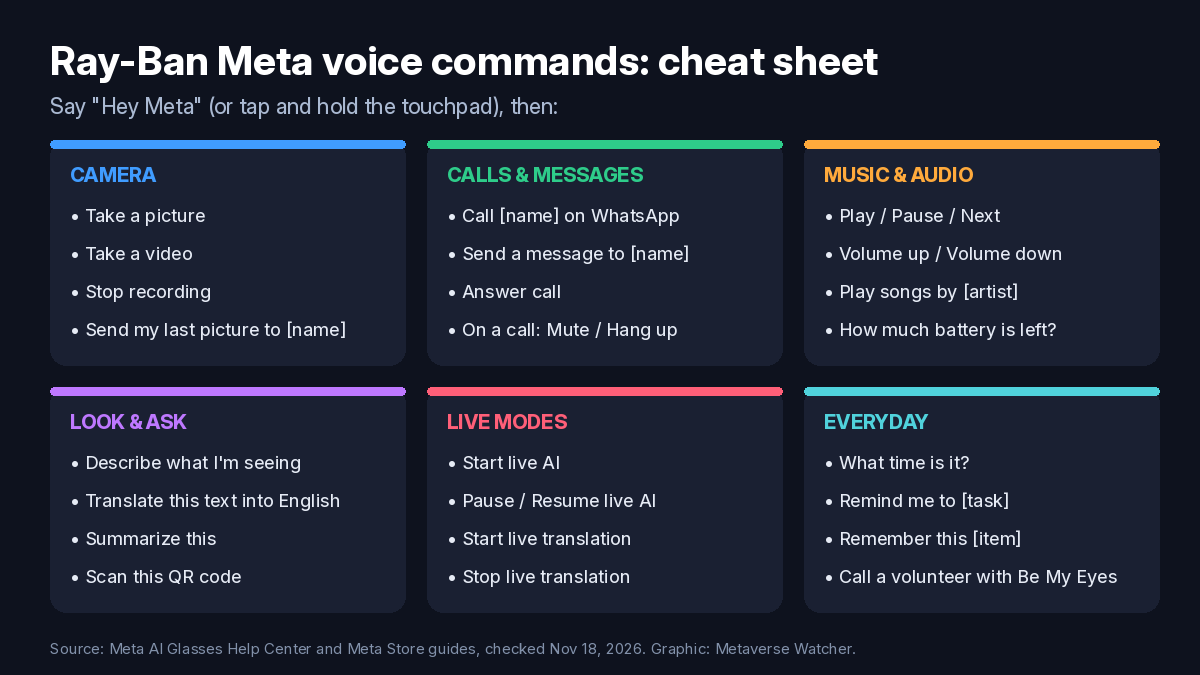
Quick answer: the 12 commands most people use
| What you want | Say “Hey Meta,” then… |
|---|---|
| Take a photo | “Take a picture.” |
| Record video | “Take a video.” / “Stop recording.” |
| Call someone | “Call [contact name] on WhatsApp.” |
| Send a text | “Send a message to [contact name].” |
| Share your last shot | “Send my last picture to [contact name].” |
| Control music | “Play.” / “Pause.” / “Next.” |
| Change volume | “Volume up.” / “Volume down.” |
| Check battery | “How much battery is left?” |
| Identify what’s in front of you | “Describe what I’m seeing.” |
| Read foreign text | “Translate this text into English.” |
| Hands-free conversation | “Start live AI.” |
| Translate a conversation | “Start live translation.” |
How to wake Meta AI
According to Meta’s help page, you can activate Meta AI on Ray-Ban Meta, Oakley Meta and Meta Glasses in two ways. You can say “Hey Meta,” or you can tap and hold the touchpad. On Meta Ray-Ban Display you can also double-tap your thumb and index finger while wearing the Meta Neural Band, as described in Meta’s voice command guide.
Two settings in the Meta AI app change how this behaves. Android Central notes that the always-listening wake word can be turned off under your glasses’ device settings, then Meta AI, then “Hey Meta” preferences, to save battery. After that, tap-and-hold is the only trigger. If you leave the wake word on, the Respond without “Hey Meta” option keeps the microphone open for about five seconds after an answer, so you can ask a follow-up without repeating the wake word (Android Central). For the privacy side of the wake word, see our report on unprompted “Hey Meta” recordings.
Camera commands
- “Hey Meta, take a picture.” (Meta’s Store guide also uses “take a photo.”)
- “Hey Meta, take a video.”
- “Hey Meta, stop recording.”
- On Meta Ray-Ban Display only: “Zoom in.” and “Zoom out.”
Photos and videos stay on the glasses until they sync to the Meta AI app. Meta’s Store guide cites 32GB of internal storage on its current models. Our guide on transferring Ray-Ban Meta photos to your phone covers the import step and the usual sync problems.
Sharing and social commands
- “Hey Meta, send a picture to [contact name].”
- “Hey Meta, send a picture to [contact name] on Messenger / WhatsApp / Instagram / my phone.”
- “Hey Meta, send my last picture to [contact name].”
- “Hey Meta, post this video to Instagram.”
- “Hey Meta, help me write a Facebook caption for this picture.”
Meta also supports voice sharing to Instagram Instants, which sends a spontaneous photo to your close friends list.
Calling and messaging commands
- “Hey Meta, call [contact name].”
- “Hey Meta, call [contact name] on Messenger / WhatsApp / Instagram.”
- “Hey Meta, video call [contact name] on Instagram.” This starts a point-of-view call, so the other person sees what you see.
- “Hey Meta, send a message to [contact name],” then dictate the message.
- “Hey Meta, answer call.”
- During a call, say “Hey Meta” and then: Mute, Unmute, Camera on, Camera off, Hang up or End call.
Calling and messaging only work after you connect your contacts and apps in the Meta AI app. Meta says this setting is under Communication in device settings. If you connect several apps, add “on WhatsApp” or “on Messenger” to the end of the command so the glasses pick the right one.
Music, volume and battery commands
- “Play.” / “Pause.” / “Next.”
- “Volume up.” / “Volume down.” (or “Turn up the volume.”)
- “Play songs by [artist].” / “Play [song] by [artist].”
- “How much battery is left?”
The battery command is quicker than opening the app. If you are not getting through a full day, our Ray-Ban Meta battery life guide explains which features drain the battery fastest.
“Look and ask” camera AI commands
These commands send an image from the camera to Meta AI, which then answers through the speakers:
- “Hey Meta, describe what I’m seeing.” / “What’s in front of me?”
- “Hey Meta, tell me more about this landmark.”
- “Hey Meta, translate this text into English.”
- “Hey Meta, summarize this.” (for a page, sign or email in front of you)
- “Hey Meta, scan this QR code.”
- “Hey Meta, how do these two products compare in price and quality?”
- “Hey Meta, tell me how much water these flowers need.”
Meta says weather and other location-based questions only work if the Meta AI app has location access set to “always allow” in your phone settings.
Live AI commands
Live AI keeps the camera and microphone on so you can hold a continuous conversation without repeating the wake word. Meta’s Live AI help page lists these controls:
| Action | Voice | Touch |
|---|---|---|
| Start | “Hey Meta, start live AI.” | — |
| Interrupt | “Stop,” or ask a new question | — |
| Pause (turns off mic and camera) | “Pause live AI.” | Tap the touchpad |
| Resume | “Hey Meta, resume live AI.” | Tap the touchpad again |
| End | “Stop live AI.” | Tap and hold the touchpad |
Meta says Live AI is available in English and is rolling out over time in the US and Canada. It uses a lot of battery. Android Central estimated that Ray-Ban Meta Gen 2 and Oakley Meta HSTN may last about an hour in this mode, so end each session with “Stop live AI.” You can review and delete Live AI transcripts in the Meta AI app under Chats.
Live translation commands
- “Hey Meta, start live translation.” Then choose your languages and tap Start in the Meta AI app.
- “Hey Meta, stop live translation.”
The voice command starts the mode, but the first time you still have to pick languages in the app (Glasses → Translate → You speak / They speak → Start). Meta’s translation help page lists 20 languages when the glasses have a connection. Six of them work offline once you download the language pack: English, Spanish, French, Italian, Portuguese and German. Offline packs are not supported on Ray-Ban Meta Audio. You hear the other person’s words in your ear, and your replies appear as text in the app for them to read or play aloud.
| Offline (after download) | Online only (Wi-Fi or mobile data) |
|---|---|
| English, Spanish, French, Italian, Portuguese, German | Hindi, Arabic, Russian, Swedish, Finnish, Chinese (Mandarin), Japanese, Korean, Indonesian, Vietnamese, Thai, Turkish, Greek, Dutch |
Everyday assistant commands
- “What time is it?” / “What’s the date?”
- “Remind me to [task],” for example “Remind me to order this book.”
- “Remember this tracking number,” while you look at it.
- “What are some top-rated cafes nearby?” / “When does the Natural History Museum close today?”
- General questions, such as “What’s the population of Singapore?”
- Writing help, such as “I can’t attend a dinner tonight. Can you help me write a polite one-line message?”
- With a fitness app connected: “What was my mileage on yesterday’s ride?”
- Accessibility (beta, select countries): “Call a volunteer with Be My Eyes.”
Meta Ray-Ban Display extras
The display model supports every command above. It also shows responses on its in-lens screen, which Meta lists at 600×600 resolution. Meta documents two extra voice features: camera zoom (“Zoom in” / “Zoom out”) and turn-by-turn walking directions with commands like “Hey Meta, navigate to the nearest library.” Meta labels navigation a beta that is only available in select cities. Live translation also shows captions in the lens. If you are deciding between models, see our Ray-Ban Meta vs Oakley Meta vs Meta Glasses comparison.
When a command doesn’t work
- Nothing responds to “Hey Meta”: check that the wake word is enabled in the Meta AI app, or use tap-and-hold. Make sure the glasses are on your face and connected to your phone.
- Calls or messages fail: reconnect your contacts and WhatsApp, Messenger or Instagram under Communication in device settings, and name the app in the command.
- Weather or “nearby” answers fail: set the Meta AI app’s location permission to “always allow.”
- Live AI or translation is missing: update the Meta AI app and glasses firmware. Live AI is still English-only and rolling out in the US and Canada.
- Translation fails offline: download the language pack while you are on Wi-Fi. The 14 online-only languages always need data.
If you are still setting up your glasses, start with our Ray-Ban Meta setup guide. For a wider look at the category, see what smart glasses are and how they work and our ranking of the best smart glasses of 2026.
FAQ
Do I have to say “Hey Meta” every time? No. Tap and hold the touchpad instead, turn on Respond without “Hey Meta” for quick follow-ups, or start a Live AI session, which needs no wake word until you end it.
Can I turn off “Hey Meta”? Yes. Turn off the wake word in the glasses’ Meta AI settings in the app, and use tap-and-hold to activate the assistant.
Do voice commands work without a phone? Meta requires the Meta AI app for setup and most features. Answers, calls, messages and online translation also depend on your phone’s connection.
Which languages can I speak to Meta AI in? Meta’s help pages describe Live AI as English-only for now. Live translation, which is a separate feature, covers the 20 languages listed above.
Sources: Meta AI Glasses Help Center (Meta AI commands, Live AI, live translation); Meta Store, “A guide to using voice commands on AI glasses”; Android Central. Metaverse Watcher did not receive compensation from Meta for this guide.