Updated November 17, 2026. Prices are U.S. starting prices as published by each maker and cited in our linked coverage.
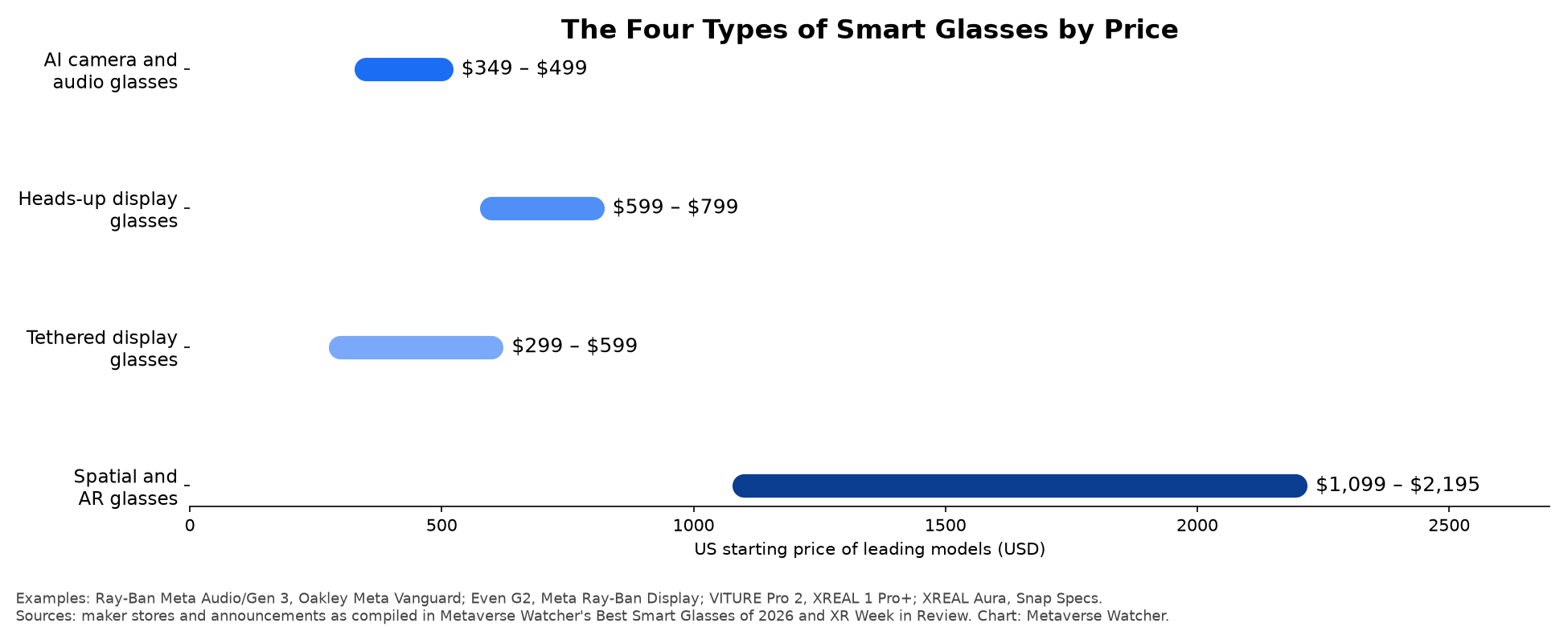
Smart glasses are eyeglasses with electronics built into the frame: some mix of speakers, microphones, a camera, a processor, a battery and, in a growing number of models, a small display. They connect to a phone, and most of them are designed to look like ordinary glasses. The term now covers four distinct product types, ranging from $299 video screens that plug into a phone to standalone AR computers above $2,000. This guide explains what smart glasses are, how each type works, what they cost and what to know before buying a pair.
What Are Smart Glasses? The Short Answer
Smart glasses are wearable computers in the shape of glasses. The simplest models are essentially open-ear headphones with a voice assistant. More advanced models add a camera for hands-free photos and video, and the most capable ones place digital images in your field of view. Unlike a VR headset, smart glasses do not block out the world; you keep seeing your surroundings through clear or tinted lenses. For a wider look at how these devices relate to headsets, see our explainer on AR vs. VR vs. mixed reality.
The Four Types of Smart Glasses
| Type | What it does | Display | Example models (U.S. starting price) |
|---|---|---|---|
| AI camera and audio glasses | Music, calls, voice assistant, and usually photos and video | None | Ray-Ban Meta Audio ($349), Google Intelligent Eyewear by Warby Parker ($395), Ray-Ban Meta Gen 3 ($449), Oakley Meta Vanguard ($499) |
| Heads-up display glasses | Notifications, navigation, translation, captions and AI answers in the lens | Small in-lens display | Even Realities G2 ($599), Meta Ray-Ban Display ($799 with Neural Band) |
| Tethered display glasses | A large virtual screen for a phone, laptop, handheld or console | Micro-OLED, wired | VITURE Pro 2 ($299), XREAL 1 Pro+ ($599) |
| Spatial and AR glasses | Apps anchored in the room, hand tracking, their own computing | See-through, wide field of view | XREAL Aura ($1,099 launch offer), Snap Specs ($2,195) |
Sources: maker stores and announcements as compiled in our best smart glasses of 2026 guide, our Google Intelligent Eyewear report and our XREAL Aura launch coverage.
1. AI camera and audio glasses
This is by far the largest category. These glasses have open-ear speakers in the arms, several microphones, a touchpad on the temple, a voice assistant and, on most models, a camera above one lens. Nothing appears in front of your eyes. You ask questions out loud, hear the answer through the speakers and, on camera models, capture photos and video from your point of view. Meta’s Ray-Ban and Oakley frames lead this segment, and Google’s first Android XR glasses from Warby Parker and Gentle Monster join it with in-store sales starting December 10 in the U.S. and South Korea.

2. Heads-up display glasses
Heads-up display (HUD) glasses add a small display inside the lens. It is not a full screen; it shows short pieces of information such as a text message, the next turn on a walking route, live captions or a translated sentence. Meta Ray-Ban Display puts a 600 × 600 color display in the right lens and is controlled with the Meta Neural Band, a wristband that reads muscle signals from small finger movements. The Even Realities G2 takes a different approach: no camera and no speakers, only monochrome green text projected into both lenses.

3. Tethered display glasses
Tethered display glasses, from brands such as XREAL, VITURE and RayNeo, are best understood as wearable monitors. A USB-C cable connects them to a phone, laptop, Steam Deck-style handheld or console, and they show that device’s picture as a large virtual screen floating in front of you. They are popular for watching films on flights and for private gaming. They do not run apps on their own and typically have no assistant or camera unless you buy an add-on.
4. Spatial and AR glasses
Spatial or augmented reality (AR) glasses are the most ambitious category. They track the room and your hands, then place apps and 3D objects in fixed positions around you. XREAL Aura, the first glasses to run Google’s Android XR platform, uses a wired compute puck; Snap Specs are standalone. Both cost far more than any other smart glasses and are aimed at early adopters and developers. Our Snap Specs vs. XREAL Aura comparison covers the trade-offs in detail.
How Smart Glasses Work
Most smart glasses share the same core building blocks, packed into frames that typically weigh 40 to 50 grams.
- Processor. A low-power chip handles the camera, audio and wireless links. Google’s Intelligent Eyewear, for example, uses Qualcomm’s Snapdragon AR1 Gen 1 with 2GB of memory and 64GB of storage, according to Google.
- Phone connection. Bluetooth and Wi-Fi link the glasses to a companion app on your phone. Heavier AI processing usually happens on the phone or in the cloud, which is why compatibility lists matter: Google’s glasses support only recent Pixel, Samsung Galaxy and iPhone models at launch.
- Audio. Directional open-ear speakers in the arms point sound toward your ears while leaking relatively little to people nearby. Multiple microphones pick out your voice for calls and commands.
- Camera. Camera models typically use a 12MP sensor. A front-facing LED lights up while recording to signal bystanders.
- Display (on some models). HUD and AR glasses commonly use waveguides, thin pieces of glass or plastic that carry light from a tiny projector in the frame across the lens and into your eye. Tethered glasses instead use micro-OLED panels viewed through optics in front of the lenses.
- Battery. Small batteries in the arms are topped up by a charging case. Google rates its glasses at up to 9 hours with seven recharges from the case; Meta rates Ray-Ban Meta Audio at up to 12 hours of general use.
- Controls. A touchpad on the temple, a capture button and voice commands are standard. Some models add wrist controls: Meta’s Neural Band, or watch gestures on Google’s glasses.
What Can You Do With Smart Glasses?
- Listen and talk: music, podcasts and phone calls without earbuds.
- Ask an AI assistant: Meta AI, Gemini or other assistants answer questions and, on camera models, describe what you are looking at.
- Capture: hands-free photos and video from your own point of view.
- Navigate: walking directions as audio or, on display models, as arrows in the lens.
- Translate and caption: live translation of conversations and captions for speech.
- Watch and play: a large private screen for films and games on tethered display glasses.
- Work: teleprompter, notes and notifications on HUD glasses, a subject we cover in our guide to smart glasses at work.
How Popular Are Smart Glasses?
Sales are growing quickly but remain concentrated. Omdia counted 4.2 million AI glasses shipped worldwide in the first half of 2026, with Meta holding 81.3% of the market. Counterpoint Research found that display-free models made up 96% of global AI glasses shipments over the same period. China is the exception: CINNO XResearch reports that glasses with displays accounted for 78% of China’s consumer AI and AR glasses sales in the third quarter, as we detailed in our China smart glasses sales report.
Privacy and Legal Questions
Camera glasses raise obvious privacy concerns for people around the wearer. Makers rely on recording indicator lights, and Google says its glasses will not record if the light is covered. Regulators are also taking an interest: courthouses in New York have banned camera glasses, and lawmakers in Norway and Ireland have proposed restrictions, which we explain in our reports on Norway’s proposed ban and Ireland’s covert recording proposal. Camera-free models such as Ray-Ban Meta Audio and Even Realities G2 avoid the photography issue, though they still carry microphones.
Can You Get Smart Glasses With a Prescription?
Yes, for most models. Meta, Warby Parker and Gentle Monster offer prescription lenses for most frames, while display and AR glasses often rely on magnetic or snap-in inserts from partner labs. Supported prescription ranges vary, so check before you order. Our best smart glasses for prescription wearers guide lists the options model by model.
Which Type Should You Choose?
- You want hands-free audio, calls and an assistant: AI audio glasses, with or without a camera.
- You want photos and video from your point of view: AI camera glasses.
- You want directions, captions or messages in view: heads-up display glasses.
- You want a big screen for travel or gaming: tethered display glasses.
- You want to try spatial apps and are comfortable paying early-adopter prices: spatial AR glasses.
For specific recommendations, see our best smart glasses of 2026, and for models still on the way, our upcoming smart glasses tracker.
Frequently Asked Questions
Are smart glasses the same as AR glasses?
No. AR glasses are one type of smart glasses. Many popular smart glasses, including Ray-Ban Meta, have no display at all.
Do smart glasses need a phone?
Almost all current models need a phone for setup, AI features and internet access. Tethered display glasses need a connected device to show anything.
How much do smart glasses cost?
Among the leading models, U.S. starting prices run from $299 for tethered display glasses and $349 for audio glasses to $799 for Meta Ray-Ban Display and $2,195 for Snap Specs.
Can smart glasses record people without them knowing?
Camera models show a recording light, and some disable recording if it is blocked. Laws on recording vary by country and venue, and several governments are considering new rules.