By the Metaverse Watcher newsroom. Published Saturday, November 7, 2026.
Meta’s Horizon OS 2.10 test build is the clearest preview yet of how Quest will look when Meta VR Glasses arrive. The Public Test Channel (PTC) release adds a dedicated Theater environment for video, and for a small group of testers it also swaps in a stripped-down Navigator with only THREE tabs: Search, Library and Notifications. Below is what changed, what is officially documented versus spotted in testing, and what Quest owners should expect before the update reaches the stable channel.
What Meta Officially Lists in Horizon OS 2.10
Meta’s official Quest release notes date the 2.10 PTC to the week of October 26, 2026, rolling out gradually to people enrolled in the test channel. The notes list only three items:
- Theater: a cinema-scale screen inside a theater environment, with your other windows hidden while you watch. In a supported media app you open More options on the Control bar and select Theater; selecting it again exits and restores your windows.
- Avatar video calls in Chats: during a call, the video icon on the active call bar switches between an avatar video call and audio only.
- Security updates: Meta says Quest now does a better job verifying that websites and online services are genuine before you visit them.
Theater: From Hidden Code to a Real Button
Theater is not a surprise. We reported in October that the Horizon OS 2.9 test build hid a Theater home cinema, and that same cycle restored classic environments like Desert Terrace and Space Station. What 2.10 adds is a working entry point.
According to UploadVR’s hands-on with the 2.10 PTC, Theater is not a VR Home you pick from settings. You launch it from the Control Bar of the specific window you want on the big screen, using a Theater button that sits apart from the existing Focus View. Leaving Theater drops you back into your normal VR Home or passthrough. UploadVR confirmed it works with the system Media Player, the Browser, YouTube, Disney+ and Amazon Prime Video, and observed real-time lighting that reacts to the content on screen. The backlight-style “Dynamic Ambiance” effect that had been reported as in development was not present in this build.
For owners who already cast Quest to a TV or phone for shared viewing, Theater is the reverse use case: a private big screen inside the headset with fewer distractions.
The Simplified Navigator: Fewer Buttons, One Big Trade-Off
The larger change is not in Meta’s notes at all. UploadVR found a launcher redesign, codenamed “Simplified Navigator” in firmware, reaching a small number of PTC users. It matches the interface Meta showed when it unveiled Meta VR Glasses at Connect in September.
| Area | Current Navigator | Simplified Navigator (2.10 PTC) |
|---|---|---|
| Top-level layout | Separate Me, People, Quick Controls, Show/Hide Windows and Environment/App buttons | Three tabs: Search, Library, Notifications |
| Quick Controls | Dedicated button | Opened by pressing the clock, Wi-Fi and battery display; larger button grid with a VR Home / passthrough switch |
| Library | Left-hand filters (installed, updates, etc.) | App folders by default in Grid View, plus an “Unknown Sources” folder for sideloaded apps; filters moved to a new List View |
| Privacy indicators | Muted purple | Green for active and recently used permissions |
| Quitting immersive apps | Less obvious | A bubble above the Library button offers a quit option |
The trade-off is real. In Grid View there is no way to show only installed apps or see which apps have updates waiting, so the Library shows everything your account owns, installed or not. Pressing the Library button again opens the new List View, where the old filters still live. For anyone with a large back catalog, that is an extra step every time. If storage is already tight, our guide to freeing up Quest storage is worth a look before the layout changes.
Why This Redesign Matters More Than the Others
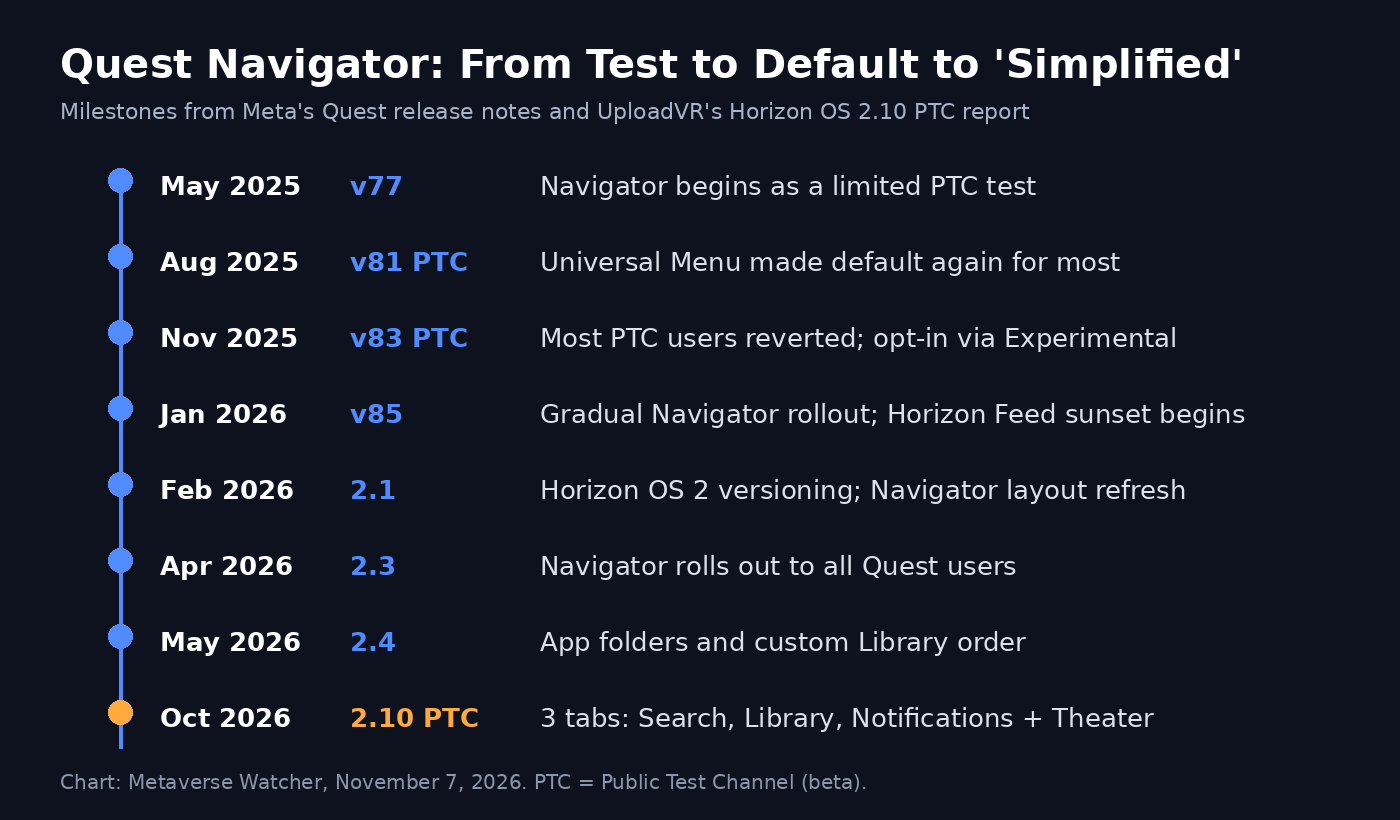
Navigator has been one of Meta’s most revised interfaces. Meta’s own release notes show it started as a limited PTC test in v77 (May 2025), was pulled back in favor of the Universal Menu for most users in v81, reverted again for most PTC users in November 2025 under v83, resumed a gradual rollout in v85 in January 2026, and finally reached all Quest users with Horizon OS 2.3 in April 2026. App folders followed in 2.4.
The Simplified Navigator is different because it is tied to new hardware. A three-tab launcher is easier to use on lightweight glasses than a dense menu built for Quest headsets, and pushing it to Quest first lets Meta test it at scale. The same logic applies to avatar video calls: UploadVR notes that bringing the avatar camera into Meta’s own Chats app could prepare the ground for Hologram Calling on Meta VR Glasses.
Other Undocumented Changes
- Smoother window resizing for apps with fixed aspect ratios such as YouTube, with fewer visible jumps as the window scales.
- External microphone toggle removed from the Experimental menu. It arrived in v64 in April 2024 for Quest 3 USB-C mics. UploadVR says external mics still worked in testing without it, but Meta has not said whether support becomes a default feature or goes away.
Which Headsets Will Get It
Meta has not said which headsets will receive the stable 2.10 release. Recent stable updates such as 2.9 shipped to Quest 3, 3S, Quest Pro and Quest 2, but Meta is winding down Quest 2 and Quest Pro support next year, so owners of those older headsets should not count on every new interface feature. If you are setting up a new headset this season, our Meta Quest 3 setup guide covers how updates and the test channel work.
Should You Join the PTC to Try It?
Only if you are comfortable with beta software. PTC builds can be less stable, features sometimes change or disappear before the stable release, and the Simplified Navigator is reaching only a small number of testers, so enrolling does not guarantee you will see it. Theater is the safer bet: it appears in Meta’s official notes, which usually means it is headed for the stable channel. For most owners, the sensible move is to wait for the stable 2.10 rollout and judge the new Library layout then.
Bottom Line
Horizon OS 2.10 makes Theater real and gives Quest owners an early look at the launcher Meta plans to ship with its glasses. The cleaner layout fixes long-standing complaints, such as how hard it was to quit an immersive app, but losing installed-app and update filters from the main Library view is a regression Meta should address before this reaches everyone.
Sources: Meta Quest release notes; UploadVR.