
By Metaverse Watcher staff. Published October 25, 2026.
Horizon OS v2.9 changes how every Quest headset handles app windows, and the change most owners will notice first is a missing button. According to Meta’s official Quest release notes, the standalone anchoring option has been removed from the window control bar. In its place, windows now open spatially, snap to nearby walls, and are organized from a new Window manager in Quick settings. The update began rolling out the week of October 19, 2026 to Quest 3, Quest 3S, Quest Pro and Quest 2, in batches.
We covered the Meta AI expansion in the same release earlier this week (Horizon OS v2.9: Meta AI on Quest Expands to UK, Japan, More). This piece covers everything else: the window overhaul, the new QR scanner, and which headsets get which features.
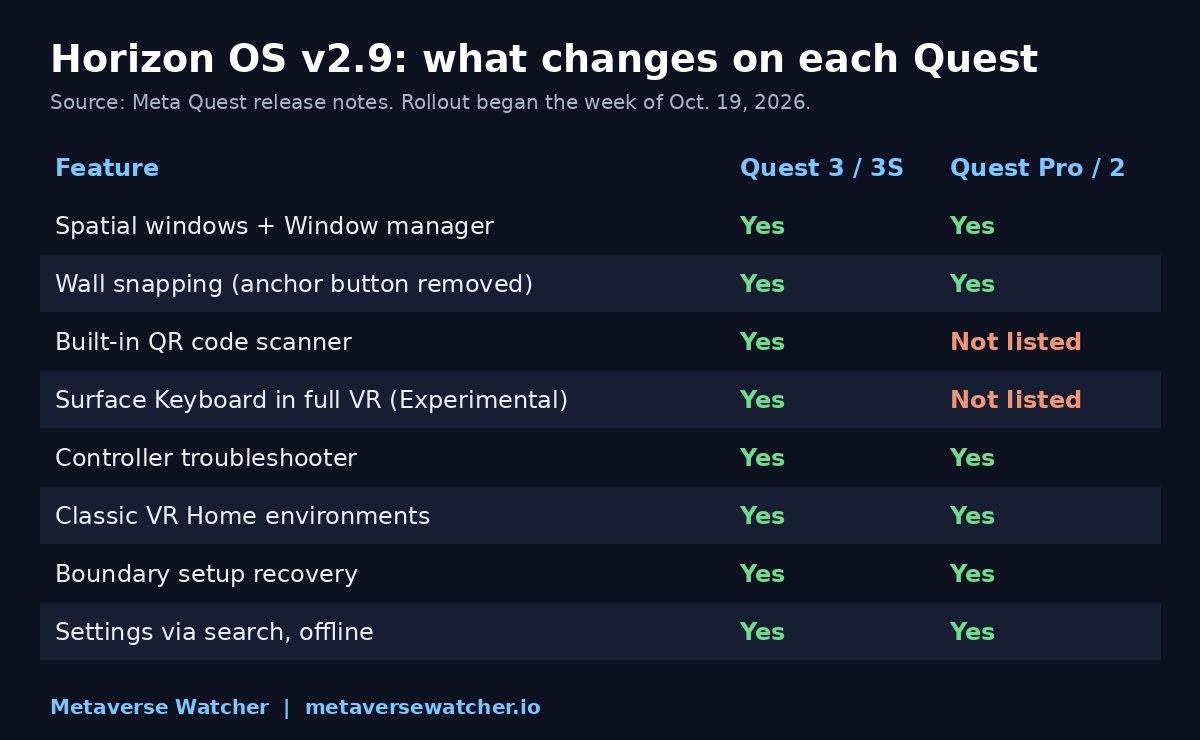
The anchor button is gone. Here is what replaces it
Until now, Quest owners could pin a window in place with an anchor control. Meta’s notes for v2.9 say plainly that “the standalone anchoring option has been removed from the control bar.” The replacement is surface attachment: “move a window close to a wall and it snaps into place.” Meta says windows now attach to surfaces “more reliably,” which is the company’s case for dropping the manual option.
The control bar itself was redesigned. Each window gets a dedicated grab handle, with buttons on either side for advanced options or to close it. As MIXED notes, anyone who relied on the anchor button will find it simply missing after the update, with no setting to bring it back.
Practical implication: if you work in a room without a convenient blank wall, or you like floating a browser window mid-air over a desk, you will now depend on where the system places windows when they launch. Meta has not said whether a manual pin will return.
How the new Window manager works
The bigger structural change is that apps now launch as windows in the space around you rather than in a fixed row. From Meta’s notes:
- A new Window manager, opened from Quick settings, lists every open window.
- It can place THREE windows side by side, or stack them.
- In a stack, you cycle through windows by clicking the top portion of each one.
Meta tested this layout in the Public Test Channel starting the week of September 28. The three-window ceiling is unchanged from earlier Horizon OS versions, so this is a reorganization rather than an increase in multitasking capacity.
It also sits apart from the industry-wide approach. The Khronos Group recently ratified OpenXR “spatial containers,” a standard for multiple 3D apps sharing one room, which we explained in our OpenXR spatial containers report. Meta backed that standard but has not committed to shipping it. The v2.9 Window manager applies to flat 2D app windows, and only one immersive app still runs at a time.
Quest 3 and 3S get a QR scanner and a better keyboard
Two v2.9 features are listed by Meta as available only on Quest 3 and Quest 3S:
- Built-in QR code scanner. Launch it from Quick controls, the Camera app or Navigator search, or say “Hey Meta, open QR code scanner.” That makes pairing, Wi-Fi codes and event links far less clumsy than typing a URL with a virtual keyboard.
- Surface Keyboard and Touchpad in full VR. The experimental feature now works in fully virtual environments as well as passthrough. Enable it under Settings, then Experimental.
If you are still choosing between those two headsets, our Quest 3 vs Quest 3S buying guide covers the hardware differences that matter more than any single update.
Smaller fixes that apply to every Quest
- Controller troubleshooter. If a Touch controller stops responding, go to Settings, Devices, Controllers, then Troubleshoot controllers.
- Boundary setup recovery. If boundary setup or a space scan is interrupted, the headset reverts to your previous boundary, or to a Stationary boundary if none exists.
- Classic VR Home environments. Some older Home environments return, rebuilt for the current Home. Choose one under Settings, then Home.
- Settings from search. Typing Wi-Fi, Bluetooth, Do not disturb, Travel mode or Passthrough surfaces the setting directly in results, even offline.
- Input-switch notifications. Immersive apps that require controllers or hand tracking now tell you when to switch. MIXED reports this, along with the Meta AI expansion, was not in the test build.
When will my headset get v2.9?
Meta pushes Horizon OS releases gradually, so some headsets on the same account will update days after others. There is no way to force the rollout. If you are setting up a new headset this week, our step-by-step Quest 3 and 3S setup guide walks through the first boot and update check, and our best VR headsets of 2026 guide puts the Quest line against Steam Frame, Vision Pro and PS VR2.
The Metaverse Watcher take
v2.9 is a polish release, not a feature leap, but the window change is a real behavioral shift. Removing a manual control in favor of automatic wall snapping is a bet that most people use Quest windows in a living room with walls nearby. For those owners, the new manager is cleaner. For anyone who used anchoring deliberately, it is a regression until Meta offers an alternative. The QR scanner, meanwhile, is the kind of small passthrough feature that makes Quest 3 and 3S feel more like everyday computers, and it is a reminder that Quest 2 and Quest Pro are not on the list for every new addition.
Sources: Meta Quest release notes (Horizon OS v2.9); MIXED.