RayNeo’s AI glasses picked up TWO software stories in the SAME week, and they point in OPPOSITE directions. The company’s own COMPANION app, RayNeo AI 1.0.6, now lets the phone DOWNLOAD translation and transcription models and take audio from the PHONE’s MICROPHONE. Separately, an INDEPENDENT developer has published Spare io, an UNOFFICIAL REPLACEMENT system for the RayNeo iO that promises live captions in 8+ LANGUAGES, an all-day memo and a bring-your-own-model AI assistant, with a public TestFlight beta slated for October 16.
What RayNeo shipped in 1.0.6
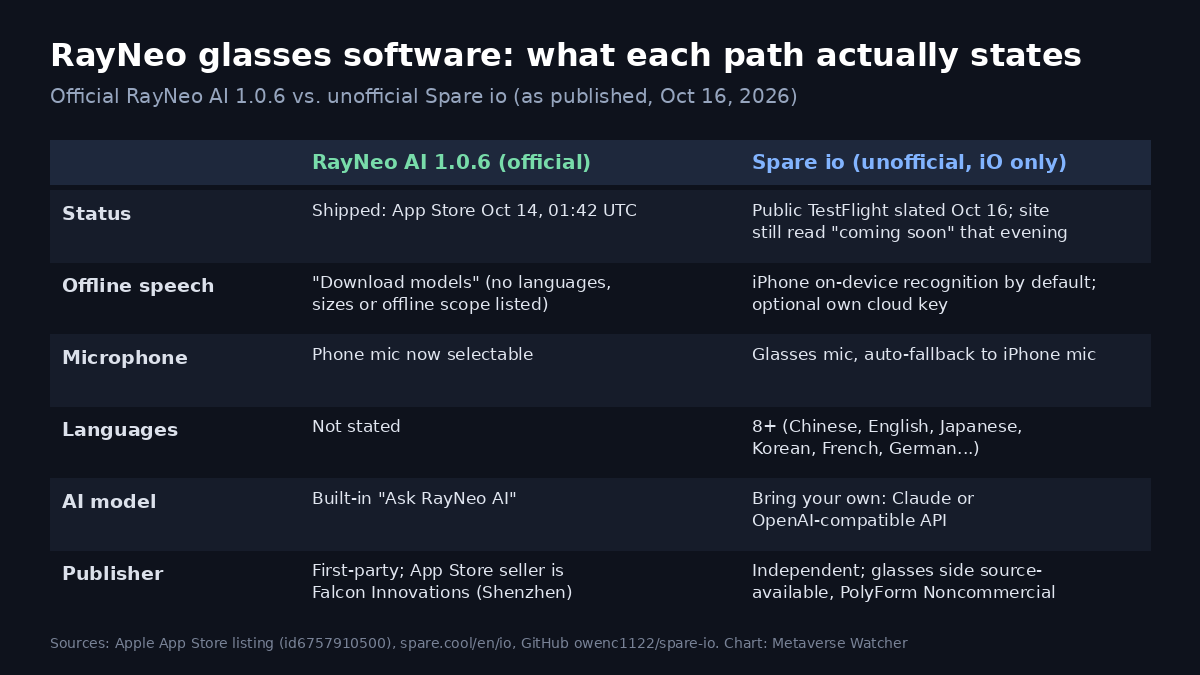
According to Apple’s App Store listing, version 1.0.6 went live on October 14 at 01:42 UTC. The release notes run to TWELVE items, and the SECOND one is the HEADLINE: “Offline translation/transcription: download models; phone mic.” The rest is HOUSEKEEPING and SMALL features, including fewer Lifelog media errors, recent chat MEMORY for the voice assistant, Live Cues for names, terms and locations, settings for glasses alerts with 29 icons, recovery from INTERRUPTED over-the-air updates, and caption, recording and pairing fixes.
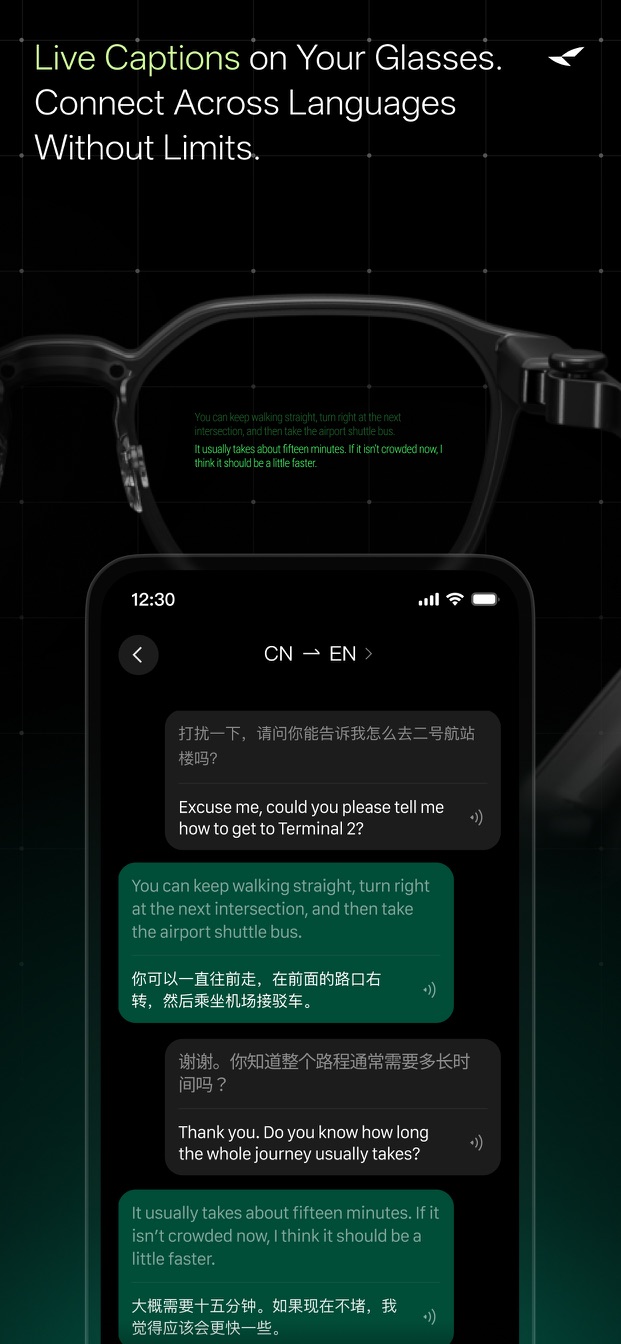
The app is still YOUNG. The listing shows a FIRST release on August 16, a minimum of iOS 15.0, a download of ROUGHLY 570MB, and a seller of Falcon Innovations Technology (Shenzhen). The Android build of 1.0.6 appeared on APKPure on October 15 at 558.5MB. RayNeo describes the app as “the OFFICIAL companion app for your RayNeo AI glasses,” with a dashboard, live captions, AI summaries, a teleprompter, phone notifications and a life log.
What RayNeo did NOT say
“Offline” is RayNeo’s word, and the notes stop there. As MIXED pointed out, the company names NO languages, gives NO DOWNLOAD SIZE for the models, and does not say WHICH glasses get them or how much of translation works with no CONNECTION at all. For a BUYER deciding whether captions will hold up on a plane or ABROAD, those are the questions that MATTER, and the listing does not answer them yet.
The phone-mic option is the more CONCRETE change. Live Captions depends ENTIRELY on what the MICROPHONE hears, and moving capture to the phone gives users a second source when the glasses’ own mics are the WEAK link, for example when the speaker is across a table rather than beside the wearer.
Spare io: an unofficial system for the RayNeo iO
Spare io goes much FURTHER. Its page describes “a whole new system for RayNeo iO smart glasses”: a crown-driven LAUNCHER, live captions and translation, an all-day memo that separates SPEAKERS, a “live prompt” that surfaces one- or two-line HINTS in lectures and meetings, Apple Music with time-synced lyrics, turn-by-turn NAVIGATION, and an AI assistant on a long-press of the crown. Everything is driven by ONE iPhone app.
On the points where RayNeo’s notes are SILENT, Spare io is SPECIFIC. It lists 8+ caption languages, including Chinese, English, Japanese, Korean, French and German. It uses the iPhone’s ON-DEVICE speech recognition by DEFAULT, “free, no connection needed,” with an optional cloud key. It listens through the glasses’ mic and falls back to the iPhone mic AUTOMATICALLY when the glasses go quiet. The assistant sends questions to Anthropic Claude or any OpenAI-compatible API the user configures, with the key kept in the iPhone Keychain. The memo is stored only on the iPhone, audio is not kept by default, and only text goes to an AI after the user APPROVES it.
The project is clear about its STATUS. The page labels it “Unofficial · No commercial use.” The glasses-side code is source-available under the PolyForm Noncommercial LICENCE, and the developer says the repository contains NO vendor FIRMWARE, code, images or fonts. The public spare-io GitHub repository, created October 15, holds the launcher UI, animations and the app SDK header; at the time of writing it showed 7 stars and 3 forks. The same developer maintains rayneo-io-on-mac, an EXPERIMENTAL Renode-based EMULATOR for the iO with a Swift macOS viewer, MIT-licensed and “bring your own firmware,” which was last updated on October 16.
One caveat on TIMING: the page says the iPhone app is “expected to open as a public TestFlight beta on October 16,” but on the evening of October 16 (ET) it still read “TestFlight coming soon,” and we COULD NOT find a public TestFlight link. Treat the date as a TARGET, not a CONFIRMED launch.
Why it matters
Captions and translation are fast becoming the DEFINING everyday feature for display glasses, and RayNeo’s own app is only TWO MONTHS old. That GAP is where independent work keeps appearing: this week alone, an open-source tool split the iO’s two microphones into two Mac inputs, and now Spare io is offering a full ALTERNATIVE front end. For RayNeo, the useful response is not complicated: publish the LANGUAGE list, the model sizes and the SUPPORTED glasses for 1.0.6, so OWNERS can JUDGE “offline” on FACTS rather than a SINGLE line of release notes.
For owners, the PRACTICAL takeaway is simple. RayNeo AI 1.0.6 is the SUPPORTED path and is AVAILABLE NOW. Spare io is an independent, non-commercial project that is NOT ENDORSED by RayNeo, and anyone trying its beta should EXPECT beta-quality software on hardware the developer does not CONTROL.
Sources: Apple App Store, RayNeo AI; MIXED; APKPure; Spare io; GitHub, owenc1122/spare-io; GitHub, owenc1122/rayneo-io-on-mac.