Meta’s VR Air Bridge, the $99 D-Link dongle that gave Quest owners a DEDICATED Wi-Fi 6 link to their gaming PC, has been END OF LIFE since July 2024. On October 13, 2026, a developer posting as AlanBacker published an open-source Windows app that puts the stranded hardware back to work, with NO Meta software in the loop. VR Air Bridge Hotspot turns the D-Link DWA-F18 into a standalone 5 GHz, 80 MHz, Wi-Fi 6, 2×2 HOTSPOT for streaming PC VR to a Quest through apps such as Virtual Desktop or Steam Link.
What the dongle was, and why it went quiet
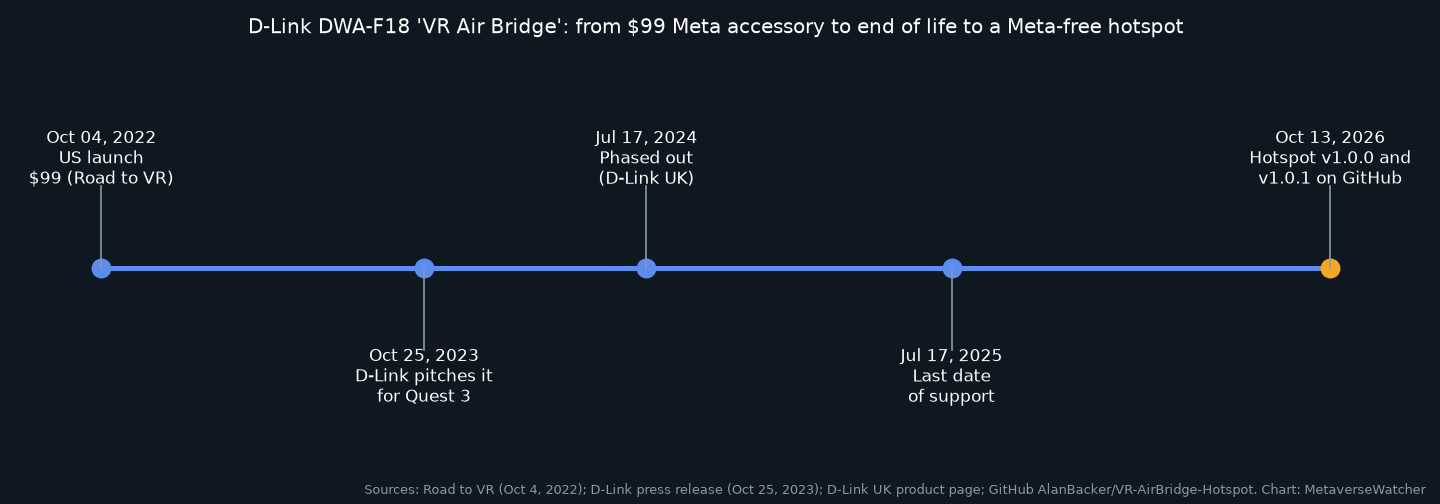
D-Link launched the DWA-F18 in the US on October 4, 2022, at $99, according to Road to VR. It shipped with a cabled USB dock and was pitched as a way to run Air Link WITHOUT loading the home router, pairing D-Link’s Wi-Fi 6 firmware with what the company called Meta’s PROPRIETARY VR algorithms. A year later D-Link marketed it for Quest 3 as well. Its own UK product page now lists Revision A1 as END OF LIFE, phased out on July 17, 2024, with a LAST date of support of July 17, 2025.
The dongle was always tied to Meta’s PC software. The new project’s README says Meta’s UNINSTALLER removes its driver, which leaves owners who switched to Virtual Desktop or Steam Link with a piece of Wi-Fi 6 hardware and no supported way to use it.
What the app actually does
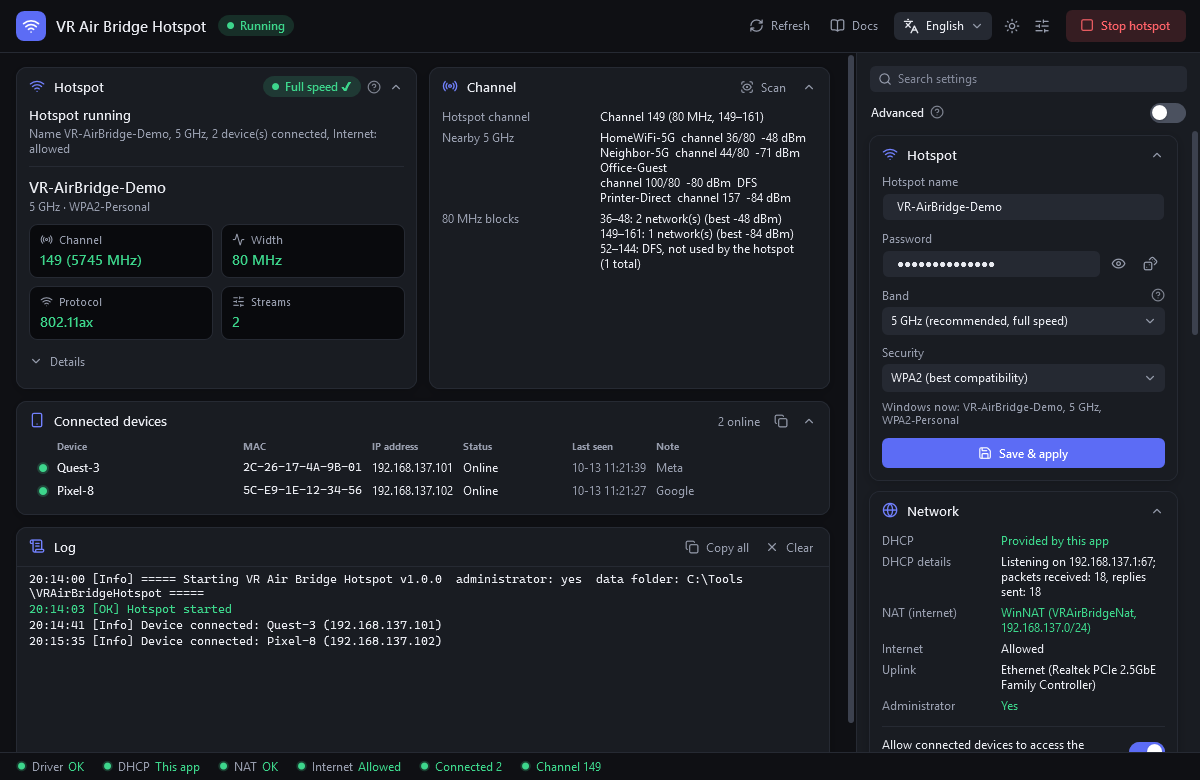
According to the GitHub repository, the app runs the DWA-F18, built on a Realtek RTL8852AU chip, as a Windows hotspot while the PC stays online through a SECOND adapter. It runs its OWN DHCP and NAT rather than relying on Windows Internet Connection Sharing, so a headset gets an address in the 192.168.137.100–199 range. A switch can cut internet access for LAN-ONLY streaming. A watchdog RESTARTS a dropped hotspot, and an “Install driver” button restores the unmodified, WHQL-signed Realtek/D-Link driver, version 1.27.831.2023, that the project REDISTRIBUTES.
The more technical feature is a BEACON check. With a second Wi-Fi adapter present, the app reads channel, width, protocol and spatial streams from the hotspot’s real beacon, so users can confirm they are getting 80 MHz Wi-Fi 6 rather than a silent fallback to 2.4 GHz or 20 MHz. The v1.0.0 release notes say the author VERIFIED channel 36, 80 MHz, 802.11ax and two streams on hardware.
The README is also candid about LIMITS. Windows, not the app, picks the channel, always within 36–48 or 149–161, and an experimental “Pin to network” option is the ONLY way to steer it. Another Meta bridge on the same channel nearby is listed as a known problem. And because the app stores the hotspot password in PLAIN TEXT in config.json beside the executable, the author advises sharing only the exe. The project says it sends NO telemetry and never connects to the internet itself.
Day-one caveats
This is very NEW software. The repository was created on the morning of October 13, and v1.0.1 followed v1.0.0 by about TWO and a half hours. The fix matters: the app sometimes picked a ZeroTier or other VIRTUAL adapter as its uplink, which dropped the router’s DNS from DHCP and enabled forwarding on the WRONG adapter. As of Tuesday evening, GitHub counted FIVE downloads across the two releases.
The executable is UNSIGNED, so Windows SmartScreen will warn on first launch, and the app needs ADMINISTRATOR rights to change network settings. The release notes publish SHA-256 hashes for each build, which is the MINIMUM check anyone should run before granting that access. It requires Windows 10 version 2004 or later, or Windows 11, 64-bit. Builds use the .NET 9 SDK, and the code is MIT-licensed.
One detail is worth flagging for owners who remember the original pitch. D-Link marketed the Air Bridge with WPA3 encryption, but the app’s own screenshots show its security setting at WPA2 for “best compatibility.” The README does NOT say whether WPA3 is offered as an option.
Why it matters
Accessory hardware OUTLIVES the software that supports it more often than buyers expect. The Air Bridge was a Made for Meta product with a TWO-YEAR life on shelves. A small, documented tool that turns it into a GENERIC PC VR access point is a reasonable rescue for owners already using third-party streaming. It is also a reminder that “end of support” leaves WORKING radios in drawers. Treat it as a FIRST release from a SINGLE author: CHECK the hash, keep the revert tool handy, and VERIFY the beacon before blaming your PC for stutter.
Sources: AlanBacker/VR-AirBridge-Hotspot README and v1.0.0 and v1.0.1 release notes, October 13, 2026; Road to VR, October 4, 2022; D-Link UK product page.