By the Metaverse Watcher newsroom. Requirements, steps and plan details were checked against Meta Quest Help, xbox.com and Xbox Wire on Tuesday, November 24, 2026, at about 8:05 p.m. ET. Prices are US list prices and can change.
Xbox Cloud Gaming on Quest 3 turns the headset into a large virtual screen for flat Xbox games, streamed from Microsoft’s servers instead of installed on the device. No console or gaming PC is required. You need the free Xbox app, a supported controller, a fast connection and, for most titles, an Xbox Game Pass plan. Meta’s support page lists the Quest 2, Quest Pro, Quest 3 and Quest 3S as compatible.
Interest is higher than usual this week. Meta is selling a Quest 3S bundle with the Xbox Nano controller for Black Friday, and many new headsets will be unboxed over the holidays. This guide covers setup, what each Game Pass plan includes on Quest, how to reduce lag, and fixes for the most common problems.
What You Need
| Requirement | Details | Source |
|---|---|---|
| Headset | Meta Quest 2, Quest Pro, Quest 3 or Quest 3S | Meta Quest Help |
| Software | Quest build 60.0 or later, or the Xbox app will not appear in the Meta Horizon Store | Meta Quest Help |
| App | Free Xbox app from the Meta Horizon Store (preinstalled on the Quest 3S Xbox Edition) | Meta Quest Help |
| Subscription | Game Pass Essential, Premium or Ultimate for most games; select free-to-play games, such as Fortnite, work with a free Microsoft account | Xbox Wire, Meta |
| Controller | Supported Bluetooth or USB gamepad (see the list below) | Meta Quest Help |
| Network | 5 GHz Wi-Fi with at least 20 Mbps download | xbox.com |
| Region | Available wherever Quest is sold, except Iceland and Taiwan | Meta Quest Help |
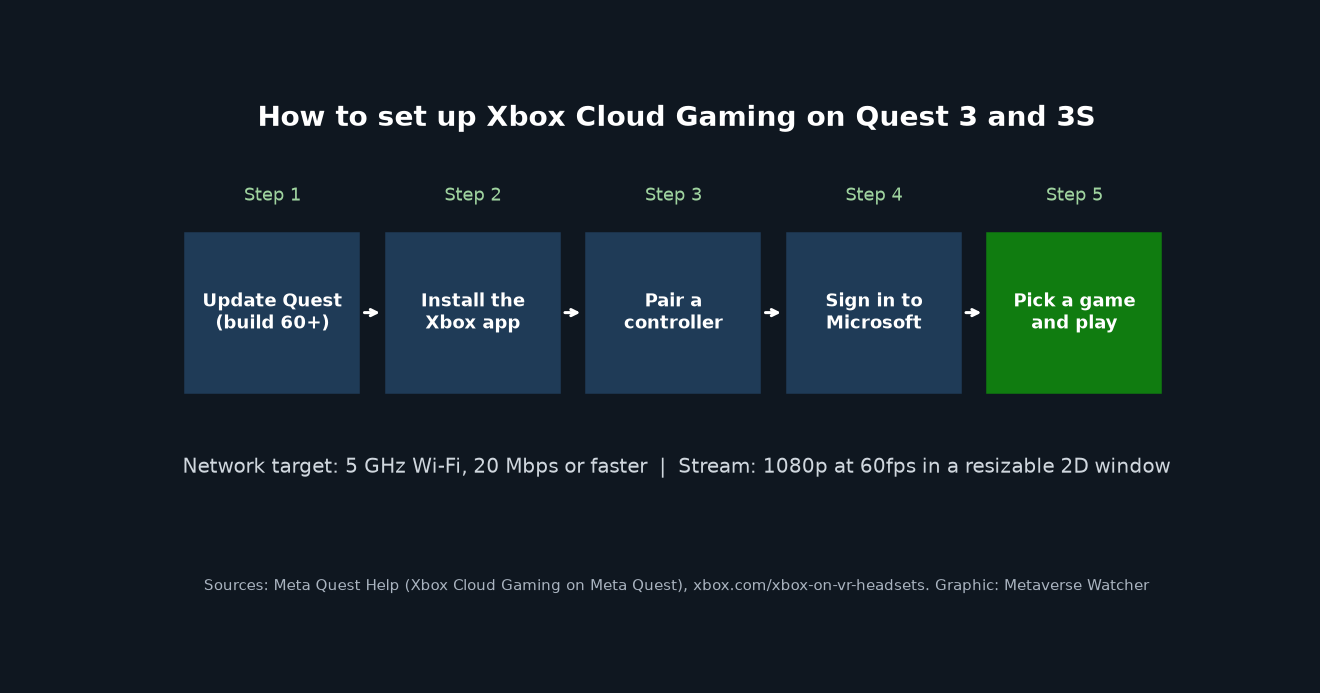
Two points are often misunderstood. First, these are standard flat games shown in a window, not VR versions; Meta says the stream runs at 1080p and 60 frames per second in a 2D panel you can resize and move. Second, your Quest Touch controllers are not the intended input. Most cloud games expect a gamepad.
How to Set Up Xbox Cloud Gaming on Quest 3 or 3S
These steps follow Meta’s official instructions. They take about ten minutes if your headset is already updated.
- Update the headset. Open Settings, then General, then Software Update, and install anything pending. Our guide to updating Quest 3 software explains how to force a check if nothing appears.
- Install the Xbox app. Search for “Xbox” in the Meta Horizon Store on the headset or in the Meta Horizon phone app, and install it. Owners of the Quest 3S Xbox Edition can skip this step.
- Open the app and select Get Started. The app walks you through pairing a controller. Put the controller in pairing mode (on Xbox controllers, hold the small pair button until the logo flashes) and confirm the pairing in the headset.
- Review the control and screen-size tips, then select Start playing.
- Select Sign in at the top of the app and use the Microsoft account that holds your Game Pass plan. If you only want free-to-play games, a free account is enough.
- Choose a game. Games marked as cloud playable start streaming within a few seconds. You can play with passthrough on, so you see your room, or in an Xbox-themed virtual environment.
To pair a controller outside the Xbox app, Meta’s controller help page lists the path: open Quick Settings, then Settings, then Devices, then Gamepad, and select Bluetooth settings. Turn the gamepad on, put it in pairing mode, and select Pair twice. If you are also setting up the headset for the first time, start with our Quest 3 and 3S setup guide.
Which Controllers Work
Meta lists six controllers it has tested for compatibility with Xbox Cloud Gaming on Quest:
| Controller | Connection |
|---|---|
| Xbox Wireless Controller | Bluetooth or USB |
| Xbox Elite Wireless Controller Series 2 | Bluetooth or USB |
| Xbox Adaptive Controller | Bluetooth or USB |
| Sony DualShock 4 | Bluetooth |
| Nintendo Switch Pro Controller | Bluetooth |
| Backbone Pro | Bluetooth |
Meta notes that other Android-compatible controllers may work but are not officially supported. The new Xbox Nano controller is not on that list, which appears to predate it, but Meta ships the Nano in its own Quest 3S bundle. If you do not have a gamepad, Quest 3 and 3S support a gamepad mode that emulates one with the Touch controllers. Meta describes it as a short-term way to try games and recommends a physical gamepad for longer sessions. We covered the feature when it arrived in Horizon OS 2.7.
Game Pass Plans: What You Get on Quest
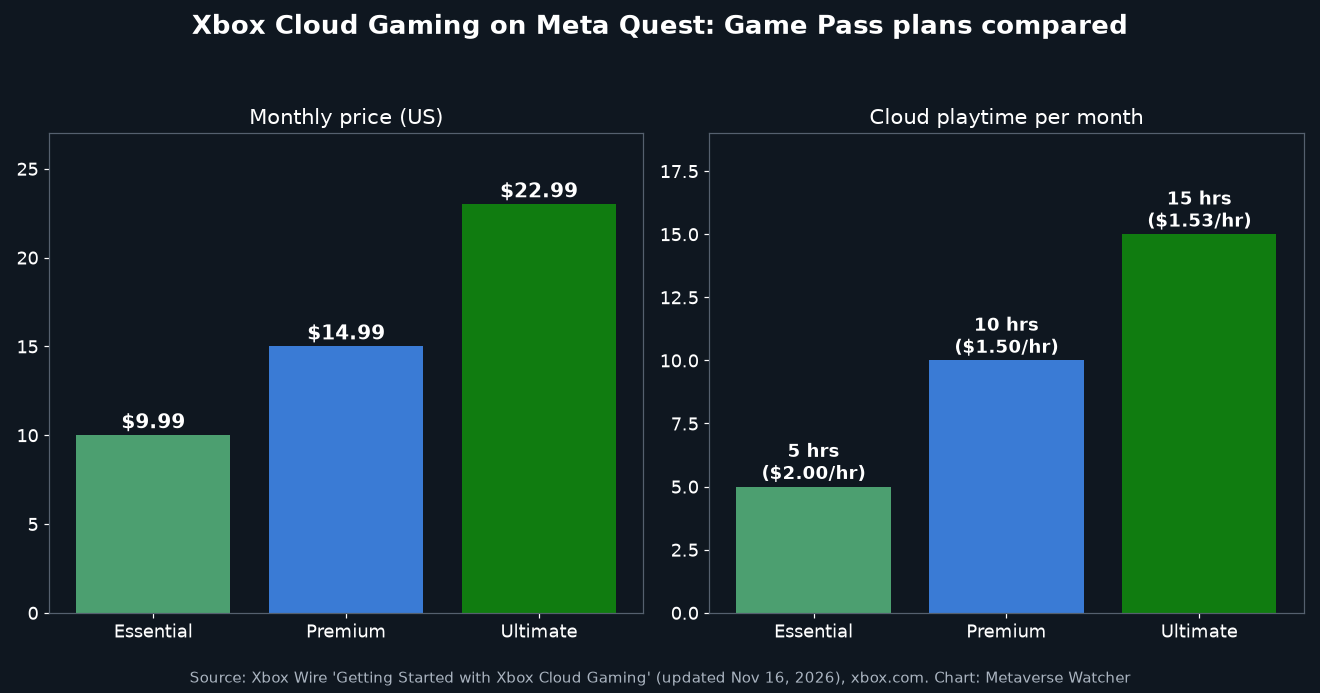
Xbox Cloud Gaming came out of beta in late 2025, and every paid Game Pass tier now includes it, but with a monthly time limit. According to Xbox Wire (updated November 16, 2026, with current pricing):
| Plan (US) | Price | Cloud playtime | Library |
|---|---|---|---|
| Game Pass Essential | $9.99/month | 5 hours/month | 50+ games |
| Game Pass Premium | $14.99/month | 10 hours/month | 200+ games |
| Game Pass Ultimate | $22.99/month | 15 hours/month | Largest library, day-one releases, EA Play, Ubisoft+ Classics |
Three practical points follow:
- Fifteen hours goes quickly. That is about 30 minutes a day on Ultimate. Microsoft says you can buy extra cloud time from the Xbox Store if you run out, with prices that vary by region.
- You can stream some games you own. Xbox says many titles outside Game Pass are cloud playable if you have bought them, and progress syncs through cloud saves to console, PC and mobile.
- Bundle trials have conditions. The Game Pass Ultimate trial in Meta’s current Nano bundle is for new members only, as we detailed in our bundle price analysis. Subscriptions renew automatically. Xbox says you can get a one-time refund of the most recent renewal if you cancel within 30 days of being charged.
Do not confuse Game Pass with Meta’s own subscription. Meta Horizon+ covers VR games for Quest; it does not include Xbox games. Our review of whether Meta Horizon+ is worth it compares the two services.
How to Fix Lag, Stutter and Blurry Video
Cloud gaming depends more on your network than on the headset. Work through these fixes in order:
- Use 5 GHz Wi-Fi, not 2.4 GHz. Xbox recommends at least 20 Mbps and says dual-band routers may need the device set to connect only to the 5 GHz network. Separate network names for each band make that easier.
- Move closer to the router. Meta’s own advice is to play near your Wi-Fi router. Walls and floors between the headset and router are a common cause of dropped frames.
- Plug in the controller. Meta says a USB-C cable between the Xbox controller and headset reduces input latency. It also removes one source of Bluetooth interference.
- Reduce competing traffic. Pause large downloads, game updates and 4K streams on other devices during play.
- Test your connection. Microsoft suggests free tools such as Speedtest.net or Fast.com. If speeds are well under 20 Mbps on 5 GHz, see our Quest 3 Wi-Fi troubleshooting guide.
- Restart the headset and router if quality drops suddenly in the middle of a session that previously worked.
Common Problems and Fixes
| Problem | Likely cause | Fix |
|---|---|---|
| Xbox app missing from the store | Headset software is older than build 60 | Update the headset, then search the store again |
| Controller connects but buttons do nothing | Gaze cursor for gamepad is on | Settings > Devices > Gamepad, turn off Use the gaze cursor (Meta’s documented fix) |
| Controller will not pair | Controller is linked to another device | Hold the pair button until the logo flashes fast, then pair from Settings > Devices > Gamepad |
| Game says it needs Game Pass | Free account, or game not in your tier | Check the tier, or play a free-to-play title |
| Session stops after a few hours | Monthly cloud playtime used up | Buy extra cloud time or wait for the monthly reset |
| No sound in headphones | Audio routed to the wrong device | See our guide to Bluetooth headphones on Quest 3 |
| “Not available in your region” | Iceland and Taiwan are excluded | No workaround is supported |
Microsoft also lists limits that apply to streamed games on any device, including Quest: lower video resolution, limited audio outputs, cloud-only saves, and limited support for in-game purchases, user-generated content and some accessories (xbox.com FAQ). For account or billing problems, Meta directs users to Xbox Support.
Remote Play and GTA VI
The Xbox app on Quest can also stream from your own console. Meta’s instructions: select your profile picture in the top-right of the Xbox app, choose My consoles, and select Connect. You can also open Cloud Gaming in the top-left corner and choose Remote play. Remote features must first be enabled on the console under Settings, Devices & connections, Remote features.
This matters for Grand Theft Auto VI. In a November 23 Xbox Wire post, Microsoft says GTA VI supports cloud streaming to Xbox One and Xbox Series X|S consoles, and Remote Play from a Series X|S to phones, PCs and handhelds. The post does not list Quest headsets for cloud play. Owners of a Series X|S and the game can try Remote Play through the Quest Xbox app, but Microsoft has not specifically documented GTA VI on Quest, so treat it as untested.
With XBOX Cloud Gaming and Remote Play you can enjoy your adventures throughout Leonida on the devices you already own. Learn more: https://t.co/iGhp0mSXwq
— XBOX Wire (@XBOXWire) November 23, 2026
Is It Worth It?
For Quest owners without a console, Xbox Cloud Gaming is the simplest way to play current Xbox games on a large screen, and in rooms without a TV. It is less useful on the move: even with travel mode, hotel and in-flight Wi-Fi rarely meet the 20 Mbps target. The limits are real: 1080p at 60fps, a monthly playtime cap on every plan, and full dependence on your home network. Players who want more than 30 minutes a day should compare that cap with buying games outright. If you are still shopping, our Quest 3 accessories guide covers controllers and straps that suit longer seated sessions.
FAQ
Can I play Xbox games on Quest 3 without Game Pass?
Yes, but only select free-to-play games such as Fortnite, using a free Microsoft account, plus cloud-playable games you already own. Most of the library requires a Game Pass plan.
Can I use Quest Touch controllers instead of an Xbox controller?
Quest 3 and 3S can emulate a gamepad with the Touch controllers, but Meta recommends a physical gamepad for anything longer than a short trial.
Does Xbox Cloud Gaming work on Quest 2?
Yes. Meta and Microsoft list the Quest 2, Quest Pro, Quest 3 and Quest 3S as supported.
What resolution does it stream at?
Meta says games stream at 1080p and 60 frames per second in a resizable window.