
Two Steam Frame owners say the Chaperone boundary grid, the SAFETY layer that WARNS players before they hit a wall or a desk, STOPS appearing once they begin STREAMING games from a PC. A Valve developer has replied on the company’s PUBLIC SteamVR bug tracker asking for REPRODUCTION steps, but Valve has not CONFIRMED a defect, named a CAUSE, or committed to a FIX. MIXED (Chris Steven, October 4, 2026) first reported the thread; Metaverse Watcher reviewed the ORIGINAL posts directly.
What the Owners Reported
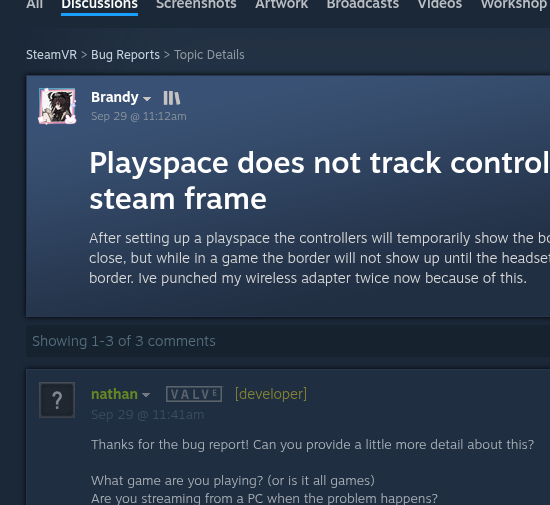
The thread, titled “Playspace does not track controllers on steam frame,” was posted on SEPTEMBER 29. The original poster wrote that after setting up a playspace, the controllers “will temporarily show the border when close, but while in a game the border will not show up until the headset is close to the border.” The same owner added a CONCRETE consequence: “Ive punched my wireless adapter twice now because of this.”
An account named nathan, tagged [developer] with the Valve badge, answered about HALF an hour later with FIVE questions: which GAME, whether the owner was streaming from a PC, how consistent the problem was, whether Room View was being toggled, and what SEQUENCE of steps triggers it. The owner then NARROWED the fault to STREAMING: “When I stream from my pc to play a game, it stops showing the border completely. I’ll try remaking the boundary, and a few minutes later it stops showing up. It happens every time, even if I’m not playing a game. I have never touched the Room view toggle.”
A SECOND owner joined on October 3 with the SAME symptom and a working THEORY centered on RECENTERING. Recentering “seems to create a small area around you thst is seen as within the playspace,” they wrote, so “if you recenter in a relatively small playspace then the boundaries you set wont appear until you go further from where you recentered.” That is ONE user’s interpretation of their own sessions, NOT a diagnosis Valve has ENDORSED.
What Valve Documents
Valve’s OWN Steam Frame Feature and Troubleshooting Guide sets a CLEAR, WRITTEN expectation: “Chaperone is the virtual boundary grid that will appear if your Frame or Controllers are nearing the edges of your designated Playspace.” Its appearance is configured under VR Settings, Play Area, Chaperone Style. Under that wording, a CONTROLLER approaching the edge should be ENOUGH to trigger the grid, which is PRECISELY the behavior the first owner says goes MISSING.
The same guide explains that the Playspace menu in the VR Dashboard taskbar can REBUILD the playspace, adjust floor height, or “recenter to your current position,” and that HOLDING the Steam button reorients the dashboard. It does NOT describe any setting that DISABLES the controller half of Chaperone.
Why It Matters
TWO reports do not make an EPIDEMIC, and no affected SteamOS or SteamVR build has been IDENTIFIED, so owners have no version to ROLL BACK to. But boundary failures are not a COSMETIC bug; they are a PHYSICAL risk in a HEADSET that Valve markets for ROOM-SCALE PC VR. Valve has moved QUICKLY on Steam Frame issues since the September launch, although several recent fixes, including the error 17 streaming FIX, have required BETA builds on both the headset and the PC.
Until Valve RESPONDS further, the PRACTICAL guidance is CONSERVATIVE: owners who stream from a PC and notice a MISSING grid should rebuild the playspace, AVOID recentering in TIGHT spaces, keep EXTRA CLEARANCE around the play area, and add REPEATABLE steps to the existing thread so Valve has what it EXPLICITLY asked for.
Sources: SteamVR Bug Reports thread; Valve Steam Frame Feature and Troubleshooting Guide; MIXED, October 4, 2026.