By MWContent, Metaverse Watcher. Updated November 11, 2026. All steps and policies checked against Meta and Valve support pages on that date.
A VR game is one of the easiest gifts to get wrong. Buy it for the wrong store, the wrong headset or the wrong region and the recipient is left with a code that will not work, or a refund clock that ran out before the holiday arrived. This guide covers exactly how to gift a Meta Quest game in 2026, how the recipient redeems it, how Meta Quest gift cards differ from Meta Gift Cards, and what to do if you are gifting for a Steam Frame or PC VR player instead. Every deadline below comes from Meta’s and Valve’s own policies, not from guesswork.
If you are still deciding what to buy, start with our Best Quest 3 Games (2026) ranking, our Best Co-op VR Games list for players who want company, and our running early Black Friday VR deals tracker ahead of November 27.
The Short Answer
- To gift one game: open the game’s page in the Meta Horizon app, tap the gift box icon, pick the recipient or enter their email, add a note and confirm.
- The recipient gets an email with a 25-digit code and redeems it from that game’s page via Options > Redeem gift.
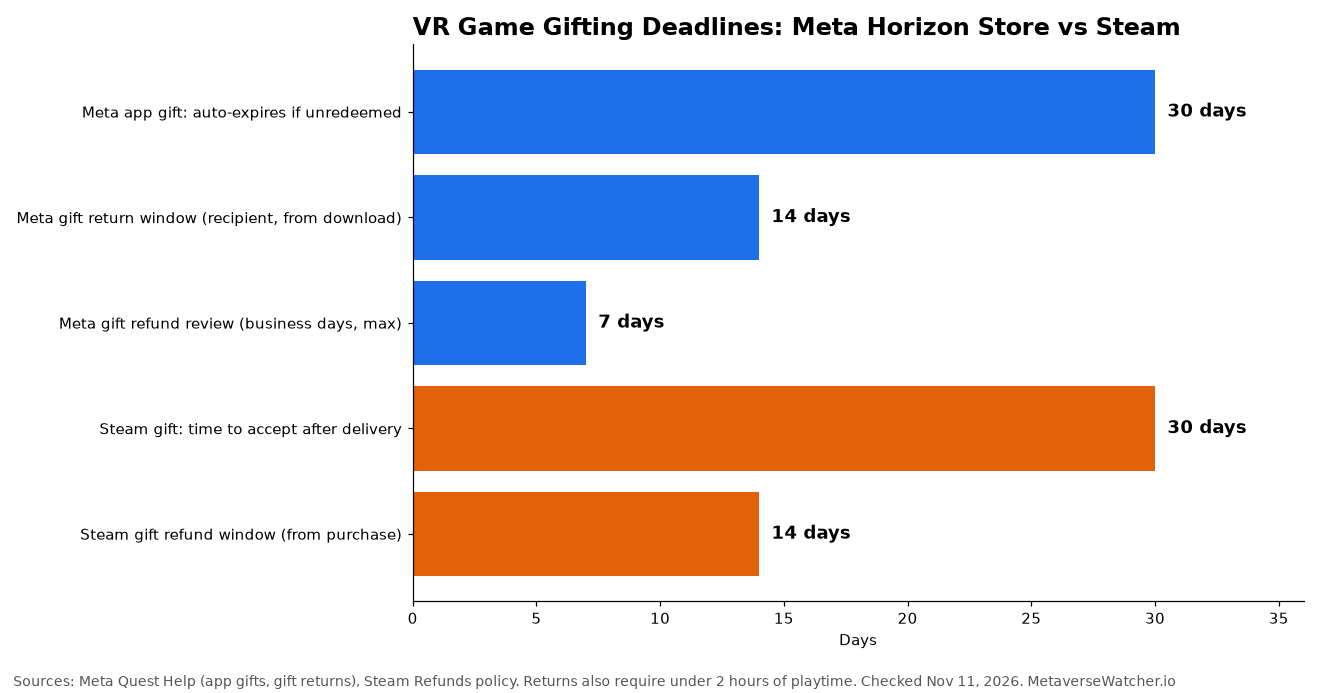
- Unredeemed gifts expire after 30 days and the money goes back to you automatically.
- Not sure what they want? A Meta Quest digital gift card adds store credit to their wallet and can be spent on any eligible app.
How to Gift a Meta Quest Game, Step by Step
Meta says you can send app gifts from a Quest headset, the Meta Horizon phone app or the Meta Horizon Store website. The phone app is the most reliable route, and it is the one Meta documents in detail on its Send and receive app gifts help page:
- Open the Meta Horizon app on your phone and tap Search.
- Find and select the game you want to give.
- Tap the gift box icon at the top of the screen.
- Find the recipient, or type their name or email address, then tap their name.
- If you are not connected to that person on Meta, tap Continue.
- Write an optional gift note and tap Next.
- Tap Confirm to pay.
To check what you have already sent, open the app’s Menu from the top of the Horizon Feed, swipe down and tap Manage gifts.
Three Checks Before You Pay
- Right device. Meta explicitly warns buyers to make sure they are purchasing the app for the correct device. A Quest 2 owner, a Quest 3 owner and a PC VR player are not always looking at the same store listing.
- Right region. Gifted apps can be restricted by location, so the game must be available in the recipient’s country.
- You pay full price. Gifts are charged at the current public standard price. Even if you got a game free through a cross-buy promotion, gifting it to someone else costs the standard price. Time the purchase for a store sale if you want a discount.
How the Recipient Redeems a Gifted Game
The recipient receives an email, and may also get a notification in the Meta Horizon app. Meta says the email comes from do_not_reply@mail.oculus.com, which is worth telling the recipient so it does not get dismissed as spam. To redeem:
- Open the email and copy the 25-digit code.
- In the Meta Horizon app, open the store page for the gifted game.
- Tap Options, then Redeem gift.
- Enter the code and tap Submit.
Two cautions. First, a gift code can only be redeemed once and Meta says it is redeemable by anyone who has access to it, so treat the email like cash and do not post screenshots of it. Second, if you sent the gift to the wrong address, contact Meta Store support to cancel it. If a new headset is part of the gift, our Meta Quest 3 setup guide covers getting the account ready before the code is entered.
Meta Quest Gift Card vs Meta Gift Card
Meta now sells two different kinds of card, and they are not interchangeable in the way most buyers assume. The table below summarizes what Meta’s own pages say.
| Option | What it buys | How to redeem | Key limits |
|---|---|---|---|
| App gift (single game) | One specific Quest app or game | 25-digit code on the game’s page: Options > Redeem gift | Expires after 30 days if unredeemed; standard price; region-restricted |
| Meta Quest gift card (store credit) | Apps and experiences on the Meta Horizon Store | Meta Horizon app: Menu > Payment and subscriptions > Redeem Store code | Balance goes to the Wallet; game-specific cards only unlock that game |
| Meta Gift Card | Meta Store items: AI glasses, Quest headsets, accessories, apps and in-app purchases | Enter in the Gift cards and credits section of your bag on Meta.com | Redeemable by account holders 13+; not for non-VR subscriptions, warranty services or other gift cards |
Meta Quest gift cards are store credit. According to Meta’s redeem a coupon code or gift card page, the recipient opens the Meta Horizon app, taps Menu, scrolls to Payment and subscriptions, taps Redeem Store code, enters the code and taps Submit. The balance lands in their Wallet. One exception matters: if the card is for a specific game, it can only be redeemed for that game. It cannot be swapped for Quest cash, put toward another title or used for in-app purchases. Meta also notes that multiple in-app-purchase cards must be redeemed one at a time, launching the game to claim each one before redeeming the next.
Denominations vary by country. Meta’s Australian gift card page lists amounts from $15 to $150 AUD and says the cards never expire; when Meta launched US digital Quest gift cards in its v47 update post, it offered $15, $25 and $50 balances. Check Meta’s gift card page for the amounts offered in your country today.
Meta Gift Cards are broader. Meta’s Meta Gift Card help page says they work for AI glasses, accessories, Quest headsets, and apps, games and in-app purchases, and are applied in the bag at checkout on Meta.com. They cannot be used for Meta subscriptions that are not VR apps, Advanced Replacements, out-of-warranty coverage, other gift cards or cash. Under Meta’s gift card terms, they can only be redeemed by account holders aged 13 and over, and they do not expire except in Japan, where cards expire six months from purchase. That age rule matters for families; our Quest parental controls guide explains how supervised teen accounts handle purchases.
Let Them Choose: Shareable Wishlists
The cleanest way to avoid a duplicate or unwanted game is to ask for a wishlist. Meta added public, shareable wishlists in its v47 software update: the owner switches their Wishlist from Private to Public, then shares the link, and friends and family can gift apps directly from it. Games are added with the heart icon in the headset store or the Add to Wishlist button elsewhere. Meta’s own support staff told users in a 2022 community thread that the privacy toggle may need to be changed from the Meta Quest apps and games website rather than the phone app, so try the web store if the Share option is missing.
Sharing a single headset in the household? A gift redeemed to one account can often be used by others through app sharing, covered in our guide to Meta Quest profiles and app sharing.
Returns and Refunds on Gifted Quest Games
Meta’s gift return policy follows its standard content refund rules, with one twist: only the recipient can request the return (unless local law requires otherwise), while the money goes back to the buyer.
- The game must be returned within 14 days of being downloaded and played for no more than 2 hours.
- If the recipient tried a demo of the game, they must delete the demo from the headset first, restart, and then open the gifted app.
- To start a return: Meta Horizon app > Menu > Manage gifts (under Payment and subscriptions) > Redeemed > select the game.
- Meta takes 5 to 7 business days to review and process the request, emails the buyer, and credits the original payment method if approved.
For the full process on games you bought for yourself, see our Meta Quest refund guide.
Gifting for Steam Frame and PC VR Players
If the person you are buying for plays on a Steam Frame, a Valve Index or a Quest connected to a gaming PC, a Meta gift will not help with their Steam library. Steam gifting is done at checkout: add the game to your cart, choose to purchase it as a gift, and select a recipient from your Steam friends list. Steam also lets you schedule delivery for a later date, which is useful for buying during a sale and delivering on the day.
The refund rules are close to Meta’s. Valve’s Steam Refunds policy says unredeemed gifts can be refunded within the standard 14-day, two-hour window, and redeemed gifts can be refunded under the same conditions if the recipient initiates it, with funds returned to the buyer. Third-party guides such as Lowstamp’s Steam gifts explainer note that a gift not accepted within 30 days is cancelled and refunded, and that the 14 days count from the purchase date, not the delivery date. Schedule a gift too far ahead and the refund window can close before it arrives. For ideas, see our Best Steam Frame Games ranking.
Budget Gifting Tips
- Watch sale timing. Because Meta gifts are charged at the current standard price, buying during a store sale is the only way to pay less.
- Do not gift what is free. Many strong titles cost nothing; check our Best Free Quest Games list before paying for something the recipient can download today.
- Send early, not late. An unredeemed Meta gift expires after 30 days. If you buy in early December for a late-December holiday, tell the recipient to redeem promptly.
- Keep the receipt email. It is your record if a code is lost or sent to the wrong address.
FAQ
Can I gift a Quest game I already own?
You cannot transfer your own copy. Gifting is a new purchase at the current public standard price.
What happens if they never redeem the gift?
Meta says an app gift not redeemed within 30 days expires automatically and the refund goes back to the buyer.
Where does the recipient find a lost gift code?
Search their inbox for mail from do_not_reply@mail.oculus.com. Redeemed and sent gifts both appear under Menu > Manage gifts in the Meta Horizon app.
Can a Meta Gift Card buy a Quest headset?
Yes. Meta lists Quest headsets, AI glasses and accessories among eligible Meta Gift Card purchases on Meta.com. A Meta Quest gift card, by contrast, is store credit for the Meta Horizon Store.
Metaverse Watcher does not use affiliate links. Store policies change; we will update this guide when Meta or Valve revise their gifting rules.