Smudged lenses are the most common reason a Meta Quest 3 suddenly looks blurry, and the wrong cleaning habit is one of the easiest ways to damage one for good. The good news: cleaning a Quest 3 or Quest 3S properly takes under a minute and needs one thing, a clean, dry microfiber cloth. This guide covers exactly what Meta’s own support pages allow, what they prohibit, and how to clean the lenses, cameras, facial interface and controllers without voiding anything or scratching the coatings.
Every instruction below comes from Meta Quest Help (Clean your Meta Quest devices, Preventing lens fogging and Avoid sunlight damage), checked on November 10, 2026, unless another source is named.
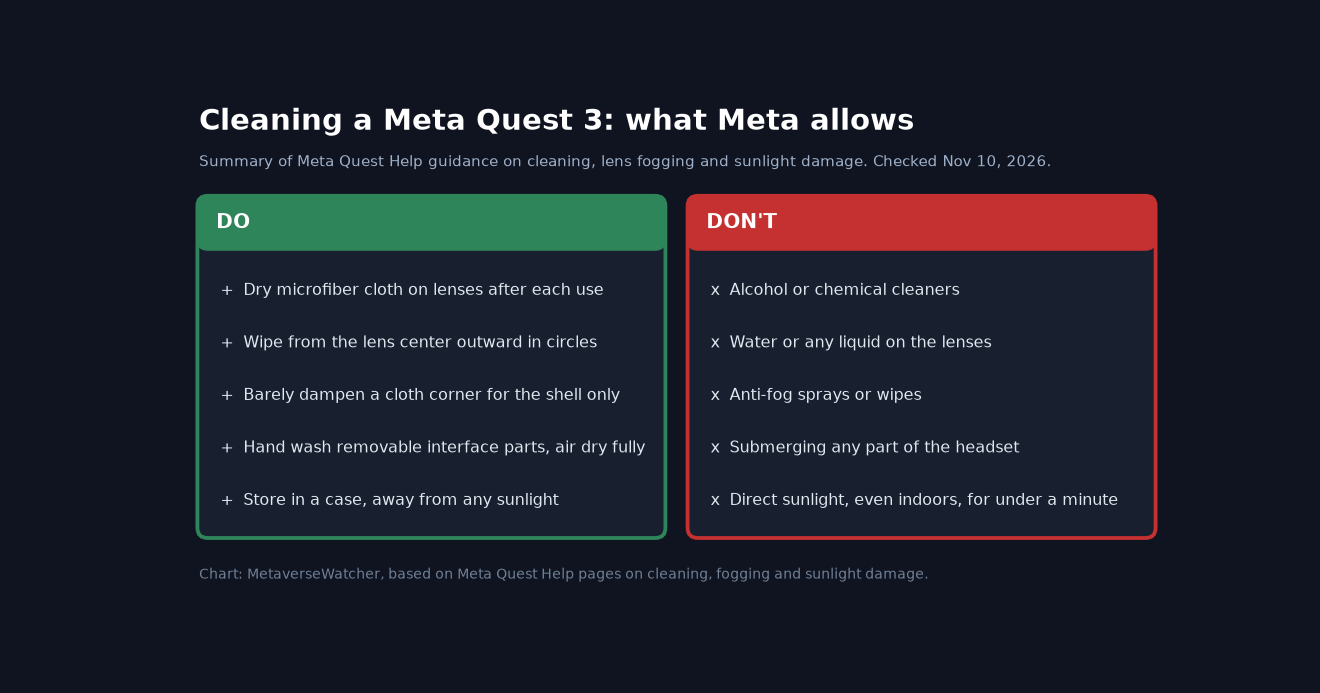
The short answer
Use a dry optical microfiber cloth. Start at the center of each lens and wipe gently in a circular motion moving outward. Do it after every session. Never put water, alcohol, glasses spray, lens wipes or anti-fog products on the lenses. Meta says liquids and chemical cleaners “can damage the protective coatings,” and its limited warranty excludes damage from exposure to liquids and lists protective coatings as consumable parts.
What you need
- Two clean microfiber cloths: one kept only for the lenses, one for the shell, straps and controllers. Mixing them moves skin oil and grit onto the optics. Quest Pro owners can use the care cloth in the box.
- Mild liquid detergent and cool water, only for removable soft parts such as the facial interface and straps.
- A case for storage. It keeps out dust and, more importantly, sunlight.
Things you do not need: lens cleaning spray, alcohol wipes, paper towels, tissues or a T-shirt. Paper and cotton fibers can carry grit that scratches coated plastic lenses.
How to clean Quest 3 lenses, step by step
- Turn the headset off or let it sleep and hold it lenses-up under good, indirect light so you can see smudges. Keep it away from windows.
- Remove loose dust first. Lightly flick or brush the lens surface with a clean corner of the cloth rather than pressing grit into it.
- Wipe from the center outward. Use light pressure and small circular motions, spiraling toward the edge. This is the method Meta specifies.
- Check both lenses by looking at them at an angle to the light. Repeat with a fresh section of the cloth if oil streaks remain.
- Do not breathe on the lenses to fog them. Meta does not list it as an approved method, and it adds moisture, which its guidance tells you to keep off the device.
If the image is still soft after cleaning, the cause is probably fit, not dirt. Check lens spacing and headset position with our Quest 3 best settings for clarity and comfort guide. Glasses wearers rubbing frames against the lenses should look at prescription lens inserts, which also protect the optics.
Cleaning the outside, cameras and sensors
The Quest 3 relies on its front cameras for passthrough, hand tracking and headset tracking, so a fingerprint on the front can show up as blurry passthrough or jittery tracking. Digital Trends suggests wiping the three dark pill shapes on the front of the Quest 3 and the two small circles under the bottom edge with a microfiber cloth when tracking drops.
- Wipe the front plate and camera windows with your second dry microfiber cloth.
- For stubborn marks on the shell only, Meta allows you to slightly dampen the corner of the cloth. Wring it so it is barely moist and keep moisture away from openings, lenses and cameras.
- No chemical cleaners and no alcohol on the outside either, per Meta.
If controllers or the headset still lose tracking after a clean, work through our Quest 3 controller drift and tracking fix.
Facial interface, straps and controllers
Soft parts collect sweat and makeup fastest. Meta’s process for the facial interface, elastic head straps, head pads and silicone covers:
- Wipe off surface debris with a microfiber cloth.
- For a deeper clean, remove the part from the headset first.
- Hand wash with cool water and a mild liquid detergent. Do not submerge.
- Rinse thoroughly so no soap residue is left against your skin.
- Let it air dry completely before reattaching it.
Controllers get the same treatment as the headset shell: a dry microfiber cloth after each use, no chemical cleaners and no alcohol. If you share a headset with family, a wipeable silicone or faux-leather interface makes hygiene much easier; see our best Quest 3 accessories list.
What never to use
| Product or habit | Why to avoid it | Source |
|---|---|---|
| Alcohol or alcohol wipes | Prohibited for headset, controllers and soft parts | Meta cleaning guide |
| Water or liquid on lenses | Can damage the lens coatings | Meta fogging guide |
| Anti-fog sprays or wipes | Can damage the lenses and surrounding material | Meta fogging guide |
| Glasses cleaner and household cleaners | Chemical cleansers are prohibited | Meta cleaning guide |
| Submerging any part | Not allowed, including washable parts | Meta cleaning guide |
| Sunscreen and perfume contact | Listed as contaminants in warranty exclusions | Meta limited warranty |
| Sharp objects near lenses | Cable tips and keys can scratch lenses | Meta care guide |
Sunlight: the damage you cannot wipe off
The biggest threat to Quest lenses is not dirt. Meta warns that the lenses “can be permanently damaged from less than a minute of exposure to direct sunlight even if it’s indoors.” Never leave the headset facing a window, never use it outdoors, and carry it in a bag or case that blocks light. Meta’s warranty also excludes damage from improper storage, so read our Quest 3 warranty and repair guide before you file a claim.
Foggy lenses are not dirty lenses
Fog forms when warm breath meets cold lenses. Meta’s fixes: let a stored headset reach room temperature before playing, play in a heated room, adjust the fit so air flows around your nose, use the included glasses spacer for more airflow, point a fan at yourself during workouts, and take short breaks to let the lenses clear. Clean lenses also fog less, since oil gives moisture something to cling to. If fogging or blurriness makes you queasy, our VR motion sickness guide covers the other causes.
A simple cleaning routine
| When | What to do |
|---|---|
| After every session | Dry-wipe both lenses center outward; wipe the facial interface and controllers dry; put the headset in its case |
| When tracking or passthrough looks off | Dry-wipe the front cameras and sensors |
| Weekly, or after sweaty workouts | Remove and hand wash the facial interface and straps; air dry fully |
| When sharing the headset | Use a wipeable interface cover and wipe surfaces between users, without alcohol |
Setting up a new headset this season? Start with our Meta Quest 3 setup guide. For smart glasses, which have their own care rules, see our Ray-Ban Meta glasses setup guide.
FAQ
Can I use Zeiss lens wipes on a Quest 3? Meta’s guidance says not to use liquid or chemical cleaners on the lenses, and pre-moistened wipes contain both. Stick to a dry microfiber cloth.
Can I use a little water? Only a slightly dampened cloth corner on the outside of the device, per Meta. Its fogging guide says never to use water on the lenses.
Is a scratched lens covered? Meta’s limited warranty excludes cosmetic damage such as scratches unless Meta caused it, and excludes damage from misuse or improper storage.
Does this apply to the Quest 3S? Yes. Meta’s cleaning page covers all Meta Quest devices, and its Quest 3S care instructions also say to clean lenses with a dry optical microfiber cloth and avoid liquid or chemical cleaners.
Sources: Meta Quest Help pages on cleaning, lens fogging, sunlight damage, headset care and Quest 3S setup; Meta Limited Warranty; Digital Trends. Checked November 10, 2026.