By Metaverse Watcher staff. Published November 9, 2026. Checked against Meta’s Limited Warranty, the Meta Warranty Plus FAQ and Meta’s Quest Help Center articles on replacements and service on November 9, 2026. Meta can change these policies, so confirm the terms on your own order before you ship anything.
If your Meta Quest 3 or Quest 3S stops working properly, Meta’s standard warranty covers defects for ONE YEAR from the date you bought it or the date it was delivered, whichever is later. You do not need to register the headset first. This guide explains what the warranty covers, what it does not, how to start a claim, the difference between standard and advanced replacement, and what to do once the warranty has run out.
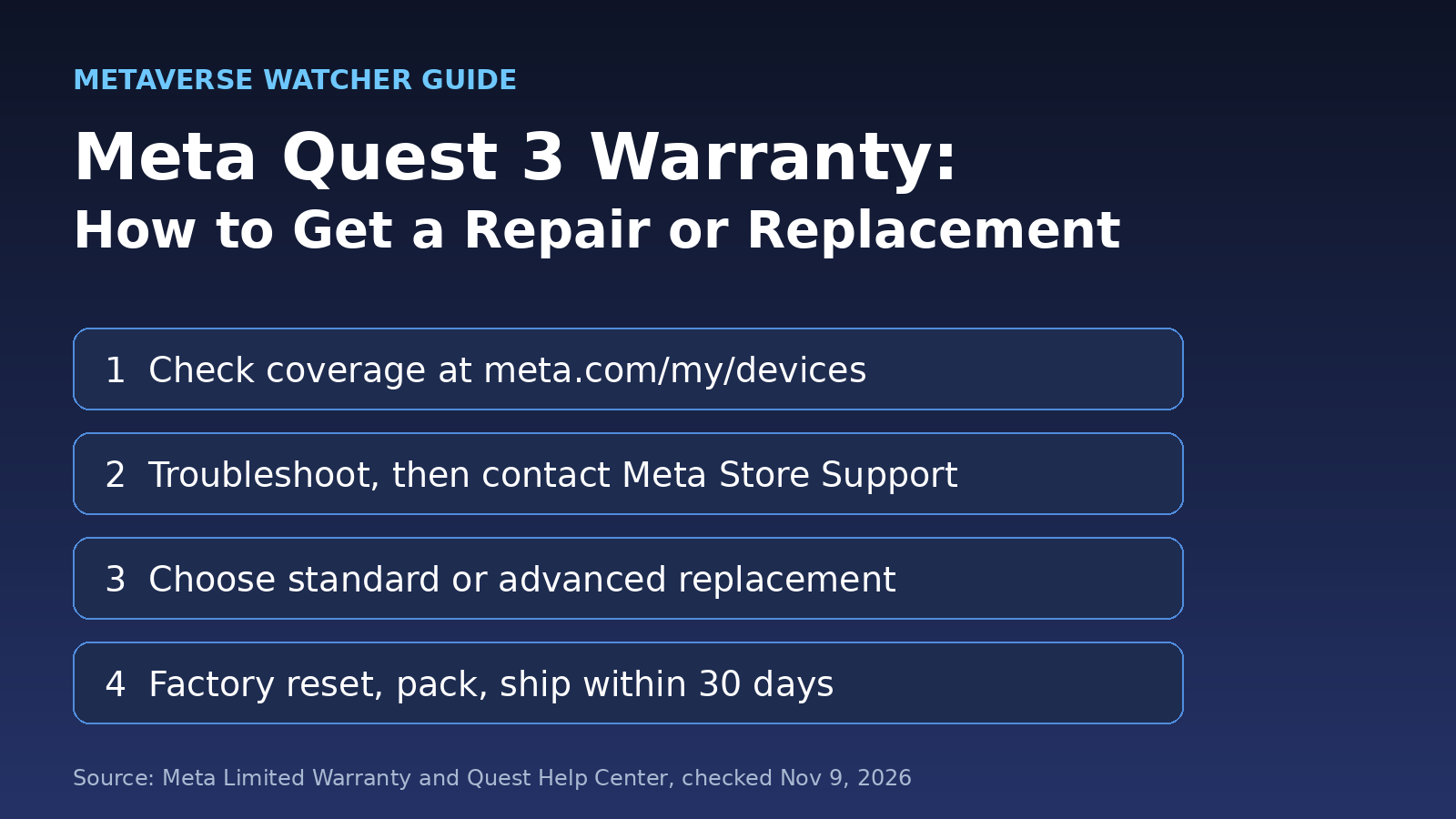
The short version: Check your coverage at meta.com/my/devices, try the basic fixes first, then start a claim through Meta Store Support. If Meta approves a replacement, factory reset the headset, pack it with every part listed in the return email, and ship it within 30 DAYS using the prepaid label.
What the Meta Quest 3 warranty covers
Meta’s Limited Warranty covers “defects in materials and workmanship” in the products that came in the original box. In plain terms, Meta promises the headset and its included parts will work as described in its specifications under normal use for the warranty period. That includes the controllers and other items packed in the box.
If something is covered, Meta says it will, at its choice, repair the product, replace it, fix it with a software or service update, or give a full or partial refund if none of those works. Replacements can be new, refurbished or remanufactured. A repaired or replacement device is covered for whatever is left of the original warranty or 90 days, whichever is longer.
Three details matter more than people expect:
- Where you bought it. Coverage applies to purchases from Meta or an authorized retailer. Headsets bought from unauthorized sellers or online auctions are excluded, and so are used or resold units, except refurbished units sold by Meta or an authorized seller.
- Software must be current. The warranty excludes a product “not currently running the latest version of Meta-issued software.” Update the headset before you file a claim. If an update will not install, Meta’s service page points to its software update tool.
- Your country. This warranty does not apply to products bought in Australia, Canada, France or Italy, which have their own country-specific terms. In the UK and EU, Meta says the warranty is in addition to your legal consumer rights, which can last longer than one year.
What it does not cover
The exclusions list is long, but most claims are refused for one of these reasons:
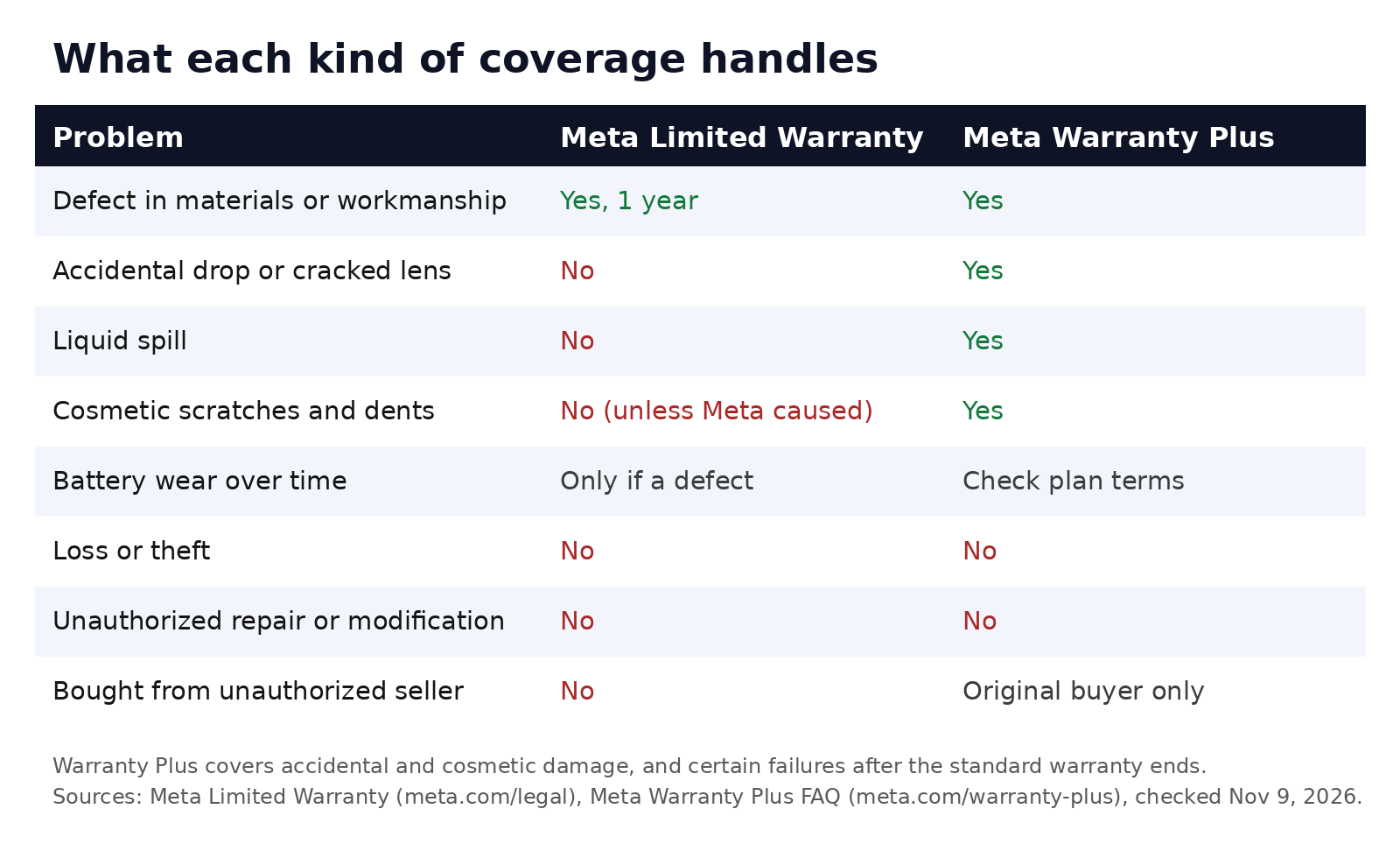
- Accidental damage, including drops, impacts and liquid exposure.
- Normal wear and tear, such as discoloration or a stretched strap.
- Cosmetic damage like scratches, nicks and dents, unless Meta caused it.
- Batteries that lose capacity over time, unless the failure comes from a defect.
- Unauthorized repairs, modifications, tampering, or removed or damaged labels.
- Lost data. Meta says it cannot guarantee your data will survive a repair, and the warranty does not cover data recovery.
Before you file: rule out the easy fixes
Meta Store Support will usually walk you through troubleshooting before it approves a replacement, so doing it first saves time. Many common problems have known fixes:
- Drifting controllers or lost tracking: try the steps in our Quest 3 controller drift and tracking fix guide, including fresh batteries and cleaning the tracking cameras.
- Blurry image or discomfort: check lens spacing and fit with our Quest 3 best settings guide.
- Short battery life: compare your runtime with the numbers in our Meta Quest 3 battery life guide before assuming the battery is faulty.
- Software crashes or a headset that will not boot properly: a factory reset often helps. Our factory reset guide explains what you lose and how to back up first.
Write down what you tried and when. If you end up talking to support, that list shortens the conversation.
How to start a Meta Quest warranty claim
- Check your warranty status. Sign in at meta.com/my/devices to see whether your headset is still covered.
- Find your proof of purchase. The warranty says you must include proof of purchase unless Meta verifies the purchase in advance. A retailer receipt or order email works.
- Contact Meta Store Support. Start from Meta’s How to service your Meta product page, which links to the warranty claim flow. Meta’s replacement article also says you can use its online form to request a replacement.
- Describe the fault and the fixes you tried. Support decides whether a repair, replacement or software fix is the right remedy.
- Pick a replacement type if one is approved (see below).
- Follow the RMA email. Meta sends a return merchandise authorization (RMA) email with the product name, serial number, printable prepaid shipping labels and packing instructions.
Standard vs advanced replacement
| Standard replacement | Advanced replacement | |
|---|---|---|
| When the new unit ships | After Meta receives and checks your returned device | As soon as possible, from stock |
| Card hold | None mentioned | Temporary hold on your credit card, plus possible taxes |
| Return deadline | 30 days after the Replacement Acknowledgement | 30 days |
| Typical timing | 3–5 business days to process the return, then 5–7 business days to ship the replacement | Depends on stock and shipping |
| Best for | People who can wait and prefer no card hold | People who need a working headset quickly |
With advanced replacement, the hold covers the cost of the new unit if you do not send the original back within 30 days, or if Meta finds the original is not covered. Timing figures come from Meta’s replacement article and can vary by region, holidays and weather.
How to pack and ship your Quest
- Check the serial number against the RMA email so you send back the right device.
- Send only what is listed. If the email names a component, such as a single controller, return just that. If it does not name a specific component, Meta says to return the entire kit with every part it came with. A missing part can delay the replacement and cost you a fee.
- Factory reset the headset before it leaves your hands.
- Pack it well. Put the product box inside the original shipping box, or a similar-size box, with bubble wrap, crumpled paper or packing peanuts.
- Print the labels in color if any of them are in color, then drop the package at the courier named on the label.
Keep your strap, cover or other third-party accessories. They are not part of the claim and you will not get them back.
Meta Warranty Plus: is it worth it?
Meta Warranty Plus is Meta’s paid protection plan. According to Meta’s FAQ, it covers cosmetic damage, accidental damage such as drops, spills and cracked lenses, and certain mechanical or electrical failures after the standard warranty ends. Coverage lasts up to two years from the date you bought the device. It does NOT cover loss or theft, unauthorized repairs, normal wear and tear, or accessories such as cases and cables, and it only covers the original buyer.
You can add it when you buy a Quest on Meta.com, or buy it within 60 days of purchasing your headset. Meta shows the price on its plan page and at checkout, and it can differ by model, so check the current figure there. Claims go through a portal linked in your confirmation email.
Our view: Warranty Plus makes the most sense for households where children use the headset, for active fitness and rhythm game players, and for anyone who travels with a Quest. If the headset mostly sits on a desk for seated games, the standard warranty and some care may be enough. If you are still deciding which headset to buy, our Quest 3 vs Quest 3S comparison covers the price gap, and our early Black Friday VR deals post tracks verified prices ahead of November 27.
What to do when your warranty has expired
Meta’s service page lists several options for out-of-warranty devices:
- Ask Meta Store Support whether an out-of-warranty service solution exists for your product.
- Some products may qualify for an out-of-warranty replacement, which can include buying certain products at a discount.
- Buy replacement accessories, such as a single controller, from the Meta Store.
- Buy a refurbished headset from Meta, which carries its own one-year warranty.
If you bought a Quest 2 or Quest Pro, note that Meta is ending feature updates for those headsets. Our report on Quest 2 and Quest Pro end of support explains the timeline, which matters if you are weighing a paid repair against an upgrade.
Warranty vs refund: which one do you need?
A warranty claim fixes a faulty device. A return or refund undoes a purchase. If you bought the headset recently and simply do not want it, the retailer’s return window is usually the faster path. For games and apps, see our guide to getting a Meta Quest refund.
Frequently asked questions
How long is the Meta Quest 3 warranty?
One year from the date of purchase or delivery, whichever is later. Consumer law in some countries can give you longer rights.
Do I need to register my Quest for the warranty?
No. Meta’s Limited Warranty says product registration is not required for coverage.
Does the warranty cover a cracked lens or a dropped headset?
No. Accidental damage is excluded from the standard warranty. Meta Warranty Plus covers accidental damage such as drops and cracked lenses.
Will I get my games and saves back after a replacement?
Your purchases are tied to your Meta account, so you can download them again on the new headset. Local data on the old headset is not guaranteed, so back up anything important and turn on cloud backup before you reset it.
Does the warranty cover the controllers?
The warranty covers the Meta products that came in the original box, which includes the controllers. If only one controller is faulty, the RMA email may ask you to return just that component.
Setting up a replacement? Our Meta Quest 3 setup guide walks through pairing, the boundary and the first settings to change.