By Metaverse Watcher Staff · Published November 14, 2026 · Sources: Tom’s Hardware, Notebookcheck (Linus Tech Tips), Tech Insider, Valve SteamOS notes
Steam Frame battery life is the complaint that shows up in almost every review of Valve’s $1,059 headset. Valve publishes a battery capacity, 21.6 Wh, but no hours-per-charge figure for the headset. So the only useful numbers come from reviewers who ran it down. This guide collects the published tests, explains why the Frame drains faster than a Quest 3 despite a bigger pack, and lists what actually buys minutes back: refresh rate, power presets, streaming from a PC, SteamOS updates and play-and-charge.
The short answer: plan on about one hour of demanding standalone VR and roughly 1.5 to 2 hours when a PC does the rendering. Every figure below names its source and was checked on November 14, 2026.
Steam Frame Battery Specs: What Valve Does and Doesn’t Say
Valve’s spec sheet lists a rechargeable 21.6 Wh lithium-ion battery in the rear of the head strap and a single USB-C port that charges at up to 45 W. Tom’s Hardware’s review confirms the pack sits in the padded rear cradle, which is why the Frame weighs 440 g with strap and battery and stays balanced on the head. Valve does not include a charger in the box; its 45 W power supply sells separately for $29.
| Item | Steam Frame | Source |
|---|---|---|
| Battery | 21.6 Wh Li-ion, rear strap | Valve spec sheet |
| Charging | USB-C, up to 45 W | Valve spec sheet |
| Charger in box | No ($29 Valve 45 W adapter) | Tom’s Hardware |
| Official runtime | Not published | Valve |
| Controllers | One AA each, about 40 hours | Valve, via Tom’s Hardware |
| Weight with strap and battery | 440 g | Tom’s Hardware |
One oddity: VR.org notes that iFixit’s teardown found the retail cells labeled 20.9 Wh, against Valve’s 21.6 Wh. Neither company has explained the gap. At about 3%, it does not change the runtimes much.
How Long Does the Steam Frame Battery Last? Published Tests
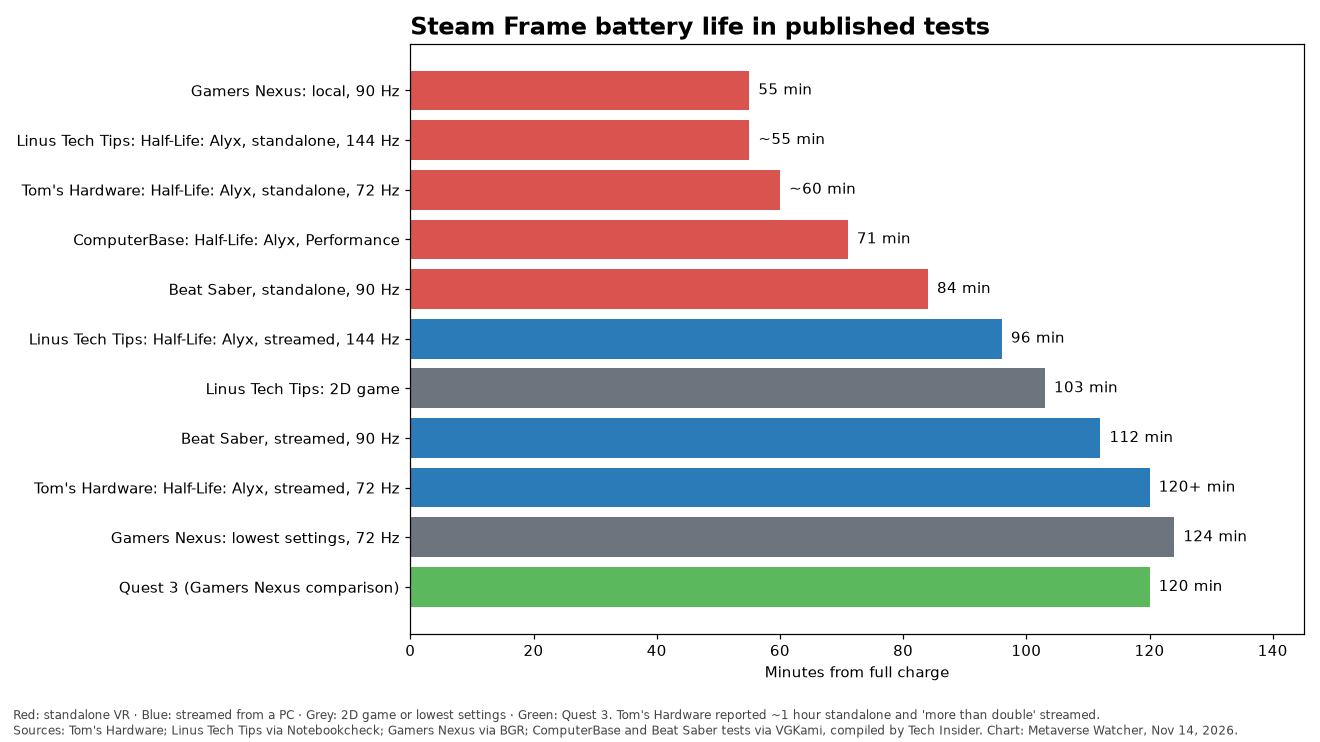
Results split cleanly into two groups: heavy games rendered on the headset’s Snapdragon 8 Gen 3, and anything where the PC carries the load.
| Test | Workload and setting | Runtime |
|---|---|---|
| Gamers Nexus (via BGR) | Game played locally, 90 Hz | 55 min |
| Linus Tech Tips (via Notebookcheck) | Half-Life: Alyx, standalone, 144 Hz | About 55 min |
| Tom’s Hardware | Half-Life: Alyx, standalone, 72 Hz | About 1 hour |
| ComputerBase (via VGKami) | Half-Life: Alyx, Performance preset, ~75% brightness | 71 min |
| Beat Saber test (via VGKami) | Standalone, 90 Hz, full brightness and volume | 84 min |
| Linus Tech Tips (via Notebookcheck) | Half-Life: Alyx, streamed from PC, 144 Hz | 1 hr 36 min |
| Linus Tech Tips (via Notebookcheck) | 2D game on the headset | 1 hr 43 min |
| Beat Saber test (via VGKami) | Streamed from PC, 90 Hz | 1 hr 52 min |
| Tom’s Hardware | Half-Life: Alyx, streamed, 72 Hz | “More than double” standalone |
| Gamers Nexus (via BGR) | Lowest settings, 72 Hz | 124 min |
The third-party figures from Gamers Nexus, ComputerBase and the Beat Saber comparison are compiled in Tech Insider’s runtime roundup. The Linus Tech Tips results are reported by Notebookcheck. Tom’s Hardware also saw “a little over an hour” from Gunman Contracts natively and “well over two hours” streaming Forza Horizon 6 in a flat-screen theater view.
For how those numbers sit in the wider review picture, see our Steam Frame reviews roundup.
Why the Steam Frame Drains Faster Than a Quest 3
Capacity is not the problem. Tech Insider puts the Quest 3’s cell at about 19.44 Wh (VGKami’s figure), so the Frame’s pack is slightly larger. Yet in the Gamers Nexus comparison the Quest 3 ran 120 minutes against the Frame’s 55 at 90 Hz.
The difference is power draw. Divide 21.6 Wh (1,296 watt-minutes) by each runtime and heavy local play works out to roughly 18 to 24 W on average, against under 10 W for the Quest 3 in the same comparison. The Frame runs a phone-class Snapdragon 8 Gen 3 with 16 GB of RAM, drives two 2160 x 2160 LCDs, and in standalone mode often translates x86 Windows games to Arm through FEX and Proton. Translation costs performance, and performance costs watts. Streaming moves the rendering to the PC, which is why the same Beat Saber session ran 28 minutes longer streamed than standalone.
Cary Golomb made the same point on X the day after reviews landed:
Turns out I DID hear correct in the video. Steam Frame actually DOES go up to 20 watts. This is why battery life can be pretty brutal on Steam Frame if you gun it.
— Cary Golomb (@carygolomb) September 15, 2026
If you are deciding between the two headsets, our Steam Frame vs Quest 3 buying guide weighs battery against price, lenses and library. Our Quest 3 battery life guide covers Meta’s side.
7 Ways to Make the Steam Frame Battery Last Longer
These are ranked roughly by how many minutes the published tests suggest each one recovers.
- Drop to 72 Hz and lower settings. Gamers Nexus went from 55 minutes at 90 Hz to 124 minutes at 72 Hz on its lowest settings. That run changed more than the refresh rate, so treat it as the ceiling, but no other change on this list comes close. The Frame supports 72 Hz to 120 Hz, with 144 Hz still experimental, and Tom’s Hardware found its games defaulted to 72 Hz.
- Use the battery-focused power preset. ComputerBase’s overlay readings, as reported by Tech Insider, showed about 12 to 14 W in the Playtime preset against 17 to 20 W in Performance. On a 21.6 Wh pack that is the difference between roughly 93 to 108 minutes and 65 to 76 minutes.
- Stream heavy games from your PC. Valve designed the Frame streaming-first, with a Wi-Fi 6E dongle for the PC link. In the matched Beat Saber test, streaming added 28 minutes, about 33%. Keep standalone mode for lighter titles; our best Steam Frame games list flags which picks run well on the headset itself.
- Stay on current SteamOS. SteamOS 0.4, which went to all Frames in October after its 0.4.3 beta, claims power-efficiency gains of “up to 12%” in both streaming and local play. Valve calls that a best case that varies by framerate and content. On a one-hour session, expect a few extra minutes, not a new tier.
- Lower brightness and volume. The Beat Saber runs above were made at 100% brightness and volume, ComputerBase’s at about 75% brightness. Neither variable was isolated, but both draw power, and turning them down costs nothing in most games.
- Play while charging. The USB-C port sits at the back of the strap, so a cable trails behind you rather than across your face. After SteamOS 0.3.0, The Verge measured charging at 19 to 21 W immediately from empty and up to 42 W while a game was running. That is enough to play on a dead headset, as our charging fix report details. Use a charger rated at 45 W or more.
- Carry a USB-C power bank for seated sessions. A common owner workaround for long streamed sessions is a high-output USB-C power bank in a pocket, cabled to the rear port. Pick one that supports USB Power Delivery at 45 W, or the headset may still drain under heavy load.
Valve has also added an option to show the battery percentage in the dashboard bar, which makes it much easier to judge when to plug in. The Steam Hardware Updates account flagged it in September:
STEAM FRAME UPDATE A Steam Client update has been posted for Steam Frame which improves color accuracy when streaming Non-VR content from a Windows PC, added the ability for displaying the battery percentage in the dashboard bar…
— Steam Hardware Updates (@HardwareSteam) September 26, 2026
How Long Does the Steam Frame Take to Charge?
Valve expects charging from empty to 65% in under 40 minutes, with the rate slowing toward 100%, according to VGKami’s guide as cited by Tech Insider. Real-world reports have been slower. Linus Tech Tips measured more than 3 hours to reach 100%, per Notebookcheck, and Gizmodo described waiting well over an hour to reach 50% on the 45 W supply. Several of those tests predate SteamOS 0.3.0, which Valve said brought “substantially faster charging while unit is off / sleeping.” If your Frame still charges slowly, update first, then check that your adapter actually delivers 45 W.
The controllers are not a concern. Each runs on one replaceable AA cell that Valve rates for about 40 hours, so the headset will always run out first.
Is a Hot-Swappable Battery Coming?
Yes, but with no date. On launch day, Valve engineers told PC Gamer and The Verge they are building a replacement head strap with a hot-swappable battery and Index-style off-ear speakers. The Verge described a kit that lets owners stack a second magnetic battery to double capacity. As of November 14, 2026, Valve has published no price, release date or photo. Our enthusiast strap report tracks what is confirmed.
When Battery Behavior Means Something Is Wrong
- Sessions far shorter than the table above at 72 Hz. Check for a background download or a stuck app, and update SteamOS before assuming the battery is faulty.
- No charging at all on a 45 W adapter. Try a different USB-C cable and outlet. Some cables cannot carry 45 W.
- A hot rear cradle during charging. Some warmth while charging and playing at the same time is expected. If it gets uncomfortably hot, stop charging and contact Steam Support, which handles Frame hardware.
The Bottom Line
Steam Frame battery life is short by standalone standards and acceptable by PC VR standards. Expect about an hour of heavy games rendered on the headset, and closer to two hours when your PC does the work. That matches how Valve positions the Frame: a streaming-first headset that can also play on its own. Run at 72 Hz, pick the battery-friendly preset, stay on current SteamOS and keep a 45 W charger or power bank nearby, and the battery becomes a scheduling issue rather than a deal-breaker. Buyers who want long untethered sessions today should weigh the Quest 3, or wait for Valve’s hot-swap strap.