Virtual reality is one of the few places where you can paint at room scale, sculpt digital clay with both hands or spray a full-size mural without buying a single can of paint. The best VR art apps on Steam now cover oil painting, 3D painting, graffiti, product sketching and professional sculpting, and several of the strongest options cost nothing. This ranked list covers ten PC VR art apps, using Steam user review scores and US prices checked on November 28, 2026, at about 2:20 PM ET, plus details from each developer’s store listing and official site.
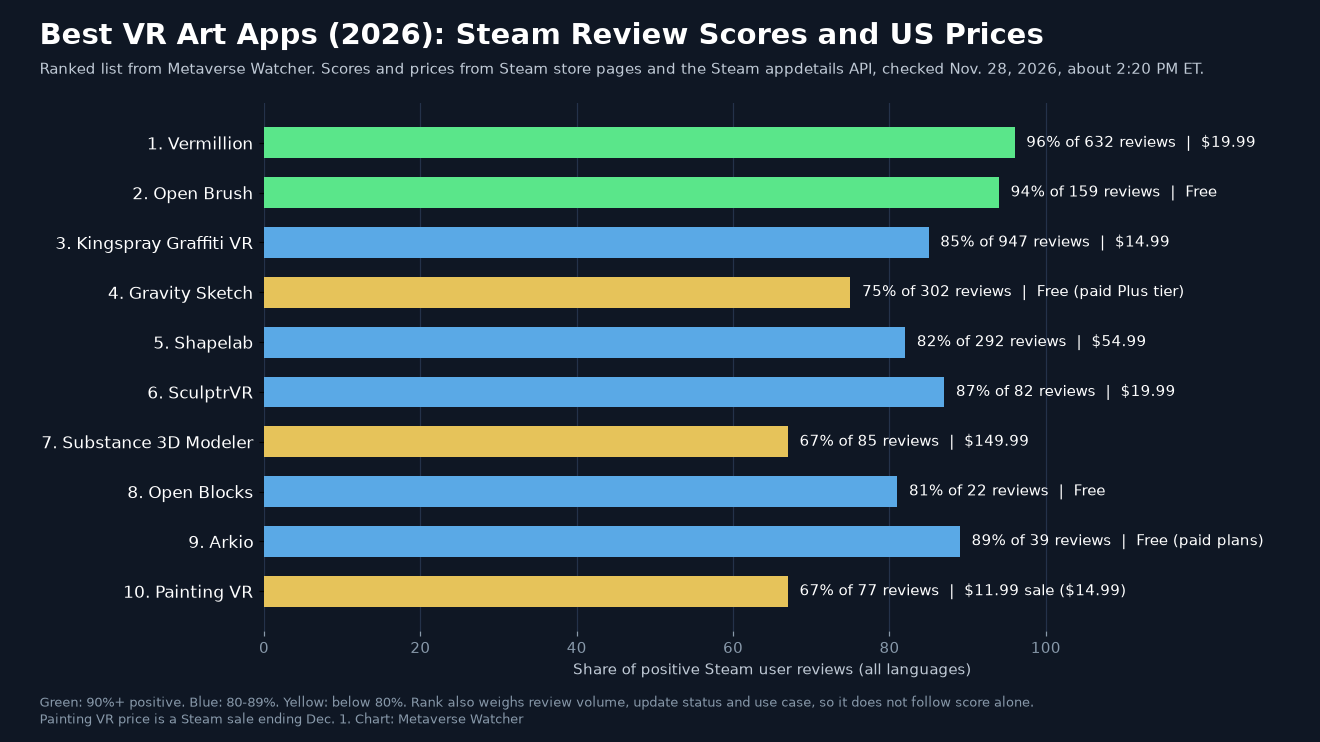
Best VR Art Apps at a Glance
| Rank | App | Best for | Steam reviews | US price on Steam |
|---|---|---|---|---|
| 1 | Vermillion – VR Painting | Realistic oil painting | 96% of 632 (Overwhelmingly Positive) | $19.99 |
| 2 | Open Brush | 3D painting in space | 94% of 159 (Very Positive) | Free |
| 3 | Kingspray Graffiti VR | Graffiti and murals | 85% of 947 (Very Positive) | $14.99 |
| 4 | Gravity Sketch | Product and concept design | 75% of 302 (Mostly Positive) | Free; paid Plus tier |
| 5 | Shapelab | Polygon-based sculpting | 82% of 292 (Very Positive) | $54.99 |
| 6 | SculptrVR | Voxel worlds and sculptures | 87% of 82 (Very Positive) | $19.99 |
| 7 | Substance 3D Modeler | Professional sculpting | 67% of 85 (Mixed) | $149.99 |
| 8 | Open Blocks | Simple low-poly modeling | 81% of 22 (Positive) | Free |
| 9 | Arkio | Architecture and spatial design | 89% of 39 (Positive) | Free; paid plans |
| 10 | Painting VR | Casual canvas painting | 67% of 77 (Mixed) | $11.99 on sale ($14.99 list) |
Review figures are Steam’s all-language totals for each app. Prices are from Steam’s US store and can change at any time; the Painting VR discount is a Steam promotion that the store page says ends December 1.
How We Ranked Them
Steam review percentage was the starting point, but it was not the only factor. A 96% score from 632 reviews carries more weight than an 89% score from 39 reviews, so review volume counts. We also considered whether the app is still maintained, what it costs, and how well it serves a clear purpose. Professional tools such as Gravity Sketch and Substance 3D Modeler were judged partly on their role in real design work, which is why they rank above some apps with higher scores. Every app listed here runs on Windows PC VR through Steam. None of the rankings are sponsored, and this article contains no affiliate links.
The Ranking
1. Vermillion – VR Painting
Vermillion turns a headset into a traditional oil painting studio, and it has the strongest Steam reception in this group: 96% positive across 632 reviews, rated Overwhelmingly Positive. The Steam listing describes realistic wet-on-wet color mixing, layers, undo and a range of simulated brushes. It also includes a built-in web browser for following video tutorials and a paint-by-numbers mode that turns any image into a template with 2 to 20 colors. Up to four people can paint together in multiplayer. Developer Thomas van den Berge lists a GTX 1050 Ti or RX 470 as the minimum GPU, so it is one of the lighter apps here. At $19.99, it is the clearest first purchase for anyone interested in painting rather than 3D modeling.
2. Open Brush
Open Brush is the free, community-maintained continuation of Google’s Tilt Brush, which helped define VR art when it launched for HTC Vive in 2016. Google ended development and released the Tilt Brush source code under the Apache 2.0 license in January 2021, according to the Google Open Source Blog. The Open Brush project, now run by the Icosa Foundation, says the app is “open and free” and has added features since the fork. On Steam it holds 94% positive from 159 reviews, offers 48 brush types including fire, smoke and light beams, and is the only app in this ranking whose Steam page lists Linux and macOS support alongside Windows. The original Tilt Brush is still listed as free on Steam, but it no longer receives updates, so Open Brush is the better choice.
3. Kingspray Graffiti VR
Kingspray Graffiti VR has the most Steam reviews in this list, 947, with 85% positive. It simulates spray painting with a range of caps, pressure and fading, drips, and metallic paints. The listing names Ironlak as the source for its real-world colors. Environments include a rooftop, a train yard and a subway station, plus sandbox surfaces such as trucks and brick walls. Up to four painters can work together in multiplayer, and a replay system records every stroke so you can watch a piece being built. At $14.99, it is the most affordable paid app in the top five.
4. Gravity Sketch
Gravity Sketch is a 3D design tool used for product and concept work. Its Steam page still carries the Early Access label, and its score of 75% positive from 302 reviews is lower than most apps here. Even so, it is the most capable free option for designers. Its pricing page says the free tier includes the core sketching, surfacing and geometry tools, unlimited OBJ and STL imports, OBJ and USDZ exports, collaboration rooms for up to three people, and 150MB of cloud storage. The paid Plus tier for individuals adds all file formats, 3GB of storage and rooms for five people, while Team and Enterprise plans are custom-priced. Its site also lists a web app and cross-device collaboration for reviewing work outside the headset.
5. Shapelab
Shapelab from Leopoly is a polygon-mesh sculpting app, which sets it apart from the voxel- and signed-distance-field tools in this list. Its Steam listing describes the current version as Shapelab Max 2026, the successor to Shapelab 2025, and Steam also sells a separate upgrade. It scores 82% positive from 292 reviews. Shapelab is aimed at sculpting characters, props and 3D-printable models, with the listing highlighting printing as a use case. At $54.99, it costs more than the hobby apps, but far less than professional software.
6. SculptrVR
SculptrVR is a voxel-based sculpting and world-building app with 87% positive from 82 reviews. Its listing highlights a 10,000x zoom, which lets you build very large scenes and still add small details. You can explore creations with friends online, share them through an in-app gallery and export models as FBX or OBJ for 3D printing. It costs $19.99 and is the most playful of the 3D tools here.
7. Substance 3D Modeler
Adobe’s Substance 3D Modeler is the most expensive app in this list at $149.99 on Steam, and its 67% positive score from 85 reviews is Mixed. It belongs in the ranking because it is a professional sculpting tool that works in both VR and on the desktop. The Steam listing says it is built on a signed distance field engine, so you can sculpt without managing polycount, topology or subdivision levels. It can export high-detail models or decimate and bake them into real-time assets. The listing says the Steam license is perpetual and names Rift, Meta Quest and Valve Index as supported headsets. Adobe also offers Modeler through its Substance 3D Collection subscription and notes that it runs on Windows only.
8. Open Blocks
Open Blocks is a free fork of Google’s Blocks, a simple low-poly modeling tool. The Steam listing says Google open-sourced Blocks in July 2024 and that the Icosa Foundation, which also maintains Open Brush, is continuing development. It uses six basic tools, making it a good first step into 3D modeling for beginners and younger users. It has 81% positive from 22 reviews.
9. Arkio
Arkio is a collaborative design app aimed at architects and building designers, with 89% positive from 39 reviews. The Steam listing says it can import projects from Revit, Rhino, SketchUp and Archicad to view them at 1:1 scale, and that a presenter can guide up to 24 users through a scene across VR, desktop and mobile devices. Arkio is free to start, but the listing notes that some features require a paid Plus, Pro or Enterprise plan.
10. Painting VR
Painting VR is a more casual studio than Vermillion, with paint mixing, reference images, templates and coloring pages. Its 67% positive score from 77 reviews is Mixed, so it ranks last here. It was $11.99 on Steam at check time, down 20% from $14.99, with the store page saying the promotion ends December 1. If you mainly want realistic painting, Vermillion has a much stronger track record for $8 more at current prices.
Also Worth a Look
- Gesture VR ($13.99): a figure-drawing practice app with more than 200 scanned models and support for up to four people. It does not yet have enough Steam reviews to show a score.
- AnimVR ($29.99): frame-by-frame hand-drawn animation with a timeline and virtual cameras. It has 60% positive from 20 reviews.
- Tilt Brush (free): still listed on Steam with 93% positive from 1,214 reviews, but Google stopped developing it in 2021. Open Brush is the maintained version.
Which VR Art App Should You Choose?
| If you want to… | Start with | Then consider |
|---|---|---|
| Paint on a canvas | Vermillion | Painting VR |
| Paint in 3D space for free | Open Brush | Tilt Brush is unmaintained, so stay with Open Brush |
| Make street art with friends | Kingspray Graffiti VR | Vermillion multiplayer |
| Design products or vehicles | Gravity Sketch (free tier) | Gravity Sketch Plus |
| Sculpt characters or 3D prints | Shapelab | SculptrVR or Substance 3D Modeler |
| Learn 3D modeling from scratch | Open Blocks | Gravity Sketch |
| Review architectural models | Arkio | Gravity Sketch |
Hardware and Platform Notes
All ten apps are Windows PC VR software on Steam, so they need a VR-ready PC. Minimum GPU requirements on the Steam pages range from a GTX 1050 Ti or RX 470 for Vermillion and Painting VR to a GTX 1060 or RX 580 for Substance 3D Modeler and a GTX 1060 or RX 480 for Shapelab. Meta Quest 3 and 3S owners can run them through Quest Link, Air Link or Steam Link; our guide to playing PC VR games on Quest 3 covers each option. Substance 3D Modeler and Arkio can also be used without a headset: Adobe’s listing describes a desktop mode with mouse, keyboard and tablet support, and Arkio’s listing says it runs on PC, Mac, tablets and phones.
If your PC runs Linux, note that Open Brush is the only ranked app whose Steam page lists native Linux support; the rest are Windows-only on Steam. Valve also says SteamVR streaming to Steam Frame from Linux PCs is not yet fully supported. Our Steam Frame Linux guide explains the current status, and our Steam Frame setup guide covers streaming from a Windows PC.
More Rankings and Guides
- Best Free VR Games on Steam (2026)
- Best VR Games Under $20 on Steam (2026)
- Best VR Gifts Under $50 (2026)
- Best VR Headsets (2026)
- How to Connect a Keyboard and Mouse to Meta Quest 3
Sources
- Steam store pages and Steam appdetails API (US region) for each app linked above, checked November 28, 2026, at about 2:20 PM ET
- Open Brush official site (Icosa Foundation)
- Google Open Source Blog: The Future of Tilt Brush (January 26, 2021)
- Gravity Sketch pricing page
- Adobe Substance 3D Modeler product page