Captioning glasses turn speech into text and float it in your field of view, so you can read what someone is saying while still looking at their face. For people who are deaf or hard of hearing, that is the whole point: no more glancing down at a phone transcript and losing eye contact, lip cues and the rhythm of a conversation. The category has grown quickly in 2026. There are now purpose-built caption frames from small accessibility companies and captions on mainstream display glasses such as Meta Ray-Ban Display.
This guide explains how captioning glasses work and what separates the models on sale. It also covers the privacy questions most buyer lists skip. Every price and spec below comes from the maker’s own product pages, checked on November 29, 2026, unless noted otherwise. Accuracy, latency and battery figures are maker claims, not our test results. This is not medical advice; an audiologist can help you weigh caption glasses against hearing aids, cochlear implants or other assistive listening options.
Quick Answer
- Need captions with no internet? Look at the XRAI AR2 or Captify Pro. Both makers say captioning runs offline on your phone.
- Want the lightest, cheapest frames? Hearview Lite and Captify Light are both $399 on sale and weigh about 28 g, but they show captions in one eye and are rated for about three hours of active use.
- Mostly in noisy restaurants with good signal? AirCaps publishes the most aggressive claims (97% accuracy, 300 ms latency, four microphones), but it needs your phone’s internet connection.
- Want general smart glasses that also caption? Meta Ray-Ban Display ($799) has live captions, but Meta says they are English only.
How Captioning Glasses Work
Nearly every caption frame on the market follows the same pattern. Microphones in the glasses (or your phone) pick up speech. A speech-to-text engine converts it, and a small waveguide display in the lens shows the text. The important detail is where the speech recognition happens. Captify’s FAQ says transcription runs on the phone “to conserve power consumption on the glasses,” and that the phone must be within Bluetooth range, about 10 meters or 30 feet. XRAI says the same for the AR2: speech-to-text runs on a paired iOS or Android phone within about 10 meters.
That makes the phone a hard requirement for most models, and it splits the market into two camps:
- Offline-capable: recognition runs on the phone itself. XRAI says it has “several offline subtitling engines that let you transcribe locally on your phone,” and claims 98% accuracy offline in quiet, one-to-one conversations. Captify says Captify Pro “works offline” and needs no internet access.
- Cloud-first: audio goes to a server for processing. AirCaps says its glasses need Bluetooth to your phone and an internet connection for cloud-based speech processing, which it says gives the highest accuracy and lowest latency. Even Realities says its Conversate feature on the Even G2 also requires an internet connection through your phone.
Offline support matters more than spec sheets suggest. Basements, planes, rural areas, hospitals with poor reception and crowded venues with overloaded networks are exactly where a cloud-only pair can fail. Several offline-capable makers still offer cloud modes for harder audio. XRAI calls these “Pro Minutes” and says they handle multiple speakers and background noise better.
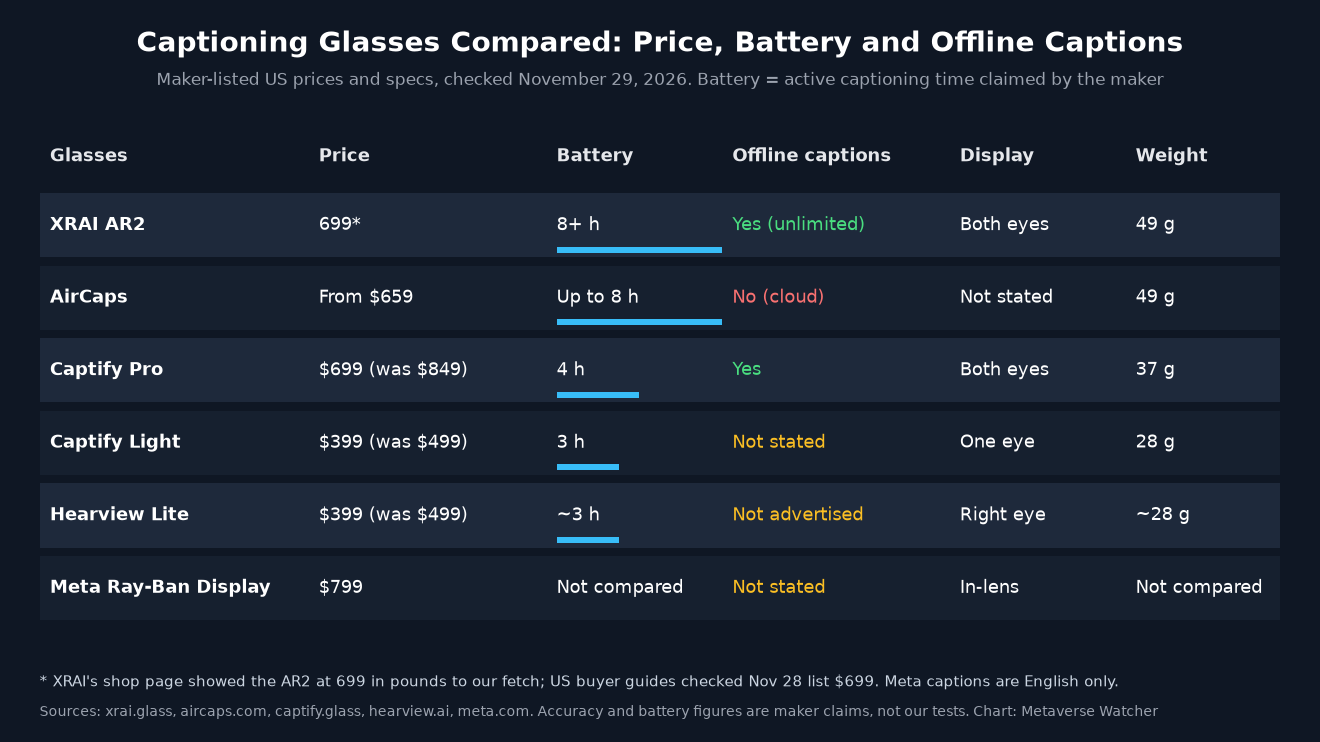
Captioning Glasses Compared
| Glasses | Price (checked Nov 29) | Claimed battery | Offline captions | Subscription | Weight |
|---|---|---|---|---|---|
| XRAI AR2 | 699 (see note) | 8+ h; case adds up to 12 recharges (96 h total) | Yes, unlimited | None required; 3,600 Pro Minutes included | 49 g |
| AirCaps | From $659 | Up to 8 h | No, cloud processing | Free tier: unlimited captions in 9 languages + 5 h/month Pro; Pro $20/month | 49 g |
| Captify Pro | $699 (list $849) | 4 h continuous, 20 h standby | Yes | Free Standard plan; $15/month Premium | 37 g |
| Captify Light | $399 (list $499) | 3 h continuous, 1.5 days standby | Not stated | Free app, no subscription needed | 28 g |
| Hearview Lite | $399 (list $499), pre-order | About 3 h active, 72 h standby | Not advertised | None for real-time captioning | About 28 g |
| Meta Ray-Ban Display | $799 with Meta Neural Band | Not compared here | Not stated | None for captions | Not compared here |
Which Captioning Glasses Fit Which Need
XRAI AR2: Best for Offline, All-Day Use
XRAI started as a captioning app and now sells its own frames. The AR2 has the strongest battery claim in this group: 8+ hours, plus a charging case XRAI says holds up to 12 recharges for 96 hours of total use. It shows captions in both lenses, lists 2,500 nits of brightness for outdoor readability, has three microphones and weighs 49 g. Offline captioning is unlimited and included, and the purchase comes with 3,600 Pro Minutes of cloud transcription. XRAI also lists speaker identification and two-way translation.
One useful detail if you already own display glasses: the XRAI Glass app supports other hardware, including the XREAL One over a USB-C tether. XRAI says that setup gives full-color, head-tracked 3D captions. XRAI’s own shop page says the AR2 itself shows green captions only and does not track your head. The catch with the XREAL route is that tethered display glasses are built for watching screens, not wearing all day in conversation.
AirCaps: Best Published Accuracy, If You Have Signal
AirCaps is the new name for TranscribeGlass, and the company says it was designed for the Deaf and Hard of Hearing community. It claims 97% accuracy, 300 ms latency and a four-microphone beamforming array aimed at noisy restaurants and parties. The glasses weigh 49 g and are rated for up to 8 hours. The free tier includes unlimited captions in 9 languages and 5 hours a month of Pro features. Pro costs $20 a month for 60+ languages, translation and AI meeting features. AirCaps lists free US shipping, a 15-day return window and HSA/FSA eligibility.
The trade-off is plain in its own FAQ: AirCaps requires a Bluetooth connection to your phone and an internet connection for cloud speech processing. If most of your hard conversations happen in places with weak signal, that is a real limit.
Captify Pro: Best for Strong Prescriptions
Captify Pro costs $699, down from $849, and is the lightest binocular option here at 37 g. Captify lists a 30-degree field of view, 1,500 nits, 640 x 480 resolution, dual beamforming microphones and an IPX4 sweat and rain rating. The free Standard plan covers unlimited offline captions in 30+ languages, offline translation in 20+ languages and labels for 300+ environmental sounds such as applause and alarms. The $15-a-month Premium plan adds speaker differentiation, summaries and accuracy of up to 98%. Captify’s subscription page still lists Premium as “coming soon.”
Its biggest advantage is prescription range: SPH -20.00 to +6.00 with astigmatism, in single vision, reading or progressive lenses. The weak spot is battery, at 4 hours of continuous use. Captify’s FAQ says it uses Microsoft’s speech recognition models. It also says Captify Pro needs an iOS 16+ or Android 12+ phone.
Hearview Lite and Captify Light: Best Lightweight Budget Picks
Both cost $399 on sale (list $499) and weigh about 28 g. Both use a single-eye display, which saves weight but means captions appear in one lens only. Hearview Lite is currently listed as a pre-order. Hearview says it recognizes 140+ languages, including right-to-left Arabic, and offers six caption positions and three text sizes. A prescription insert and sunglass lens are included. It can caption phone calls, WhatsApp calls, Teams and Zoom when you use the glasses microphone and speakerphone. Hearview also says the Lite shows about 90% less visible green glow to people facing you than its MYVU Air. Battery is about three hours active, and US shipping is $12.
Captify Light lists 3 hours of continuous use and 300 nits of brightness. That is far dimmer than Captify Pro’s 1,500 nits, so read outdoor use with caution. It also lists translation in 80+ languages, recognition of 500+ sounds and a free app with no subscription needed.
Meta Ray-Ban Display: Captions as One Feature Among Many
Meta Ray-Ban Display is a general-purpose display glasses product, not an accessibility device, but it does caption. Meta’s help page says live captions are English only. You may need to download the language in the Meta AI app first, and Meta says to face the person speaking for best results. Start captions from the app launcher, from the Meta AI app, or by saying “Hey Meta, start captions.” Stop them with a voice command, a three-finger tap on the touchpad, or a middle-finger-to-thumb tap on the Meta Neural Band. In the US, Meta says the glasses start at $799 including the Neural Band. Our Meta Ray-Ban Display setup guide covers fit and Neural Band pairing. If you are weighing it against Even Realities’ G2, see our Ray-Ban Display vs Even G2 comparison. Screenless models such as Ray-Ban Meta cannot show captions in the lens. They can, however, do spoken live translation.
Privacy: The People You Caption Are Part of the Deal
Captioning glasses do not have cameras, but they do capture other people’s voices, which is the part buyer lists tend to skip. Three questions are worth asking before you buy:
- Where is the audio processed? Offline engines keep speech recognition on your phone. Cloud engines send audio to a server. AirCaps says it uses cloud processing, and XRAI’s Pro Minutes and Even’s Conversate are online features too. XRAI markets the AR2 as “Encrypted. Private. Local.” Read each privacy policy for retention terms before using cloud modes in medical, legal or workplace settings.
- Are transcripts saved? Hearview offers conversation history, and Captify’s free plan includes automated note-taking. Even says Conversate turns conversations into AI summaries in its app. Saved transcripts are useful, but they are a record of what other people said.
- Do local rules apply? Live captioning is not the same as recording audio, but saved transcripts and notes can raise similar consent questions in some places and workplaces. Our smart glasses recording laws guide explains one-party and all-party consent rules. Our guide to spotting recording smart glasses explains what bystanders can and cannot see.
On-device speech recognition for glasses is still developing. We looked at one example, Tether’s QVAC TranscribePsy model, which runs on phones but is batch-only for now rather than live.
Captioning Glasses vs Hearing Glasses
These are different products. Captioning glasses show text. Hearing glasses amplify sound through speakers in the frame and are aimed at mild to moderate hearing loss. Meta announced FDA-cleared Hearing Enhancement for supported AI glasses in the US at $149.99. EssilorLuxottica’s Nuance Audio Plus and Legato Frames also sit in the hearing-glasses group. If your hearing loss is severe, or you are Deaf and rely on text, captions are the relevant tool. Some people use both: Hearview says the Lite can be worn with hearing aids or a cochlear implant.
Buying Checklist
- Offline or cloud: decide whether captions must work without signal.
- Battery against your day: 3 to 4 hours suits appointments and dinners; a full workday needs a longer battery or a case.
- One eye or both: single-eye displays are lighter, but some people find both-eye captions easier to read for long periods.
- Brightness: claims range from 300 nits (Captify Light) to 2,500 nits (XRAI AR2). Outdoor reading needs the higher end.
- Prescription: check the supported range and whether inserts cost extra. See our smart glasses for prescription wearers list.
- Total cost: add any subscription to the frame price over two or three years.
- Returns and payment: AirCaps lists 15-day returns and Captify 14 days. AirCaps and Captify both accept HSA/FSA, and Captify notes that prescription lenses are not returnable.
- Phone support: confirm your phone’s OS version is supported, and remember most frames stop working beyond about 10 meters from it.
FAQ
Do captioning glasses work without a phone?
Generally no. Captify and XRAI both say speech-to-text runs on a paired phone within about 10 meters, and AirCaps needs a phone for Bluetooth and internet.
Can other people see my captions?
Mostly not, but waveguides can leak light. AirCaps lists light leakage under 2%. Hearview says a faint green glow may still show from extreme side angles.
Do captioning glasses work in movie theaters?
They can caption whatever their microphones pick up, and AirCaps publishes customer testimonials about uncaptioned theaters. Results depend on audio levels, so do not treat any pair as a guaranteed replacement for venue captioning devices.
Are captioning glasses covered by insurance?
AirCaps and Captify say you can pay with HSA or FSA funds. Captify says it can provide an itemized receipt for out-of-network insurance claims, but coverage depends on your plan.
New to the category? Start with our explainer on what smart glasses are and our best smart glasses of 2026 list.
Sources
- XRAI AR2 product page and XRAI shop and compatible glasses
- AirCaps product page and FAQ and TranscribeGlass rename notice
- Captify Pro, Captify Light and Captify FAQ
- Hearview Lite product page and FAQ
- Meta: live captions on Meta Ray-Ban Display and Meta Connect 2026 Display update
- Even Realities Conversate
- HearSmart caption glasses guide (US price cross-check for XRAI AR2)