How to tell if smart glasses are recording you is now a practical question rather than a hypothetical one. Camera glasses from Meta, Google and a long tail of cheaper brands look almost exactly like ordinary eyewear. Over the holidays many more people will be wearing them at family gatherings, in shops and on public transport. This guide explains what the official recording signals actually show, where they fall short, and what you can reasonably do if you think you are being filmed.
Every claim below comes from the manufacturers’ own documentation, European regulators or independent testing, all checked on November 26, 2026. The short version: a lit indicator is a RELIABLE sign of recording, but an unlit one is NOT PROOF that the camera is idle.
Quick Answer
- Look for a light on the front of the frame. Meta’s AI glasses have a white capture LED that blinks briefly for a photo and keeps blinking for the length of a video. Google says its intelligent eyewear has an outward-facing LED that lights for photos and video.
- Know what the light does not cover. On Meta glasses after the first-generation Ray-Ban Meta, the LED does not light when the wearer asks Meta AI about what the camera sees. Images can still be captured for the AI in that case.
- Tamper protection is good, not perfect. Meta and Google both say covering the light blocks capture, but researchers, a German regulator and journalists have documented workarounds.
- Detector apps are a hint, not evidence. Bluetooth scanners can flag glasses-makers’ hardware nearby, but they produce false positives, can be fooled and can miss glasses that are already paired to a phone.
- When in doubt, ASK. A direct, polite question is still the most effective tool, and venues, employers and schools can set their own rules.
Step 1: Recognize Camera Glasses
The first task is noticing that a pair of glasses has a camera at all. Any camera glasses need a lens facing outward, usually a small circular opening set into the front of the frame near one of the hinges, and the major brands put the recording light on the front as well. Meta says plainly that there is “a light on the front of every pair” of its AI glasses. Temples (the arms) on camera glasses also tend to be thicker than on standard frames because they hold the battery, speakers and electronics.
That is not always easy to see. The European Data Protection Board’s chair, Anu Talus, said in October that these devices “look like ordinary glasses, but they include cameras and microphones and are connected to the internet,” and the Board has urged makers to adopt DISTINCT designs so people can tell smart glasses from regular eyewear. Not every smart-glasses model has a camera, either. Some products, such as Even Realities’ display glasses and several audio-only frames, are deliberately camera-free. Our guide to what smart glasses are explains the main categories.
Step 2: Watch the Recording Light
On Meta’s Ray-Ban Meta, Oakley Meta and Meta-branded glasses, the indicator is a bright WHITE light Meta calls the capture LED. According to Meta’s privacy page, it “blinks briefly” when a photo is taken and “continues to blink for as long as you are recording” video. Meta’s July 2026 FAQ adds that the capture LED has NO OFF SWITCH and also signals livestreaming. Meta’s 2025 bystander privacy paper says the second-generation LED was made larger, 2MM versus 0.9mm on the original Ray-Ban Stories, with a dynamic blinking pattern.
Google’s intelligent eyewear, which Google says is available in the U.S. and Korea, uses the same basic approach. In a November 12 post, Google’s XR chief Shahram Izadi wrote that “an outward-facing LED indicator lights up” when the wearer takes a photo or video for the gallery, and that sensors are designed to detect a covered or tampered light and prevent capture. Google also requires owners to agree not to cover the indicator, and its Play Store policies bar apps from changing how the light behaves. We compared the two companies’ rules in detail in Android XR glasses privacy vs Ray-Ban Meta.
In practice, a small white light that is blinking or steadily lit on the front of someone’s glasses while they face you should be treated as active recording. In bright sunlight the light is harder to see, and Hamburg’s data protection authority found in a 2026 technical review that visibility drops with distance and viewing angle (see our report on the Hamburg findings).
Step 3: Understand What the Light Does Not Show
The most important limitation is that the LED is tied to GALLERY capture, not to every use of the camera. Meta’s bystander privacy paper separates “active capture” (photos and video saved for later) from “AI features” that use the camera to answer questions about the wearer’s surroundings. Meta says the capture LED continues to signal active capture, while for AI features it takes “steps to protect people’s privacy, like removing key identifiable information” with the light off. A footnote says first-generation Ray-Ban Meta glasses (2023) still light the LED for all camera uses because of their hardware design.
Google takes a similar line. It says its glasses redact bystanders’ faces before images are sent to Gemini and that camera visuals are not saved in Gemini History or used for model training, but its post describes the LED only for photos and video. Both companies’ AI features can therefore use the camera without a visible signal. We covered the gap when it first drew attention in Meta’s capture LED skips camera AI.
Step 4: Be Aware of Covered or Disabled Lights
Meta says that, starting with its second generation, the camera is disabled if the glasses detect a blocked LED, and that newer software also disables it if the light has been “physically tampered with or destroyed.” The company has disabled cameras on thousands of tampered glasses and says it removes ads and listings for tampering services and takes legal action against sellers.
Workarounds still exist. In October 2025, 404 Media bought a $60 modification from a hobbyist that disabled the LED on Ray-Ban Meta glasses while leaving the camera working, and reported that the modified glasses looked new. A June 2026 test by the security site Mobile Hacker found that covers with a small opening can let enough light reach the sensor while making the LED very hard to notice. The practical lesson: a frame where the area around the light is taped, painted or fitted with a cover should raise your suspicion, not lower it.
Step 5: Use Detector Apps With Caution
Several apps now promise to warn you when smart glasses are nearby. The best known, Nearby Glasses by developer Yves Jeanrenaud, scans Bluetooth Low Energy broadcasts for company identifiers assigned to Meta, Luxottica (the maker of Ray-Ban Meta frames) and Snap. Help Net Security reports that the default alert threshold of -75 dBm corresponds roughly to 10 to 15 meters in open space and 3 to 10 meters indoors.
The app’s own project page warns that FALSE POSITIVES are likely, for example from VR headsets made by the same companies, and asks users not to act rashly on its alerts. Mobile Hacker’s testing found two further problems: its Ray-Ban Meta Gen 2 pair stopped broadcasting entirely once connected to a phone, so it could not be detected, and fake signals from cheap hardware could trigger false alerts. These apps can tell you that a device from a glasses maker is probably nearby. They CANNOT tell you whether anyone is recording.
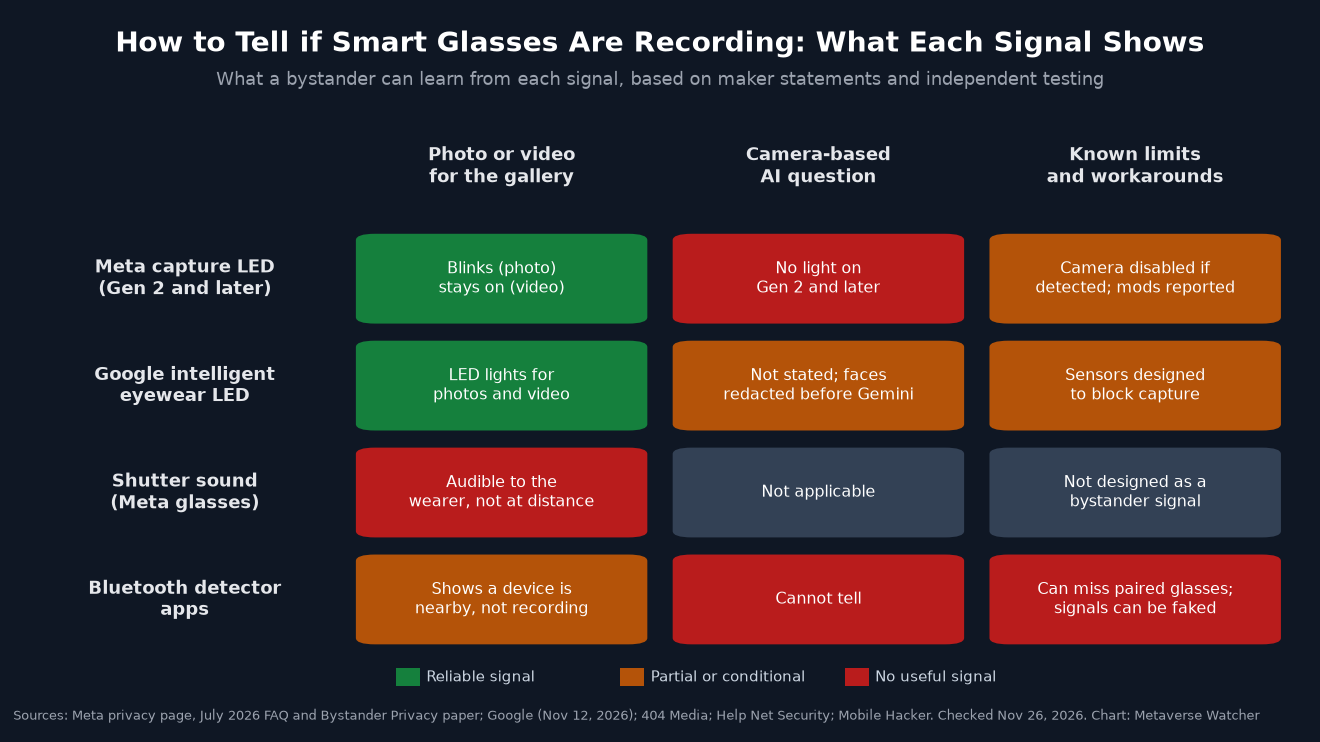
Recording Signals Compared
| Signal | What it shows | Main limitation | Source |
|---|---|---|---|
| Meta capture LED | Blinks for photos; stays on for video and livestreams | Off for camera-based Meta AI on Gen 2 and later; modifications reported | Meta privacy page and FAQ; 404 Media |
| Google intelligent eyewear LED | Lights for photos and video | Not described for Gemini camera use (faces are redacted instead) | Google, Nov 12, 2026 |
| Shutter sound | Plays on Meta glasses during a photo | Meta says it is not practical to make it audible at a distance | Meta FAQ |
| Bluetooth detector apps | A device from a glasses maker may be nearby | False positives, spoofing, can miss paired glasses | Project page; Help Net Security; Mobile Hacker |
| Physical appearance | Lens opening and thicker temples suggest a camera | Designs closely resemble normal eyewear | EDPB, October 2026 |
Step 6: What to Do if You Think You Are Being Recorded
- Ask directly and calmly. “Are your glasses recording?” is a fair question. Meta says millions of people use its glasses for music, podcasts, hands-free photos and its AI assistant, so the answer may well be no, and a calm question avoids an unnecessary confrontation.
- Ask them to stop or delete. Meta says photos and videos are stored on the glasses until the owner imports them to a phone, so a recent clip can be deleted on the spot.
- Involve staff where rules apply. Gyms, hospitals, schools, courts and many employers restrict camera glasses. See our guide to smart glasses at work.
- Know the law where you are. In the U.S., audio recording consent rules vary by state. In the EU, the EDPB says a wearer who posts footage publicly or uses glasses for professional purposes becomes a data controller with GDPR duties. Our smart glasses recording laws guide covers the details.
- Report tampering services. Meta says it removes ads, posts and Marketplace listings that advertise LED tampering, so reporting them on its platforms is one practical step.
Regulators are watching how well these signals work. The EDPB adopted its first statement on smart glasses on October 13, calling for warnings that are “reliable, hard to ignore, and always up to date.”
🤝 The Board had a fruitful discussion today at the #EDPBplenary on the privacy implications of smart glasses.
— EDPB (@EU_EDPB) October 13, 2026
Main highlights: statement & Support Pool of Experts' report on smart glasses 👓
The Board’s statement suggests combining bright LEDs with audio cues, voice-activation cues, privacy-friendly phone notifications and distinctive designs, rather than relying on a single light. Our analysis of the EDPB statement explains what each proposal would mean in practice.
If You Own Smart Glasses
Owners can make life easier for the people around them. Keep the light clear, say when you are about to take a photo, and take the glasses off or switch them off in places where cameras are not welcome. Google’s frames have a physical power switch for that purpose. Our Ray-Ban Meta privacy settings guide covers the controls that limit what Meta stores about you and the people you capture.
Frequently Asked Questions
Can Ray-Ban Meta glasses record without the light on?
Not for normal photo and video capture: Meta says the LED has no off switch and that covering it disables the camera. However, on models after the first generation, camera-based Meta AI questions do not light the LED, and 404 Media has documented an aftermarket modification that disables the light.
Does a blinking light mean I am being livestreamed?
Not necessarily. On Meta glasses the same light signals photos, video and livestreams, so it shows that capture is happening but not where the footage is going.
Do smart glasses detector apps work?
Sometimes. They can flag nearby hardware from Meta, Luxottica or Snap, but their developer warns of false positives, and independent testing found they can miss paired Ray-Ban Meta glasses and be triggered by fake signals.
Sources
- Meta, Privacy settings for Meta AI glasses
- Meta, Meta’s AI Glasses: Your Questions Answered (July 2026)
- Meta, Bystander Privacy: Evolving with the AI Glasses Landscape (PDF)
- Meta Help, How to capture photos and videos with AI glasses
- Google, Designing for privacy on intelligent eyewear (Nov 12, 2026)
- European Data Protection Board, statement on smart glasses (Oct 13, 2026)
- 404 Media, A $60 mod to Meta’s Ray-Bans disables its privacy-protecting recording light (Oct 23, 2025)
- Help Net Security, Android app uses Bluetooth signals to detect nearby smart glasses
- Mobile Hacker, Smart glasses can record you, and detecting them isn’t so simple (June 2026)
- Yves Jeanrenaud, Nearby Glasses project page