By the Metaverse Watcher newsroom. Published November 20, 2026. Language lists checked against Meta’s help center on November 20, 2026.
Live translation is one of the most useful features on Ray-Ban Meta glasses, and one of the most misunderstood. It now covers 20 languages, but only six of them work without a connection, the glasses only speak the translation to the wearer, and the other person follows along on your phone. This guide explains exactly which languages are supported, how to start and stop a session, how to set it up for offline use before a trip, and what to do when it doesn’t work. It applies to Ray-Ban Meta, Oakley Meta and Meta Glasses, with a separate section for Meta Ray-Ban Display.
Quick Answer
- Start: say “Hey Meta, start live translation,” or open the Meta AI app and tap Glasses, then Translate, then Start.
- Stop: say “Hey Meta, stop live translation,” tap and hold the touchpad, or tap Stop in the app.
- Languages: 20 with Wi-Fi or mobile data; English, Spanish, French, Italian, Portuguese and German also work offline after you download their packs.
- Exception: Ray-Ban Meta Audio cannot translate offline.
- How the other person hears you: your words are translated into text in the Meta AI app, which they can read or play aloud.
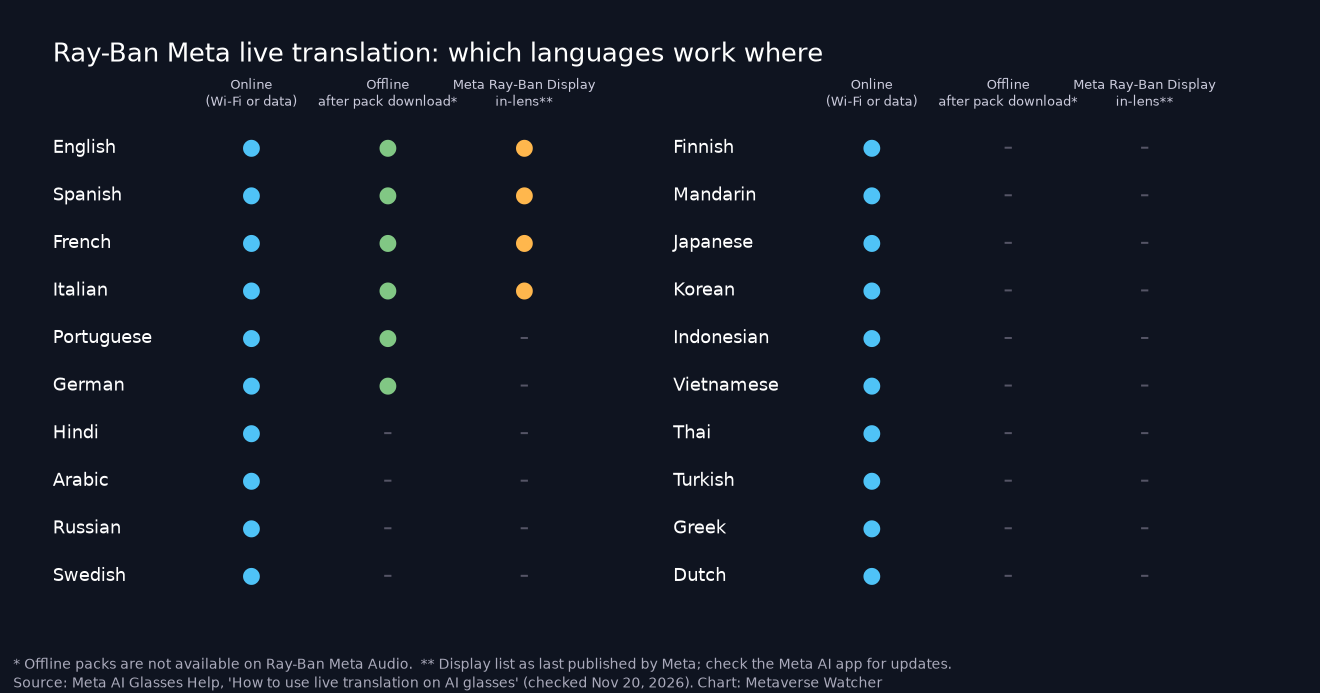
Which Languages Does Ray-Ban Meta Live Translation Support?
According to Meta’s help page, How to use live translation on AI glasses, live translation supports the following languages. Any pair can be chosen through the “You speak” and “They speak” selectors in the Meta AI app.
| Language | With Wi-Fi or mobile data | Offline (after downloading the pack) |
|---|---|---|
| English | Yes | Yes (not on Ray-Ban Meta Audio) |
| Spanish | Yes | Yes (not on Ray-Ban Meta Audio) |
| French | Yes | Yes (not on Ray-Ban Meta Audio) |
| Italian | Yes | Yes (not on Ray-Ban Meta Audio) |
| Portuguese | Yes | Yes (not on Ray-Ban Meta Audio) |
| German | Yes | Yes (not on Ray-Ban Meta Audio) |
| Hindi | Yes | No |
| Arabic | Yes | No |
| Russian | Yes | No |
| Swedish | Yes | No |
| Finnish | Yes | No |
| Chinese (Mandarin) | Yes | No |
| Japanese | Yes | No |
| Korean | Yes | No |
| Indonesian | Yes | No |
| Vietnamese | Yes | No |
| Thai | Yes | No |
| Turkish | Yes | No |
| Greek | Yes | No |
| Dutch | Yes | No |
The list has grown in stages. Meta’s AI glasses release notes show live translation opening to everyone with English, French, Italian and Spanish in the v15 update in 2025. Hindi, Arabic, Russian, Swedish and Finnish arrived for Early Access members in the v23 update in March 2026, and the v27 release notes in August 2026 announced 14 new languages for everyone: Arabic, Dutch, Finnish, Greek, Hindi, Indonesian, Japanese, Korean, Mandarin, Russian, Swedish, Thai, Turkish and Vietnamese. Meta says the languages added through Early Access did NOT require a language pack download, which matches the help page: only the six European languages have offline packs.
What You Need Before You Start
Meta lists four requirements. Most failed sessions come down to one of them.
- Your glasses are paired with the Meta AI app. If you haven’t done that yet, follow our Ray-Ban Meta setup guide.
- The glasses have the latest firmware installed.
- The Meta AI app is updated to the most recent version.
- You have Wi-Fi or mobile data for any language that needs a connection.
How to Start Live Translation on Ray-Ban Meta
From the Meta AI app
- Open the Meta AI app.
- Tap Glasses.
- Tap Translate.
- Choose your language under You speak and the other person’s under They speak.
- Tap Start. You will hear an announcement through the glasses confirming that live translation has begun.
If more than one pair of glasses is paired with the app, Meta says to swipe left or right to pick the pair you are wearing first.
With a voice command
Say “Hey Meta, start live translation.” The first time, you still need to choose your languages and tap Start in the Meta AI app. After that, you can adjust the language pair in the app at any time. Our full list of Hey Meta voice commands covers the other commands worth knowing.
What a Live Translation Conversation Looks Like
On Ray-Ban Meta, Oakley Meta and Meta Glasses, translation is asymmetric, and it helps to explain that to the other person before you begin:
- When they speak: you hear the translation in your language through the glasses’ open-ear speakers.
- When you speak: the Meta AI app shows your words translated into their language as text on your phone. They can read it, or tap the speaker icon in the app to hear it.
In practice, that means holding your phone where the other person can see it. In a November 2025 engineering deep dive, Meta explained how the pipeline works: speech is transcribed, translated and turned back into audio by a text-to-speech model, with the five-microphone array using beamforming to separate the wearer’s voice from the conversation partner’s. Meta said its team cut latency from more than 5 seconds to 2.7 seconds, so expect a short pause after each sentence rather than simultaneous interpretation. Meta also said that, for the languages covered in that post, processing ran entirely on the glasses.
How to Use Live Translation Offline
Offline translation is the feature travelers care about most, and it requires preparation. Meta’s help page says that when you are connected to Wi-Fi, most languages are ready right away, but to use a language offline you must download its language pack through the Meta AI app first. Only English, Spanish, French, Italian, Portuguese and German have packs, and Ray-Ban Meta Audio is excluded from offline use entirely.
Before a trip:
- Update the glasses and the Meta AI app at home on Wi-Fi.
- In the Meta AI app, open Translate for your glasses and download a pack for your own language and the language you expect to hear.
- Run a short test session in airplane mode to confirm the pack works.
- Charge fully. Translation keeps the microphones, processing and speakers busy, so plan around the limits in our Ray-Ban Meta battery life guide.
For the 14 connection-only languages, including Japanese, Korean, Mandarin and Thai, you need a data plan or Wi-Fi at the moment you translate. That is worth knowing before a trip to East or Southeast Asia.
How to Stop Live Translation
Meta lists three ways to end a session on Ray-Ban Meta, Oakley Meta and Meta Glasses:
- Say “Hey Meta, stop live translation.”
- Tap and hold the touchpad on the glasses.
- In the Meta AI app, tap Glasses, then Stop.
Live Translation on Meta Ray-Ban Display
Meta Ray-Ban Display adds the option to read translations as subtitles on the in-lens display. Meta’s live translation and captions page says you can see subtitles right on the 600 x 600 in-lens display. On Display, translation supports fewer languages than on the screenless models: Meta’s November 2025 post listed English, French, Italian and Spanish, and Frames & Features reported the same four on Meta’s help center when it checked on October 23, 2026. Check the Meta AI app for the current list.
Display also has a separate live captions feature, which transcribes speech in the same language rather than translating it. According to Meta’s captions help page, live captions are available only in English. You start them from the app launcher by swiping down and selecting Captions, from the Meta AI app under Glasses and Captions, or by saying “Hey Meta, start captions.” You stop them by saying “Hey Meta, stop live captions,” tapping three fingers on the touchpad, tapping your middle finger to your thumb with the Meta Neural Band, or tapping Stop in the app. For how Display compares with rival display glasses, see Meta Ray-Ban Display vs Even G2.
Translating Signs and Menus
Live translation is for conversations. For written text, use Meta AI’s camera instead: look at the sign or menu and say “Hey Meta, translate this text into English.” The glasses take a photo, and Meta AI reads the translation aloud. Meta’s own examples include translating street signs and restaurant menus. This uses Meta AI rather than the live translation mode, so it depends on Meta AI being available in your region and language.
Live Translation Not Working? Fixes to Try
| Problem | Likely cause | What to do |
|---|---|---|
| Translate option missing in the app | Outdated app or firmware | Update the Meta AI app, then the glasses’ firmware, and restart the app |
| A language is greyed out or fails offline | It has no offline pack, or the pack isn’t downloaded | Only six languages work offline; connect to Wi-Fi or data for the rest |
| Nothing works offline on your glasses | You have Ray-Ban Meta Audio | Meta excludes Audio from offline translation; use a connection |
| Session starts on the wrong glasses | Multiple pairs on one account | Swipe to select the pair you’re wearing before tapping Start |
| Translations lag or miss words | Noise or distance | Face the speaker, move somewhere quieter and keep sentences short |
Privacy and Etiquette
Live translation runs the glasses’ microphones on another person’s speech, so tell people what you’re doing before you start, the same way you would before taking a photo. Regulators are paying closer attention: this week the Dutch data protection authority advised consumers against buying AI camera glasses after testing six models (our report), and an Irish parliamentary committee recommended prohibiting glasses that can record covertly. Translation alone doesn’t record video, but being upfront avoids awkward misunderstandings.
How Ray-Ban Meta Compares With Other Translation Glasses
Ray-Ban Meta’s strength is that translation works with no display and, for six languages, no signal. Display glasses such as Meta Ray-Ban Display show subtitles instead of speaking them, which is better in loud places but supports fewer languages so far. Google is building translation into Android XR as well, as we covered in Google Translate’s listening area on Android XR. For the wider market, see our best smart glasses of 2026 and the Ray-Ban Meta vs Oakley Meta vs Meta Glasses comparison.
FAQ
Does Ray-Ban Meta live translation need Wi-Fi?
Only for some languages. English, Spanish, French, Italian, Portuguese and German work offline after you download their packs, except on Ray-Ban Meta Audio. The other 14 languages need Wi-Fi or mobile data.
Does the other person need glasses?
No. They read your translated words in the Meta AI app on your phone, or tap the speaker icon to hear them.
Does live translation cost anything?
Meta doesn’t list a fee for live translation on its help pages. Connection-only languages use your phone’s data.
Can Ray-Ban Meta translate Japanese or Mandarin?
Yes. Both were added in Meta’s v27 update in August 2026, and both require a connection.