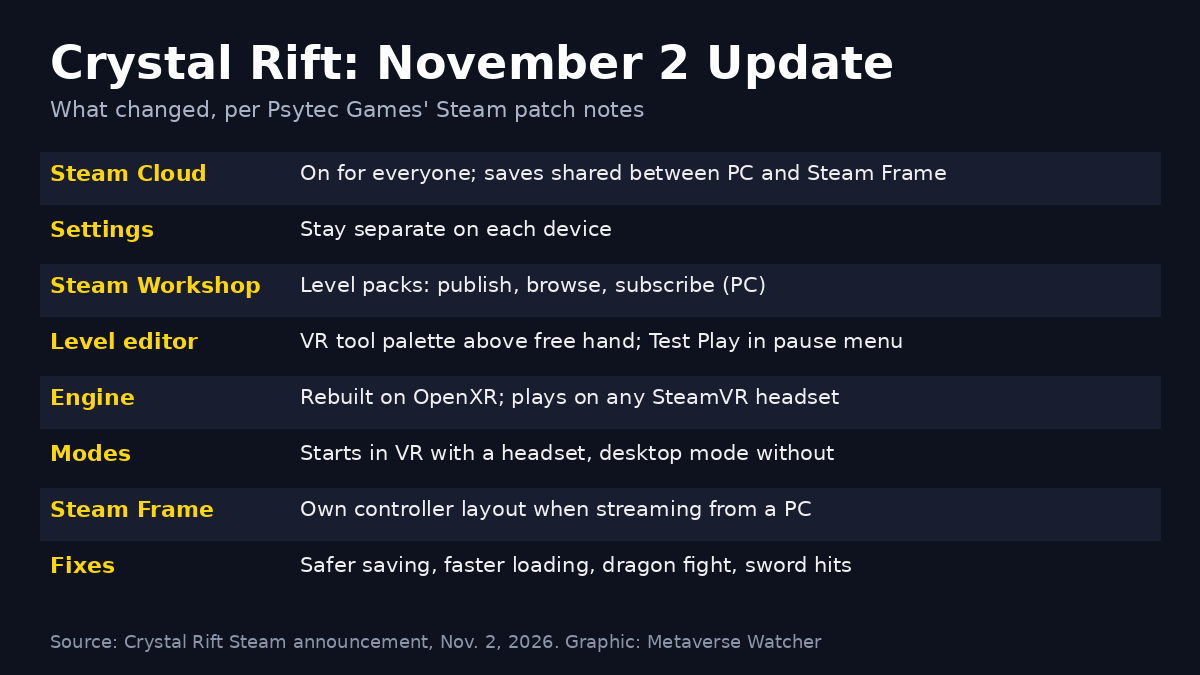
Psytec Games has turned on shared Steam Cloud saves for Crystal Rift, so a dungeon run started on a PC can now be continued on Valve’s Steam Frame, and the other way around. The change arrived in a November 2 update that also adds Steam Workshop level packs, a rebuilt OpenXR version of the PC game, and a reworked level editor that can be used without a keyboard.
The developer’s wording in its Steam announcement is direct: “Steam Cloud saves are now on for everyone, and your save games are shared between PC and Steam Frame. Settings stay separate on each device.” MIXED highlighted the update on November 8.
What cross-device saves mean for Steam Frame owners
Steam Frame runs games natively and can also stream from a gaming PC, which is why a shared save matters. A player can now progress through Crystal Rift’s grid-based dungeons at a desk-bound PC VR setup and pick up the same save on the standalone headset later. Only save games are shared; graphics and comfort settings remain on each device, which is sensible given the performance gap between a desktop GPU and a mobile chip.
Crystal Rift already carries a Steam Frame Verified rating. Valve’s compatibility record, as listed on SteamDB, shows the game was tested on August 19, 2026, and passed checks for controller support, legible text and default performance. The new update also gives Steam Frame its own controller layout when streaming the game from a PC.
A practical note: Steam Cloud only helps if the sync completes. Before switching devices, confirm that Steam Cloud is enabled for the game and let the upload finish when you quit. Our Steam Frame streaming guide covers the network side if you plan to stream rather than play natively.
Steam Workshop level packs arrive on PC
The larger feature for long-time players is Steam Workshop support, which the patch notes label as PC. Creators build levels in the existing editor and press Publish next to an editor slot to upload all of its levels as one pack. Other players browse packs from a new Steam Workshop entry on the main menu, sorted by Top Rated, Most Subscribed or Newest, then subscribe, press Play and pick a difficulty.
- Separate progress: each level pack saves like the main game, and the Load Game menu has a new Saves button to switch between the campaign and installed packs.
- Creator controls: a My Level Packs section lets authors update or unpublish their uploads at any time.
- Starter content: Psytec points new players to a “Random Maze – Starter Level Pack.”
Because Workshop is described as a PC feature, Steam Frame owners should not assume that browsing and subscribing to packs works directly on the headset. The patch notes do not say either way, and we have not tested it.
A level editor built for VR hands
The editor now has a VR tool palette that floats above the player’s free hand. Pointing the laser at a button and pulling the trigger reaches Test Play, Save, Map, Fill, Undo, Redo, Copy, Paste, Rotate, Open/Shut, Ghost, Set Target, Delete Target and Previous/Next Level. Changing level from the palette saves first. Test Play and Back to Editor are also in the pause menu, so building and playtesting no longer require reaching for a keyboard, although the F2 shortcut still works.
Rebuilt on OpenXR, with VR and desktop in one game
Psytec says the PC version has been rebuilt on a modern engine using OpenXR, so it runs on any SteamVR headset. It is now a single game for VR and flat screens: Crystal Rift starts in VR when a headset is available and in desktop mode when one is not. Valve Index players can pause with the left B button, and Vive wand users move and turn with the trackpads. If you are weighing hardware for PC VR, see our look at VR-ready PC costs with Steam Frame, and Quest owners can use our guide to playing PC VR games on Quest 3.
Fixes in the update
- Saving is more robust: a crash or headset removal during a save no longer wipes the existing save, and settings stay put between floors.
- The crystal dragon fight no longer stops after the dragon’s first fly-over.
- Sword attacks no longer pass through barrels and monsters, and fireballs now hit monsters standing with their backs to a wall.
- Defeated monsters, including the Rock Golem, now sink into the floor instead of vanishing.
- Levels load much faster, and lighting and fog have been rebalanced.
Why it matters
Crystal Rift first launched on Steam in March 2016, which makes this one of the more substantial updates an older VR title has received in the Steam Frame era. Cross-device saves are exactly the kind of small, practical feature that makes a mixed PC and standalone setup feel coherent. For more games that already play well on Valve’s headset, see our ranked list of the best Steam Frame games, and if dungeon movement bothers you, our guide to preventing VR motion sickness can help.
Sources: Psytec Games’ Crystal Rift Steam announcement (November 2, 2026), MIXED, SteamDB. Metaverse Watcher has not independently tested the update.