Valve has pushed SteamOS 0.5.8 to the Steam Frame Beta channel, and its headline change closes one of the most-requested gaps in the headset’s mixed reality story: Room View, the Frame’s camera passthrough mode, no longer hides content streamed from a PC. According to Valve’s Steam Frame community announcement dated November 6, users can now see a remote desktop or the remote game theater while passthrough is active, and PC VR games that support OpenXR mixed reality can blend rendered content with the real room. Valve names X-Plane 12 as an example. Alongside it, SteamVR 2.19.2 went to the beta branch for all users, as GamingOnLinux reported.
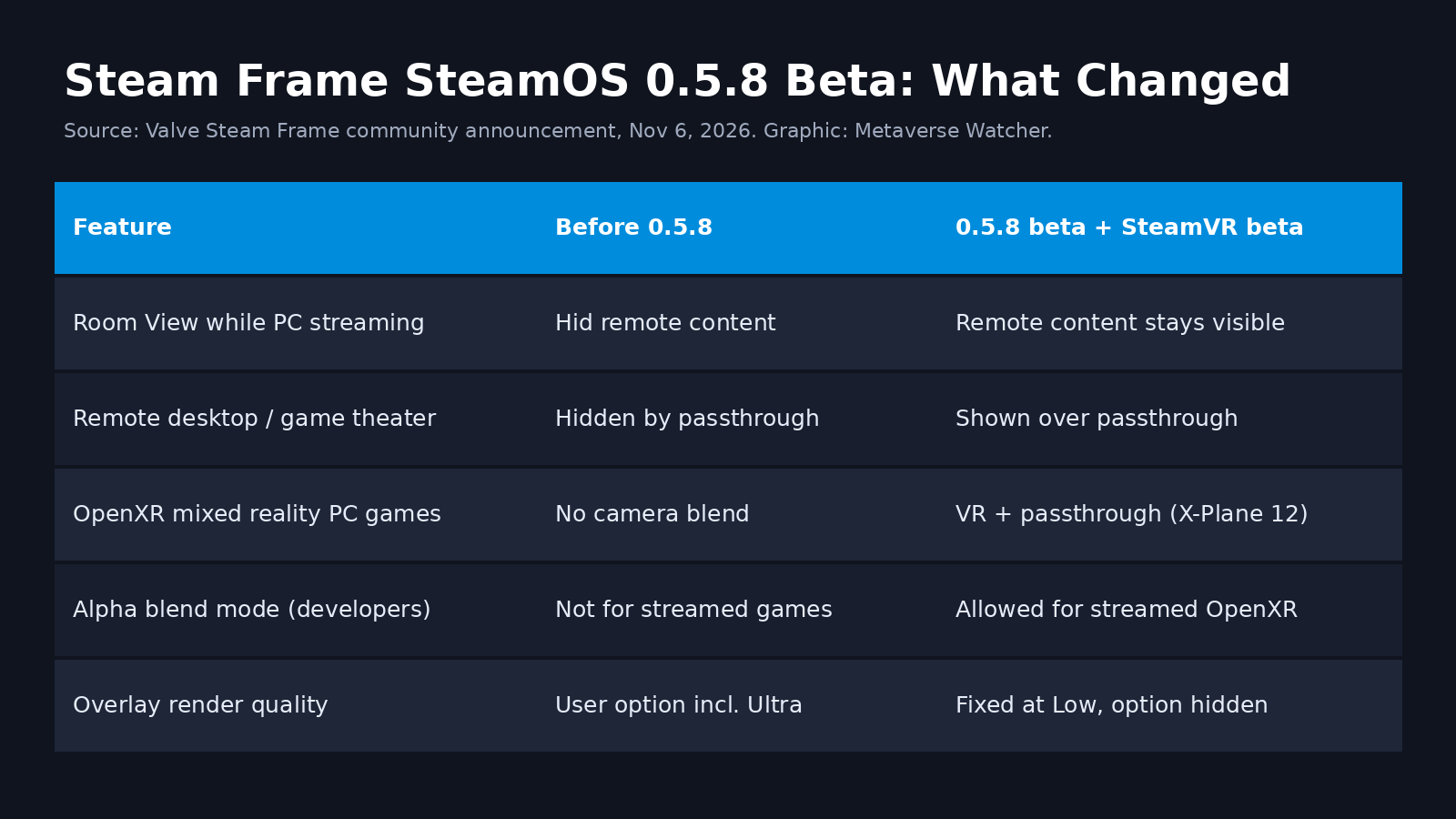
What SteamOS 0.5.8 changes
- Room View during PC streaming. Valve says that previously, enabling Room View would hide remote content. Now remote desktop and remote game theater stay visible over camera passthrough.
- Mixed reality for streamed PC VR games. OpenXR titles with mixed reality support can blend VR content with the Frame’s cameras. This requires opting into the SteamVR beta branch on the PC as well as the headset beta.
- Developer hook. OpenXR games streamed from a PC may now use
XR_ENVIRONMENT_BLEND_MODE_ALPHA_BLEND, the standard OpenXR mode that lets an app mark parts of its frame as transparent so passthrough shows through. - Overlay quality locked to Low. The option is hidden on Steam Frame; Valve says this fixes problems that occurred when Ultra was selected.
- Display and tracking fixes. Improved eye tracking self-calibration, a fix for low-end gamma response including inconsistencies between eyes on some headsets, and a permission fix that had stopped WebXR working in Chrome v157.
SteamVR 2.19.2 fixes
The PC-side update matters to every headset that uses Steam Link, not just the Frame. SteamVR 2.19.2 fixes several overlay and game-menu regressions introduced in 2.19.1, an occasional crash and transient visual artifacts when streaming resolution changes, and improves resilience to brief network interruptions. It also restores the option to drop the encoding resolution as low as 512, fixes a Linux launch issue when running the SteamRT3 client without the Legacy Steam Runtime in the default library, and fixes the Quick Access Menu battery tab listing the right controller twice with some third-party drivers, PS VR2 among them.
Why this matters
Steam Frame is primarily a PC streaming headset, and until now its passthrough and its streaming path effectively worked as either-or. That was a practical limitation, not a niche one: sim racers and flight-sim players want to see a wheel, yoke or keyboard, and productivity users want a PC desktop floating in their actual room. The pressure was visible in public. In an October OpenVR GitHub issue titled “Steam Frame: no way for an overlay to access or show passthrough”, developers documented that streamed apps had no route to the cameras. One commenter showed a community workaround: a Vulkan layer that chroma-keys green regions of the streamed image into local passthrough, relying on an undocumented compositor setting. That user reported 90 Hz with roughly 0.3 to 0.4 ms of extra compositor GPU time, while warning that any SteamVR update could break it.
SteamOS 0.5.8 is Valve’s official answer to at least part of that request. Allowing the standard OpenXR alpha blend mode for streamed games means developers can now build mixed reality PC titles for the Frame through a documented API rather than shader hacks. What the release notes do NOT say is whether third-party apps can read camera frames directly, the other limitation raised in that GitHub thread. Valve has not addressed that, so developers should assume it is unchanged.
How to try it
- On the headset, open Settings > System > System Update Channel and choose the Beta channel, then update to SteamOS 0.5.8.
- On the PC, right-click SteamVR in your Steam library, choose Properties, then Game Versions & Beta, and select beta.
- Stream as usual and enable Room View. For mixed reality games, launch a title with OpenXR mixed reality support, such as X-Plane 12.
Beta builds are for testing. Valve’s own wording is that the channel “includes new features that are still being tested”, so owners who rely on the headset for daily play may prefer to wait for the stable release. If streaming quality is your bigger issue, our Steam Frame streaming guide covers the adapter, Wi-Fi and router setup that matter most.
Context
The update lands as the Frame’s install base grows: it reached fifth place among headsets in the October 2026 Steam Hardware Survey. Valve has kept up a steady cadence of beta builds since launch, including SteamOS 0.5.6 in mid-October and the SteamVR 2.18 streaming fixes. For what to play once it is set up, see our ranked best Steam Frame games of 2026, and for how critics scored the hardware, our Steam Frame reviews roundup.