Last checked: November 15, 2026. Every claim below comes from the streaming service’s own help or store pages, Meta’s Quest release notes, or the outlet linked beside it. Menu names can move slightly after Horizon OS updates.
The short answer: you can watch Netflix on a Meta Quest 3, but not in an app. Netflix plays in the built-in Meta Quest Browser at up to 1080p, while YouTube, Disney+, Prime Video and Peacock each have their own app in the Meta Horizon Store. This guide covers how to set up each one, what picture quality you actually get, which services now stream in 3D, and how to fix the problems Quest owners run into most often. Everything here also applies to the Quest 3S unless noted.
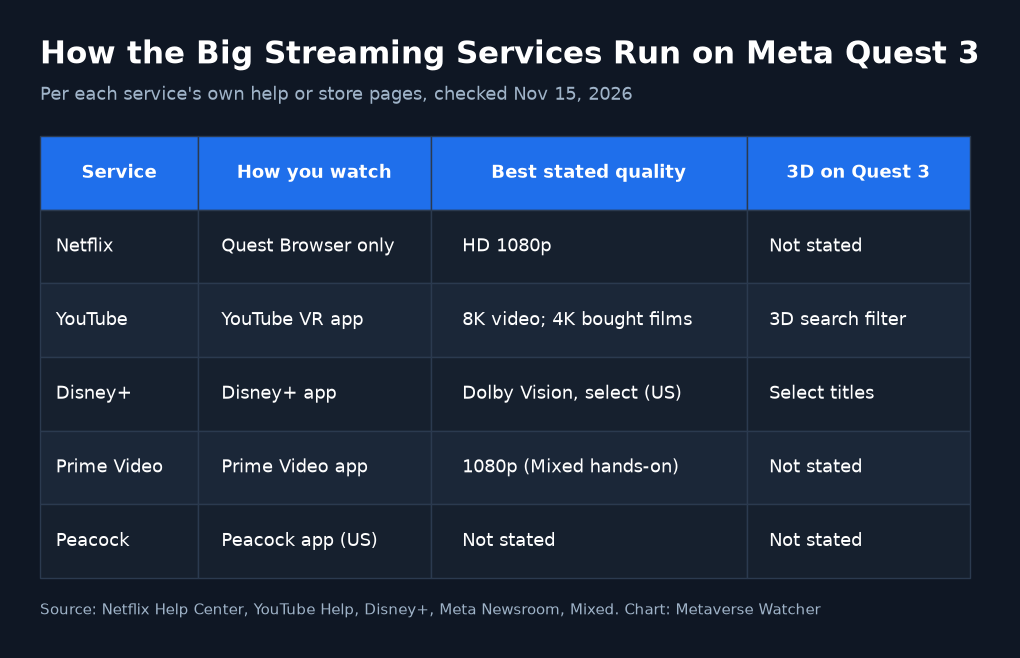
Quick Answer: Which Services Work on Quest 3
| Service | How you watch on Quest 3 | Best stated quality | 3D | Source |
|---|---|---|---|---|
| Netflix | Meta Quest Browser (no app) | HD 1080p | Not stated | Netflix Help |
| YouTube | YouTube VR app | 8K video on Quest 3; up to 4K on purchased movies | 3D search filter | YouTube Help |
| Disney+ | Disney+ app, Meta Horizon Store | Dolby Vision HDR on select titles (US) | Select films on Quest 3 and 3S | Disney+ |
| Prime Video | Prime Video app, Meta Horizon Store | 1080p in Mixed’s hands-on | Not stated | Mixed |
| Peacock | Peacock app (US and certain US territories) | Not stated | Not stated | Meta Newsroom |
How to Watch Netflix on Quest 3
Netflix retired its old Quest app in 2024, and Android Central reported at the time that the app simply told users to visit netflix.com in the Meta Quest Browser instead. That is still the official route. Netflix’s help page lists the steps:
- Open your Library and launch the Meta Quest Browser.
- Type netflix.com into the address bar.
- Select Sign In and enter your Netflix account details.
- Pick a profile and press play. Drag the window to a wall or enlarge it, then use Theater (see below) for a cinema-size screen.
Three limits are worth knowing before you settle in:
- 1080p is the ceiling. Netflix’s browser requirements page lists Meta Quest Browser version 32 or later at up to Full HD (1080p). A Premium plan’s 4K does not apply in the headset.
- No offline downloads. The browser cannot save Netflix titles, so you need Wi-Fi for every episode. That makes Netflix a poor pick for a flight.
- You need a steady connection. Netflix’s speed guide recommends a stable 5 Mbps or higher for 1080p and 3 Mbps for 720p.
Tip: once Netflix is open, use the browser’s menu to add the page to your Library. Meta’s release notes describe this shortcut, and it puts Netflix next to your apps so you can launch it in one click.
How to Watch YouTube on Quest 3
YouTube is the sharpest streaming option on the headset. Google’s YouTube VR help page says the app supports 8K on Quest 3 and up to 4K on purchased movies, and you can filter search results by 360°, VR180, 4K and 3D.
- Install YouTube from the Meta Horizon Store.
- Open it and select Account and Settings, then Sign In. You will see an activation code.
- On your phone or computer, go to youtube.com/activate, enter the code, and choose your Google account. Brand Accounts are not supported, according to Google.
- Choose immersive mode for a full theater, or Watch in Panel to keep YouTube as a window beside other apps.
The Mixed Reality environment, which pins the YouTube screen to your real room, needs Quest spatial data access. If the screen drifts, hold the Meta button on your right controller to re-center it.
How to Watch Disney+ on Quest 3, Including 3D Movies
Disney+ has the most headset-specific features of any service. According to Disney’s own Quest page (revised November 10, 2026), the app launched on December 15, 2025, and select 3D movies plus immersive Disney+ Environments arrived on November 10, 2026 at no extra charge. 3D works on Quest 3 and 3S; Quest 2 owners get 2D playback and the Environments. Disney lists titles such as Avatar: The Way of Water, Avengers: Endgame, Tron: Legacy and Inside Out 2 among those that could be available, with availability varying by region.
- Download the Disney+ app from the Meta Horizon Store and update your headset to the latest software.
- US subscribers get select titles in Dolby Vision HDR on Quest 3 and 3S; Dolby Atmos needs Disney+ Premium.
- Disney says the app is for profiles aged 10+ that are not in Junior Mode.
For step-by-step 3D setup, see our guide on how to watch Disney+ 3D movies on Quest 3, and our ranked list of the best Disney+ 3D movies on Quest 3. Owners have been sharing the feature since launch week:
Watch 3D Disney+ Movies in Immersive Environments on Meta Quest #VR #QuestCreatorPartner #Movies @DisneyPlus
— M4cheteColletti (@gapascarella) November 15, 2026
How to Watch Prime Video on Quest 3
Amazon’s current Prime Video app arrived around Meta Connect 2024 and replaced an older, rarely updated VR app. In Mixed’s hands-on, it ran as a flat 2D panel you can place anywhere, resize, or expand to a large curved cinema screen, with playback at 1080p. Mixed also downloaded a film in four quality levels, from “Best” (3.12 GB) to “Data Saver” (0.24 GB), and watched it with Wi-Fi switched off.
That offline feature is the main reason to pick Prime Video for travel. Amazon’s own download help page does not list the Quest by name, so check that the download button appears in the app before you leave home. Prime Video’s Horizon Store page shows a 2.1 user rating from 633 reviews, the lowest of the major apps here, so expect a functional rather than polished experience.
Peacock, Hulu and the Rest
- Peacock launched on Quest in April 2023 for people in the US and certain US territories, according to the Meta Newsroom. It lets you watch multiple screens at once and scale the screen up to theater size.
- Hulu and ESPN: Meta said at Connect 2025 that Disney+ and content from Hulu and ESPN would come to Quest through the Horizon Store and the Meta Horizon TV hub. Check the Store for what is available in your region.
- HBO Max and Apple TV do not list the Quest on their official device pages, and Paramount+ does not say either way. Owner reports of browser playback are mixed, so treat these services as unsupported for now.
Get a Bigger, Better Screen: Theater and Settings
Horizon OS v2.10, rolling out from the week of November 9, 2026, adds Theater, according to Meta’s release notes. In a supported media app, select More options on the Control bar, then Theater. Your video moves to a cinema-scale screen in a theater environment and your other windows are hidden. Select it again to leave.
- Use the right app for each service. YouTube VR goes far beyond Netflix’s 1080p browser cap, so it is the best showcase for the Quest 3 display.
- Tune clarity and comfort. Our best Quest 3 settings guide covers the lens distance and fit tweaks that make text and subtitles sharper.
- Lie back. Meta added a “use apps while lying down” option under Experimental settings; it suits long movie sessions.
- Better audio. Pair headphones using our Bluetooth headphones guide, but note the audio-sync caveat below.
- Watch together. To show the picture to someone in the room, follow our guide to casting Quest 3 to a TV, phone or PC.
Troubleshooting: Common Streaming Problems
| Problem | Try this |
|---|---|
| Netflix buffers or looks soft | Check you have at least 5 Mbps for 1080p (Netflix’s guidance), move closer to the router or use 5 GHz Wi-Fi, and confirm your plan includes HD. |
| Disney+ in the browser keeps telling you to download the app | Use the Disney+ app from the Horizon Store instead. If the browser keeps redirecting, owners on Meta’s forums report that clearing the Browser’s data under Settings > Storage fixed it. |
| Video freezes while sound keeps playing | Owners have tied this to Bluetooth earphones; try the built-in speakers and update the headset. |
| App missing from the Store | Availability varies by country; Disney+ and Peacock both limit some features or the app itself by region. |
| Not enough space for downloads | Clear room with our guide to freeing up storage on Quest 3. |
| Battery runs out mid-movie | See our Quest 3 battery life guide, or plug in a USB-C cable or battery strap for long films. |
Which Service Looks Best on Quest 3?
On picture quality alone, YouTube VR is the clear leader thanks to 8K support, and Disney+ is the most interesting for film fans now that select 3D titles and Dolby Vision are available. Netflix and Prime Video are dependable but capped at 1080p, which shows on a very large virtual screen. For flights, Prime Video’s downloads give it the edge, since Netflix has no offline mode on the headset.
Still deciding on hardware? The Quest 3’s higher-resolution display gives it an advantage for movies; compare the two in our Quest 3 vs Quest 3S buying guide.
Frequently Asked Questions
Is there a Netflix app for Meta Quest 3?
No. Netflix plays only in the Meta Quest Browser, at up to 1080p, per Netflix’s help center.
Can I download Netflix shows to watch on a plane?
No. The browser version has no download feature. Prime Video’s Quest app supported downloads in Mixed’s testing.
Can I watch 3D movies on Quest 3?
Yes. Disney+ added select 3D films on Quest 3 and 3S on November 10, 2026, and YouTube VR lets you filter for 3D videos.
Do these steps work on Quest 3S and Quest 2?
Mostly. Netflix lists Quest 2, Quest Pro, Quest 3 and 3S. Disney+ 3D needs a Quest 3 or 3S, and YouTube’s 8K support is specific to Quest 3.