Valve has pushed a matched pair of beta updates for PC VR streaming. SteamOS 0.5.10 for Steam Frame and SteamVR 2.19.4 for the PC were both posted on November 19, about 14 minutes apart (2:12 p.m. and 2:26 p.m. ET), according to the Steam Frame and SteamVR announcement feeds. The headset build adds a per-game haptics strength setting and a global display sharpness control. The PC build adds matching haptics options and brings chroma-key Room View to Steam Link for Meta Quest.
Both are opt-in betas. Valve says the Steam Frame build “includes new features that are still being tested,” and the most recent SteamOS release for Steam Frame that Valve has posted for all users is still 0.4, from October 8.
What SteamOS 0.5.10 Changes on Steam Frame
Valve groups the 0.5.10 notes into image quality, general and developer changes. Most of them concern streaming from a PC.
| Area | Change in SteamOS 0.5.10 (per Valve) | Where to find it |
|---|---|---|
| Streaming | Faster streaming decode, allowing higher default streaming resolutions | Automatic |
| Display | New global display sharpness control, on by default | VR Settings > Display > Display Sharpness |
| Image | Less “green tint” on high-frequency greyscale content | Automatic |
| Remote desktop | Less head wobble when streaming a remote desktop | Automatic |
| Haptics | Per-game controller haptics strength | VR Settings > Controllers > Manage Controller Bindings |
| Eye tracking | Lower eye-tracking latency, especially at lower frame rates | Automatic |
| Networking | More robust Multi-Link Streaming on poor networks | Automatic |
| Boot | Fix for a hang on the Steam Frame logo after an OS update | Automatic |
| Drivers | Upgraded Iris video decoder driver; “Foveated Sharpening” renamed “SGSR Sharpening” | Automatic / Display settings |
| Developers | XR_KHR_convert_timespec_time support in the Android runtime | OpenXR |
The sharpness control is worth knowing about. Because it ships enabled, owners who find the streamed image too crisp now have a setting to change instead of living with one default. The SGSR rename also matters for anyone following older guides: the setting that used to be called Foveated Sharpening now appears as SGSR Sharpening.
The boot fix is the change most likely to affect owners who never touch a setting. Valve describes it as a hang on the Steam Frame logo “at boot after updating the OS,” which is exactly the moment a beta tester is most exposed to it.
SteamVR 2.19.4: The PC Side, and Quest Owners Benefit Too
SteamVR 2.19.4 is the larger update by line count. Valve lists 16 items in its “New in 2.19.4” section, against 11 in SteamOS 0.5.10. The ones with the widest reach are:
- Better streaming on NVIDIA and AMD. Valve says streaming quality and reliability improved on both brands of graphics card, along with better handling of brief network drops and a fix for sessions occasionally running at a reduced bitrate.
- Dual-GPU laptops. Steam Link now uses the high-performance GPU on laptops with two GPUs, unless a Windows graphics preference has been set for SteamVR.
- Chroma key for Steam Link on Meta Quest. Quest streaming now supports chroma key, so Room View can show through VR content. Settings sit on the PC in SteamVR’s Camera section, with a switch between “Protect Content” and “Key Content.” In Key Content mode, Valve says, any game “can simply draw the key color to control Room View transparency.”
- Per-game haptics on PC. A new preference turns haptics off per game. On Steam Frame over Steam Link there is also a strength slider, which ties in with the SteamOS 0.5.10 setting.
- Fixes. Valve lists a 2D-mode audio crash after three hours of streaming on Quest, several Linux crashes, a Steam dashboard that sometimes went missing for a whole session, and skybox textures such as VRChat’s transition screens that sometimes looked wrong.
The Quest change extends a feature Steam Frame received a week earlier. As we reported in our SteamOS 0.5.9 coverage, the November 13 betas added chroma-key Room View to Steam Frame streaming. That followed the 0.5.8 beta’s Room View changes for streamed desktops and OpenXR mixed reality games. With 2.19.4, the same key-color approach reaches Quest owners who use Steam Link instead of Meta’s own Link or Air Link. Valve’s notes still do not name a default key color or list games that use it.
Yesterday's Frame beta was the headset side of streaming, and SteamVR 2.19.4 beta is the PC side. Steam Link streaming is better on NVIDIA and AMD, dual GPU laptops finally use the dedicated GPU, and you get per game haptics toggles.
— Joshua Keith (@joshuakeith) November 20, 2026
Chroma key Room View also reportedly works on…
How to Get Both Betas
Some features need both builds, so a Steam Frame owner who wants the full set should opt in on the headset and the PC:
- Headset: on Steam Frame, open Settings > System > System Update Channel and choose the beta.
- PC: in the Steam library, right-click SteamVR, open Properties > Game Versions & Betas, and select the beta branch.
- Quest (Steam Link): Valve says Quest features require opting into the Steam Link for Meta Quest beta, either through Meta’s store page or “Release Channels” in the Steam Link app settings in the headset, as well as the SteamVR beta on the PC.
New owners setting up the headset for the first time can follow our Steam Frame setup guide before switching channels. Quest owners weighing Steam Link against other wired and wireless options can compare them in our guide to playing PC VR games on Quest 3.
Analysis: Fast Betas, Slow Stable Channel
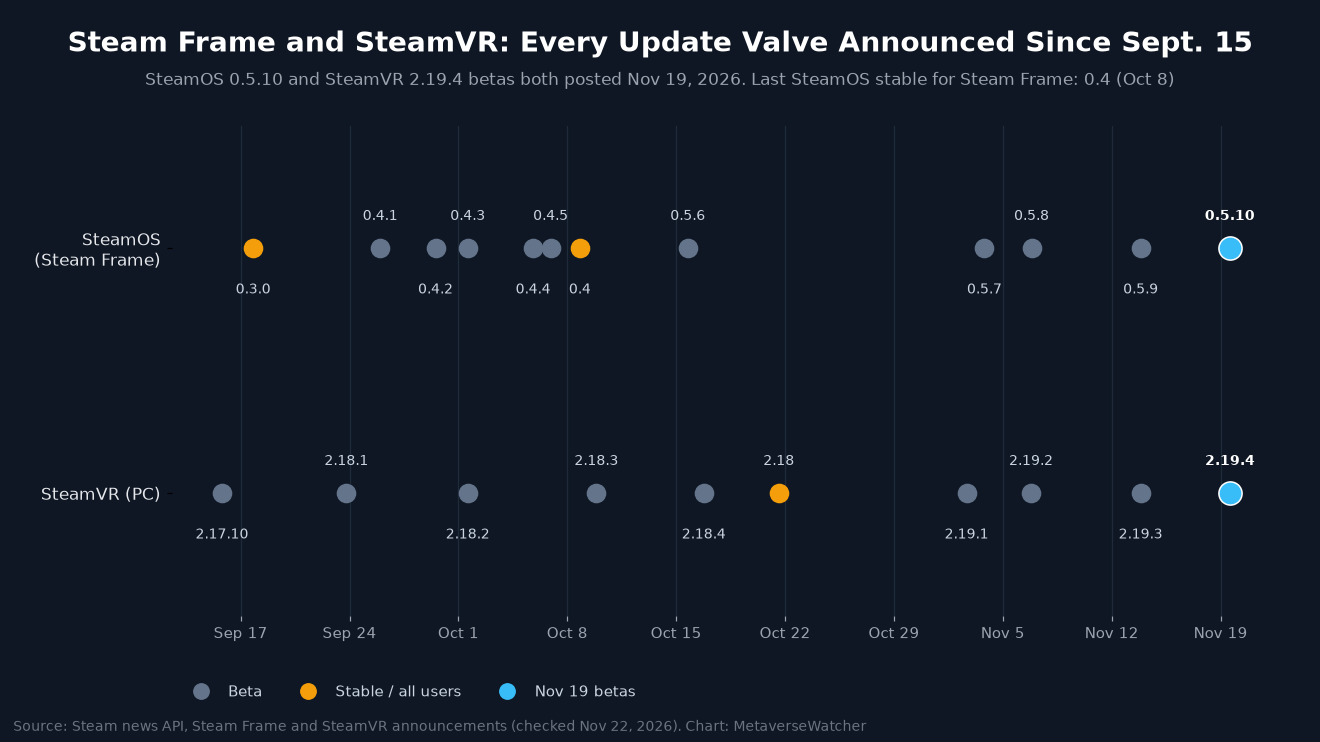
The Steam news API shows how much of Steam Frame’s recent progress is still beta-only. Valve has posted 12 SteamOS builds for the headset since September 17. Ten were betas. The two stable releases, 0.3.0 on September 17 and 0.4 on October 8, are the only ones Valve announced as going to all users. Every 0.5-series build, from 0.5.6 on October 15 to 0.5.10, has gone only to the beta channel. That means Room View during PC streaming, chroma key, the sharpness control and per-game haptics are not yet in the default software, six weeks after the last stable release.
SteamVR has followed a similar but faster pattern: four 2.19 betas (November 2, 6, 13 and 19) since SteamVR 2.18 went stable on October 21, a release we covered in our SteamVR 2.18 report. Since November 6, Valve has released the SteamOS and SteamVR betas on the same day, within an hour of each other each time. That matches the shared features: chroma key, haptics and streaming quality each depend on both the headset and the PC.
For owners, the trade-off is the usual one. The beta channel gets new features roughly weekly but carries the risk of regressions. The 0.5.10 boot-hang fix shows that risk is real. Owners who mainly need reliability can stay on stable and wait for Valve to promote the 0.5 features. Valve has not given a date for that. Buyers still deciding on the headset can find hardware details in our Steam Frame specs and price guide and our Steam Frame vs Valve Index comparison.
Sources: Valve, “SteamOS 0.5.10 Beta for Steam Frame” and “SteamVR Beta Updated – 2.19.4” (both November 19, 2026); earlier Steam Frame and SteamVR announcements via the Steam news API (checked November 22, 2026); MIXED (November 21, 2026).